Showing posts with label latest. Show all posts
Showing posts with label latest. Show all posts
Monday, April 10, 2017
How To Backup APK Using ES File Manager Latest Version Now You Cant See The Old App Manager Menu Item
How To Backup APK Using ES File Manager Latest Version Now You Cant See The Old App Manager Menu Item
 Along with bug fixes,performance improvements and other feature enhancements the ES team brought a modified Fast Access menu on the recent version of ES File Explorer File Manager. In the previous version of ES File Manager there was an App Manager menu item in the Fast Access menu, Which is used to mange User and System apps. The App Managers apk backup feature is very useful as we can backup and reinstall the app later without downloading from Google Play. One of my old post titled "How To Backup Android Apps As APK using ES File Explorer ?" mentioned the steps do the same.
As the recent version modified the Fast access menu, now you cant find the App Manger there. Its renamed to APP and placed in Library menu. The New APP is same as the old App Manager and which can do all the old stuffs like Uninstall, backup, etc. The process of backup apk is same and I included the complete steps in this post.
Backup Android App Using ES File Explorer File Manager
1. Open ES File Explorer - Download2. Tap on Fast Access icon or option soft key or swipe from left to right.
3. In Fast Access menu tap on Library then APP.
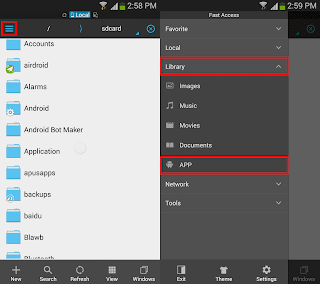
4. In the APP grid long press on the desired app you wish to back up and finally tap on Backup.
(If you wish to backup multiple apps, just tap on other apps too)

Thats it.. You can grab the backed up app apk from /sdcard/backups/apps/.
Available link for download

Wednesday, February 8, 2017
How to Install Latest TWRP Recovery on Android Devices
How to Install Latest TWRP Recovery on Android Devices

How to Install Latest TWRP Recovery on Android Devices
TWRP is the most popular custom recovery available for Android devices and it just got a newer version. So if you own an Android device that has already TWRP installed or any another recovery, it’s time for your to update to the latest TWRP 3.0.
For those who are unaware of TWRP or custom recoveries, let me clear things for you. TWRP is a custom recovery which lets you perform actions like:
- Installing ROMs, Mods or any other zip or .img files to your system.
- Making Nandroid backups, i.e. backup of your entire ROM including data and other partitions.
- Restore ROM backups
- Wipe any partition of your device,
These tasks cannot be performed by stock recovery, just like custom ROMs custom recoveries gives you more features and easy to use interface specially TWRP. Well the TWRP custom recovery gives you immense control of your device, but you should take things easy and do not play around with every option until you are sure what you are doing.
The newer version brings many changes, the most noticeable being the introduction of Material design. Other changes introduced in the latest version are:
- Completely new theme – Much more modern and much nicer looking (by z31s1g)
- True Terminal Emulator – Includes arrow keys, tab, and tab completion, etc. (by _that)
- Language translation – It won’t be perfect and especially some languages that require large font files like Chinese & Japanese won’t be available on most devices. Also, some languages may only be partially translated at this time. Feel free to submit more translations to OmniROM’s Gerrit. (mostly by Dees_Troy)
- Flashing of sparse images – On select devices you will be able to flash some parts of factory images via the TWRP GUI (by HashBang173)
- Adopted storage support for select devices – TWRP can now decrypt adopted storage partitions from Marshmallow
- Reworked graphics to bring us more up to date with AOSP – includes support for ADF and DRM graphics (by Dees_Troy)
- SuperSU prompt will no longer display if a Marshmallow ROM is installed
- Update exFAT, exFAT fuse, dosfstools (by mdmower)
- Update AOSP base to 6.0
- A huge laundry list of other minor fixes and tweaks


Install TWRP 3.0 on Your Android Device
Things You Will Need
- An Android device and a PC
- Download the latest TWRP.img for your device: Link
- Minimal ADB and Fastboot: Follow this guide and install Minimal Fastboot and ADB on your PC. (How to Get ADB and Fastboot within Seconds)
- Usb drivers: Link
Steps to Follow
Follow any one of the following methods that suit you:
For Those Who Already have an earlier version of TWRP
- Download the .img file for your device from the links given above.
- Boot your device into TWRP custom recovery.
- Select Install, then browse for the download image file. Keep in mind you will have to tap on Images button in the bottom right corner first in order to display .img files in the list. (as shown below).
- Now select the TWRP 3.0 .img file, then select Recovery partition on the next screen.(as shown in the screenshot below)
- Now swipe right to confirm the installation.
- Reboot to recovery, it should have been updated.


For Those Who Do Not Have a Custom Recovery Installed but have Root Privilege
- Download the TWRP manager app from Google Play Store.
- Select TWRP Install and select device name and version to install and then select Install Recovery.


Fastboot Install Method ( Who are Installing Custom Recovery for the First Time)
This method will most of the Android devices. If you are unable to install it or you get stuck somewhere feel free to leave a comment down below, we will be happy to help you.
- Download the .img file for your device from the links given above.
- Download and Install Minimal Fastboot and ADB following this guide.
- Copy the .img file to the Minimal ADB and Fastboot folder (usually C:Program Files (x86)Minimal ADB and Fastboot) and rename it to ‘twrp.img’.
- On your device, go to Settings -> About and find the Build Number and tap on it 7 times to enable developer settings. Press back and go into Developer Options and enable USB debugging.
- Connect your device to your PC via USB cable.
- Open Minimal ADB and Fastboot, it will open a command prompt
- Type the following command and hit Enter:
adb reboot bootloader - Above step will boot your device into fastboot mode. Now type the following command to install TWRP3.0:
fastboot flash recovery twrp.img - Now type the following command to reboot your device:
fastboot reboot - Now press the default key combo for your device for booting into Recovery mode.
Note many devices will replace your custom recovery automatically during first boot. To prevent this, use Google to find the proper key combo to enter recovery. After typing fastboot reboot, hold the key combo and boot to TWRP. Once TWRP is booted, TWRP will patch the stock ROM to prevent the stock ROM from replacing TWRP. If you don’t follow this step, you will have to repeat the installation process.
Once you have installed TWRP 3.0 custom recovery on your Android device, you could use to install any Mods or custom zip files on your device. But before installing any custom files on your device’s system make sure to backup your current ROM, using Backup option available in the TWRP recovery. Taking backup ensures that your data is safe and you could restore using this backup if something messes up your device. Also, make sure to flash files meant for your device/model only otherwise, your device could get bricked.
Flashing Zip Files Using TWRP Recovery
- Download the zip file and copy it to your device’s storage.
- Boot your device into TWRP recovery.
- Select Install button in the recovery and then browse for the zip file you want to install on your device.
- Now swipe to confirm the installation.
- Now tap the Reboot option and select System to see the effect of the ROM/mod you have installed.
Enjoy latest TWRP on your Android version and have the freedom of flashing anything on your device. But be careful! while using it. Let us know if you have any queries in the comment section below.
Available link for download
Sunday, February 5, 2017
Get Android Lollipop Icons and Animations Using Latest Nova Launcher Lollipop Update
Get Android Lollipop Icons and Animations Using Latest Nova Launcher Lollipop Update
 Yesterday I have posted the stock lollipop wallpaper pack. Now its time to get a bit more. Apart from other features and performance improvements most Android users like to get the UI look and feel in every latest Android release. If you are one of them and you would like to get the lollipop icons and animations in your old Android device, just install the latest version of the Nova launcher from Google play.
The latest version of Nova launcher packed with the Android 5.0 lollipop animation and icon pack. You can apply the lollipop icons in the Look and feel menu.
How To Apply Lollipop Icons in Nova launcher?
1. Install Nova Launcher - Download
2. After installation click home and chose Nova as the default launcher.
3. Click settings soft key and tap on Nova settings.
4. In Nova settings, tap on Look and feel then on Icon theme.
5. Finally in Icon theme list choose Lollipop.
Thats it...
Available link for download
Monday, January 16, 2017
GC PRO KEY GcProKey Update V25 Latest Setup Download
GC PRO KEY GcProKey Update V25 Latest Setup Download
GcProKey UPDATE25...
..... GCPRO GSM TOOL V1.0.0.0019 released.
..... GCPRO GSM TOOL V1.0.0.0019 released.
- Added New Support
- Samsung N920T Unlocking official support.
- (NOTE 5 T-Mobile)
- Samsung G928T Unlocking official support.
- S6Edge+ T-Mobile
- Samsung G928T Unlocking official support.
- S6Edge+ T-Mobile
- Samsung sprint USA unlocking official support.
- including GCF_ENABLE setting.
- Select samsung usb serial port
A.K.A. DIAG PORT- if need domestic unlocking. This will enable GCF.
- Select samsung usb serial port
- including GCF_ENABLE setting.
- Samsung sprint spc/msl read while sprint unlocking.
- Samsung Write_NV_DATA
- Useful to restore backup nv_data.bin created by GcPro or EVEN other tools !
- Samsung N920T Unlocking official support.
- Added New Support As Beta
- Samsung SS222 base band sim unlock support..
- T339N & G800F/H/HQ/I/M ETC
- adb + root
- USE ADB_UNLOCK
- Samsung SS222 baseband CERT read support
- T339N & G800F/H/HQ/I/M ETC
- adb + root
- USE ADB_UNLOCK
- Samsung SS222 base band sim unlock support..
- Improvements
- mtk nvram added option to continue even after decryption fail...
- Caution !!
- Use At Your Own Risk !!
- Caution !!
- adb unlock exynos show unsupported security..
- adb unlock old device cert read..
- htc sprint unlocking..
- Samsung sprint unlocking..511 and other version
- Samsung regional unlocking support sprint devices.
- DOMESTIC UNLOCKING FOR USA.ONLY FOR SAMSUNG AT MOMENT
- Improved crash on some time
- mtk nvram added option to continue even after decryption fail...
link1= https://www.mediafire.com/folder/kzd5v0z4fecn7/GCPROKEY
link2= https://mega.co.nz/#F!1pxHgTBA!P7owR-MlJxD-r0_N6o0xWQ
link3= https://drive.google.com/folderview?...FE&usp=sharing
Available link for download
Tuesday, December 13, 2016
GIGABYTEs Latest OC Contest Lets You Overclock on Your Favorite Chipset!
GIGABYTEs Latest OC Contest Lets You Overclock on Your Favorite Chipset!

Every Overclocker has their favorite chipset that allows them to perform their best. This is why GIGABYTE is allowing overclockers to use whatever chipset they please in its next overclocking competition, Target OC: Open Target.
In this competition Overclockers will be tasked with hitting challenging targets in XTU and Geekbench 3 from November 8 until December 27. New targets will be revealed weekly, and users will be able to compete in both Extreme and Ambient categories. Overclockers are free to use any GIGABYTE motherboard and there are no restrictions on chipset.
Were giving away some big prizes for this contest that you dont want to miss out on. Contestants will have a chance to win awesome GIGABYTE prizes like GIGABYTE Z170X-Gaming 3 and GIGABYTE Z170X-SOC FORCE motherboards as well as USD $250 for those that achieve a global first place. At the end of the contest there will be a lucky draw for USD $500 and a GIGABYTE Z170X-Gaming G1 motherboard.
The contest kicks off November 8. You can find out more information on HWBOT.
Happy Overclocking!
Available link for download
Friday, December 9, 2016
Hot! Download latest Android Marshmallow 6 0 1 stock firmware for N106 tablet
Hot! Download latest Android Marshmallow 6 0 1 stock firmware for N106 tablet

Download latest Android Marshmallow 6.0.1 stock firmware for N106 tablet from here or from here.
Firmware details
Archive? A83T_N106_N1061L6BC_20160309-ok
Image: A83T_N106_N1061L6BC_20160309-ok.img
Build number: A83T_N106_N1061L6BC.20160309 / octopus_ibt-eng 6.0.1 MMB29M 20160309 test-keys
FW version: v6.0rc4_20160307
Style: N1061L6BC
Company: Inet
Pixels: 800 x 1280
Caution: Please do not update firmware unless you know what you are doing, you really want it or it is absolutely necessary. Firmware updates may occasionally have bad results, like bricking your device, temporarily or permanently. The firmware update process is done entirely at your own risk. Before attempting to update the firmware, back up your data.
Don’t miss any of our future video tutorials, follow us on Youtube. Like us on Facebook. Add us in your circles on Google+. Watch our photo albums on Flickr. Subscribe now to our newsletter. Biggest firmware download center.
Archive? A83T_N106_N1061L6BC_20160309-ok
Image: A83T_N106_N1061L6BC_20160309-ok.img
Model: N106 tablet
Firmware: Android Marshmallow 6.0.1 stock
Archive size: 254 MB
Platform: Allwinner A83T octa-coreFirmware: Android Marshmallow 6.0.1 stock
Archive size: 254 MB
Build number: A83T_N106_N1061L6BC.20160309 / octopus_ibt-eng 6.0.1 MMB29M 20160309 test-keys
FW version: v6.0rc4_20160307
Style: N1061L6BC
Company: Inet
Pixels: 800 x 1280
Caution: Please do not update firmware unless you know what you are doing, you really want it or it is absolutely necessary. Firmware updates may occasionally have bad results, like bricking your device, temporarily or permanently. The firmware update process is done entirely at your own risk. Before attempting to update the firmware, back up your data.
Don’t miss any of our future video tutorials, follow us on Youtube. Like us on Facebook. Add us in your circles on Google+. Watch our photo albums on Flickr. Subscribe now to our newsletter. Biggest firmware download center.
Available link for download
Thursday, November 17, 2016
GPG Dragon Box Latest Version v4 45c With Driver Free Download For Windows
GPG Dragon Box Latest Version v4 45c With Driver Free Download For Windows
GPG Dragon Box Latest Version v4.45c With Driver Free Download For Windows
You are downloading GPG Dragon Box Latest Version v4.45c With Driver avail here to free download for windows operating system. GPG Dragon Box Latest Version v4.45c is lates updated setup released. GPG Dragon Box Latest Version v4.45c which helps that original mobiles is sony ericsson, Samsung pattern lock etc removing solution for GPG Dragon Box Latest Version v4.45c. GPG Dragon Box Latest Version v4.45c is always try to give the bestand working flash files and firmware, we do not guarantee the compatibility or accuracy of any of the files. So use them at your own risk. GPG Dragon Box Latest setup, there are many features are introduced. GPG Dragon Box formatting software latest version is mostly used software around in the world. You must downloading from here to your PC. If you want to free download GPG Dragon Box Latest Version v4.45c With Driver from here.
Screen Shoots of GPG Dragon Box Latest Version v4.45c :

Download GPG Dragon Box Latest Version v4.45c>> (56.4MB)
Download GPG Dragon Box Driver>> (2.24MB)
Available link for download
Saturday, November 12, 2016
How To Install The Latest Nvidia Drivers In Ubuntu Via PPA
How To Install The Latest Nvidia Drivers In Ubuntu Via PPA
Upgrading to the latest version of the proprietary Nvidia drivers in Ubuntu was pretty complicated a while back. You would either have to use the official Linux installer, which was not always reliable, at least for me, or use a bleeding edge PPA, like the Xorg Edgers PPA, which would upgrade multiple packages, most of which were unstable.
Thats no longer the case thanks to the Proprietary GPU Drivers PPA, which offers stable proprietary Nvidia graphics driver updates, without updating other libraries to unstable versions (some libraries may still be updated using this PPA, if they are needed by the drivers, but theres nothing unstable in the PPA).
Despite its name, the PPA only provides proprietary Nvidia graphics drivers updates, with no support for AMD or Intel.
Even though the PPA is probably the most stable way of upgrading to the latest proprietary Nvidia drivers version in Ubuntu, its still considered in testing. That means issues may still occur (though I didnt encounter any and Ive been using it for some time), so you should only use this PPA if you have experience with recovering your system from a failed graphics driver upgrade.
Even though the PPA is probably the most stable way of upgrading to the latest proprietary Nvidia drivers version in Ubuntu, its still considered in testing. That means issues may still occur (though I didnt encounter any and Ive been using it for some time), so you should only use this PPA if you have experience with recovering your system from a failed graphics driver upgrade.
I should also mention that the PPA provides packages for all supported Ubuntu versions (16.10, 16.04, 15.10, 14.04 and 12.04). At the time Im writing this article, the PPA provides the latest long lived branch version (367.27) of the Nvidia graphics drivers for Ubuntu 16.10 and 16.04 and the latest short lived branch version (364.19) for Ubuntu 15.10, 14.04 and 12.04.
You can check the latest Nvidia Linux graphics drivers version by visiting THIS page.
Install the latest Nvidia graphics drivers in Ubuntu via PPA
1. Add the PPA.
Before proceeding, please read the PPA description!
To add the Proprietary GPU Drivers PPA in Ubuntu and update the software sources, use the following commands:
sudo add-apt-repository ppa:graphics-drivers/ppa
sudo apt update
2. Install (and activate) the latest Nvidia graphics drivers
From System Settings or directly from the menu / Dash, open Software & Updates, click on the "Additional Drivers" tab, select the driver you want to use, and click "Apply changes":
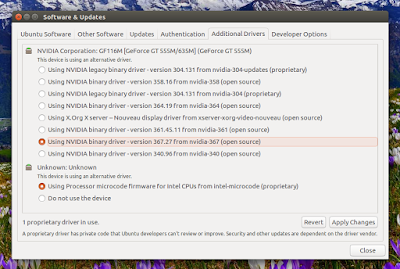
After the driver is downloaded and installed, restart your system. Thats it!
You can also install the latest drivers using Synaptic or from the command line. To see the available versions, you can use:
apt-cache search nvidiaapt search nvidiaAnd look for the packages called "nvidia-VERSION", for instance "nvidia-367" for the latest 367.27 graphics drivers, and install it ("sudo apt install nvidia-VERSION").

Available link for download
Subscribe to:
Posts (Atom)