Sunday, February 5, 2017
Get Android Lollipop Icons and Animations Using Latest Nova Launcher Lollipop Update
Get Android Lollipop Icons and Animations Using Latest Nova Launcher Lollipop Update
 Yesterday I have posted the stock lollipop wallpaper pack. Now its time to get a bit more. Apart from other features and performance improvements most Android users like to get the UI look and feel in every latest Android release. If you are one of them and you would like to get the lollipop icons and animations in your old Android device, just install the latest version of the Nova launcher from Google play.
The latest version of Nova launcher packed with the Android 5.0 lollipop animation and icon pack. You can apply the lollipop icons in the Look and feel menu.
How To Apply Lollipop Icons in Nova launcher?
1. Install Nova Launcher - Download
2. After installation click home and chose Nova as the default launcher.
3. Click settings soft key and tap on Nova settings.
4. In Nova settings, tap on Look and feel then on Icon theme.
5. Finally in Icon theme list choose Lollipop.
Thats it...
Available link for download

Monday, January 30, 2017
How To Root Nokia X Android Phone and Install GApps Include Google Play Google Now Launcher etc
How To Root Nokia X Android Phone and Install GApps Include Google Play Google Now Launcher etc
 Nokia X, the budget Android mobile got root access. The phone has a decent specification for the price tag includes a Dual Core 1 GHz Qualcomm Snapdragon S4 processor and a 512 MB RAM. According to the official source the phone is expected to release in India on 10 March 2014 for Rs. 8500 /-.
As I mentioned in the older post the phone comes without Google Play Store. The independent Nokia store may have few apps compared to Google Play. So it may be a pain on the ass for those who not interested in side-loading apk files. In this post I included the steps to root Nokia X and Install Google Play on the device. Here are the steps..
How To Root Nokia X Android Phone ?
1. Download and Install Framaroot - Download2. Open Framroot app
3. Select Install SuperSU and tap on Gandalf.
4. On Success you will get a Success dialog ... tap OK.


5. Finally, Reboot device to complete root process.
Thats it....Now Your Phone will be successfully Rooted...Follow the below steps to Install Google Play, Google Now Launcher in Nokia X.
How To Install Google Play, Google Now Launcher, etc. in Nokia X ?
Assume You have rooted your Nokia x ... If not follow the rooting instruction included above.1. Download and Install any root explorer - ES File Explorer or Root Explorer
2. Download and extract NokiaX_Gapps_KashaMalaga_28.02.2014.zip and copy all apk files to /system/app
3. Now change permission of all the copied files to rw-r--r--. see the image below.
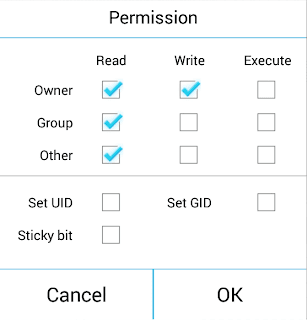
4. After setting permission....Reboot device...
5. After boot up....Download and extract NokiaX_SomeGoogleApps.zip then, install needed apk files in the archive.
Thats it....
source
Available link for download
Wednesday, January 18, 2017
GIGABYTE Tweak Launcher for Z170 chipset
GIGABYTE Tweak Launcher for Z170 chipset
Hey guys,
I have for you the GIGABYTE Tweak Launcher (GTL) software to use on the Z170 chipset GIGABYTE motherboards to help you overclock in Windows. We’ve tested it on all versions of Windows OSes and it operates well. You can change various frequencies including base clock, CPU and Uncore ratios, various volts and voltage related parameters.
Happy OCing and be careful with this software, don’t go setting crazy voltage because you can kill hardware (for example, the settings in the screenshot were done using liquid nitrogen so we could use high voltage such as 1.45vcore on CPU and 1.84v on memory). On air cooling, these settings are not advisable. I would stick to 10% overvolt at most for regular OC rigs.
Download link: https://www.dropbox.com/s/f4loxilzn1prbhg/gtl%202.2%20b15.0923.1.rar?dl=0

Available link for download
Thursday, November 3, 2016
How To Change Icon in Samsung TouchWiz Launcher Flat Icons Included
How To Change Icon in Samsung TouchWiz Launcher Flat Icons Included
In this post I included the steps to change TouchWiz UI icons in Samsung Android mobiles. To get work this method your device must be rooted
Update:
This post is updated with WizIconizer apps method. Using WizIconizer you can change the icon pack without booting into any recovery. use the first method.
I have tested this method with Galaxy S3 and Galaxy Core, and works without any problem. Icons pack contains a set of flat icon extracted from other icon packs and some of them made by me. I will update the icon pack whenever I got time.


How To Change Samsung Touchwiz Launcher Icon?
Method1 [ Recommended ]1. Download and Install WizIconizer - Download
2. Download and Extract FlatIcons_Technoxide.zip
3. Copy extracted apk and xml file anywhere in phones Internal or External storage.
4. Open WizIconizer
5. Long Press on the CSCAppResource.apk and tap on Apply.
6. On First time the asks for root permission tap Grand
7. Finally ... Tap on Restart Device !
Method 2 (With Custom recovery)
1. Download FlatIcons_Technoxide.zip
2. Copy to Internal or External storage.
3. Reboot to CWM or TWRP
4. Install the FlatIcons_Technoxide.zip
5. Finally reboot your device
Thats it..
Extra Download
Blue Wallpaper
Available link for download