Wednesday, April 12, 2017
How to make money with affiliate program if you are A blogger
How to make money with affiliate program if you are A blogger

There are many ways to be an affiliate. Most bloggers sign up with an affiliate network because it’s a one-stop place to find many programs to join. You apply to the network and then apply to individual programs in the network. They give you special links to use or banner ads that track clicks and sales. You can link to a website or to a specific product. When someone clicks on your link or ad and makes a purchase you make a percent of the sale, usually around 10%. Some programs give you a percent of any sales from their website from someone who came from your link, up to 30 days or longer.
The advantage of joining a network is you manage many different businesses and get paid from the network, rather than getting individual checks and logging onto different sites. You usually get paid once a month and you can log in and see your sales and what you’re making at any time (remind you of The Blogger Network?).
When you apply to be an affiliate, you are called a “publisher”. The brand or business is called the “merchant”. Some of the signup processes are not very user-friendly but they all involve filling out an application and getting approved by the network. Once approved you can search for merchants to promote. Once accepted, the merchant provides links and creative you can use on your blog.
There are many ways to be an affiliate, here are some examples:
Be an Event Affiliate
Many conferences or events have affiliate programs. It can be as simple as a discount code that if someone uses you code, you’ll make money to a more formal setup. Eventbrite makes it easy to set up affiliates because it’s easy to create a signup code and then track when someone uses that code to sign up. Then the conference organizer will pay you a percentage of the total sales.
Earn Money Promoting Free Products
You can be an affiliate for free things like free ebooks, downloads, coupons (Coupons.com has an affiliate program) free trials, or even by posting recipes (such as with My Recipe Magic – please note the site is temporarily down). There are also affiliates who get paid when someone fills out a lead form, such as applying for a credit card.
Every blogger can create a page of their favorite resources and use affiliate links in the post (be sure to disclose that they are affiliate links though).
Example: the Lemons for Lulu blog has a post that shows the camera, web hosting, WordPress theme, books and other things she uses and loves. See http://www.lemonsforlulu.com/blogger-resources.
Create Helpful Posts and Use Affiliate Links
You could do a post about your favorite plugins and include affiliate links to any paid ones. Many affiliate programs will allow you to promote products directly on social media. We’ve seen fashion bloggers directly link to buy pages on Facebook, for example.
Post about how to start a blog in your niche and link to the web hosting company where they buy a domain, link to the paid theme you recommend, etc. This blog post from Pinch of Yum tells how to start a food blog and includes many affiliate links: http://pinchofyum.com/resources/how-to-start-a-food-blog.
Another way to get started is to go see what your most popular posts are and see if there are ways you could use affiliate links in the post. For example, if you have a recipe that goes viral on Pinterest, you could monetize that post. You can create a box that lists all the ingredients or supplies needed and then link to stores that carry those products. You can link to either Walmart, Target or Amazon in most posts. If you’re higher end you might link to Williams Sonoma, Pottery Barn or other retailer. Don’t just think about food, think about the tools, dishes or other parts of your post. If someone ever asks, where did you get that platter, that’s an opportunity for you.
The good news is, you will get paid on the entire order, so if someone buys anything because of your link, you make money.
To get started, look at the major affiliate networks:
Commission Junction www.Cj.com
This is one of the largest affiliate networks. Here is the sign up page: https://signup.cj.com/member/publisherSignUp.do
Linkshare www.Linkshare.com
Amazon – www.Amazon.com (find the associates link in the footer to apply)
Amazon pays less than a lot of programs but it has a huge selection and user-friendly tools. The name of the game here is to sell quantity because the margins are small. Still, there is a lot of brand trust and many people, especially those with Amazon Prime, prefer to order from Amazon.
Share A Sale www.ShareASale.com
This network has many smaller and mid-sized businesses, including niche products and brands you might not already know.
Clickbank www.Clickbank.com
This program carries information products and ebooks. Since there is very little cost once the product is created, you can get very high commissions. Some offer to 75% commissions on products. Commissions are paid weekly, and direct deposit is available to its affiliates.
AvantLink – www.AvantLink.com
This network has cutting edge tools and more advanced features such as data feeds.
We hope that this helps you understand how affiliate marketing works enough so that you can get started. Please let us know if we missed anything! To inspire you, here’s another post from Pinch of Yum that breaks down how much they make from different revenue streams, including affiliate marketing.
Available link for download

Monday, April 3, 2017
How to Flash Intex ECO 205 with SPD Upgrade Tool vR2 9 9015 Flash tool Tested
How to Flash Intex ECO 205 with SPD Upgrade Tool vR2 9 9015 Flash tool Tested
Intex ECO 205 in any type issue software related you can easy solve using this method and this is for everyone who new fresher technician or experience technician in software related, before use remember of must be working well all are required which you can see in this method it below to be mention, different to be error when you try to flash or upgrade first of USB not recognized this error possible when micro USB not working, battery not charged, phone USB socket not working properly so if you fail with this method just write down your comment on below comment box i will soon possible to fix it, first take backup into device if live otherwise dead you cant take backup, this method use when device in dead condition also but must be in software problem in hardware device not be live
Required for Intex ECO 205
- Intex ECO 205 Feature phone with well battery charged, do not try with low battery
- Intex ECO 205 Flash file you can download from here | Mirror
- Intex ECO 205 Flash tool you can download from here
- Intex ECO 205 USB Driver you can download from here
- Micro USB Cable with Good Quality
- Computer or Laptop
Procedure for Intex ECO 205
- Download tested flash file, flash tool or USB driver from the above link, if link not working just leave your comment on below comment box
- Extract to anywhere as you like from WinRAR, Must be installed WinRAR in your Computer or Laptop
- Open SPD Upgrade Tool vR2.9.9015 folder and choose UpgradeDownload.exe file and open it
- Click on Flash file button and choose Intex_ ECO 205_V01_NOWTP_India _SER.pac file from the HLG_X600_011_V01 20150407 flash folder
- Now click on Download button
- Press and hold Center key and Insert USB Cable then wait until driver installing if already installed then downloading stat automatically
- Wait until finished the process, do not unplug while phone in flashing mode
- I hope you are done, Congratulation

Available link for download
Thursday, March 30, 2017
How to Flash or Upgrade HTC Desire 620G dual sim with SP Flash tool tested
How to Flash or Upgrade HTC Desire 620G dual sim with SP Flash tool tested
Must read users:
This tutorial tested by me without any error but remember here some impotent question for successfully done with this tutorial, must be working device sub socket, must be working micro usb cable, must be working volume up or down keys for boot device, must be working computer or laptop usb socket, this tutorial you can use without any box its simple.
Required for HTC Desire 620G
- HTC Desire 620G dual Sim with good battery charged, it to be 80% up, and do not try with low battery
- HTC Desire 620G dual Sim tested Stock ROM Firmware | Download Mirror | Mirror
- HTC Desire 620G dual Sim USB (Flashing) Driver | Download here
- HTC Desire 620G dual Sim Flash tool | Download here
- Quality Micro USB Cable
- Computer or Laptop
Procedure for HTC Desire 620G
- First take files from above link which required for Flash or Upgrade, if link not working just leave your comment on below comment box
- Extract to Desktop or As you like path from the WinZip, Must be installed WinZip software in your computer or laptop
- Open SP Flash tool folder and choose flash_tool.exe file and open it
- Click on Scatter-loading button and choose MT6592_Android_scatter.txt file and click OK
- Now click on Download button and Just Insert Micro USB Cable into device after auto installing driver if installed in your computer or laptop
- If device not detect so just Press and hold Volume Up key and Insert USB cable into device
- If driver not take device after installed so just update Driver which above links from the device manager
- After updated flashing star automatically and wait until finished process, do not try to unplug device which in flashing
- You are done, Congratulation

Available link for download
Monday, March 27, 2017
How to Root Android Smartphones with Rooting Tools
How to Root Android Smartphones with Rooting Tools
How to Root Android Smartphones.
Best Rooting tools for Android .


What is Rooting ?
How Does VROOT work ?
How to Root with VROOT ?
Available link for download
Thursday, March 23, 2017
How to Flash Gionee Elife S5 1 with SP flash tool Tested
How to Flash Gionee Elife S5 1 with SP flash tool Tested
Must Read before Following
You have to charge your battery with any charger and charged it by 70%, your data is very important for you so it is good to do a backup of your data it may consist like your contact details,your important messages, your emails or any other important thing which you feel to be the backup in your device. This backup can be done on another device. we have to do the backup because after a format of your device, all your data will be gone and it will not be recovered. For backup in other devices you can use other external device like your hard drive, sd card or any other suitable devices. If you are doing by your own.do it at your own risk as we dont take any responsibility if your device is damaged
About Method
This method without any box and this is free for all who know about software in mobile, impotent for flashing first must check your micro USB cable if not good then you cant flash it so check micro USB cable second check your device battery that is impotent for flashing if your device battery low so stop your device between flash so this is impotent for flash, before you flash save your data like contact, photos, videos etc because this is factory flash file so you cant save after full flash so must remember all are impotent notes.
Requirement for Gionee Elife S5.1
- Gionee Elife S5.1 device with good battery charged, do not try with low battery otherwise many problem be in device
- Gionee Elife S5.1 tested Stock ROM Firmware | Download here
- Gionee Elife S5.1 tested Flash tool | Download here
- Gionee Elife S5.1 USB Driver | Download here
- Good Quality Micro USB Cable
- Computer or Laptop
Procedure for Gionee Elife S5.1
- First Download tested Stock ROM Firmware, Flash tool or USB Driver from above link, if link not working just leave your comment on below comment box
- Unzip all WinZip file to Root Folder or As you like path, Must be installed WinZip software in your Computer or Laptop
- Open Sp Flash tool folder and choose flash_tool.exe file and open it
- Click on Scatter-loading button and choose MT6592_Android_scatter.txt file and click OK button
- Now Click on Download button, Insert Micro USB Cable to device and wait until driver installed, if driver not installing automatically just update from the above links driver
- If device not detect with Sp flash tool then Press and hold Volume Up button and Insert USB Cable
- Wait until finished process, do not try to unplug while device in flashing mode
- Congratulation i hope you are done

Available link for download
Monday, March 20, 2017
GIGABYTE OC guru from Australia does a 1v1 interview with OCTV an interesting watch!
GIGABYTE OC guru from Australia does a 1v1 interview with OCTV an interesting watch!
Overclocking TV (OCTV) conducted a series of one-on-one interviews with some of the world’s best known overclockers during the recent Computex 2015 overclocker gathering. This week they’re focusing on dinos22 who is one of GIGABYTE’s OC gurus. Check it out!
Available link for download
Sunday, March 19, 2017
How to Flash or Upgrade Intex Aqua A1 with SP Flash Tool Tested
How to Flash or Upgrade Intex Aqua A1 with SP Flash Tool Tested
This flash file tested by me without any error working well, this is free for all who know about software in mobile, impotent for flashing first must check your micro USB cable if not good then you cant flash it so check micro USB cable second check your device battery that is impotent for flashing if your device battery low so stop your device between flash so this is impotent for flash, before you flash save your data like contact, videos, notes, emails, photos, videos etc because this is factory flash file so you cant save after full flash so must remember all are impotent notes.
If you want to repair your device, you can try to repair it by you.You have to charge your battery with any charger and charged it by 70%. Your data is very important for you so it is good to do a backup of your data it may consist like your contact details,your important messages, your emails or any other important thing which you feel to be the backup in your device. This backup can be done on another device. we have to do the backup because after a format of your device, all your data will be gone and it will not be recovered. For backup in other devices you can use other external device like your hard drive, sd card or any other suitable devices. If you are doing by your own.do it at your own risk as we dont take any responsibility if your device is damaged
Required for Intex Aqua A1
- Intex Aqua A1 handset with good battery charged, do not try with low battery
- Intex Aqua A1 Stock ROM Firmware | Download here
- Intex Aqua A1 Flash tool | Download here
- Intex Aqua A1 USB Driver | Download here
- Micro USB Cable with Good Quality
- Computer or Laptop
Procedure for Intex Aqua A1
- Take files of required for this method from the above link, if link dead or broke just leave your comment on below comment box i will soon fix it if possible
- UnZip from WinZIP to anywhere you want from the ZIP, must be installed ZIP in your Computer or Laptop
- Open SP Flash tool folder and select and open flash_tool.exe file
- Click on Scatter-loading button and choose MT6572_Android_scatter.txt file from the Firmware folder
- Now click on Download button, and Just Insert USB Cable to device
- Wait until driver installing, if driver already installed in your Computer or Laptop then downloading start automatically
- If device dead for detection Press and hold Volume Up button and Insert USB Cable
- Wait until finished process, do not disconnect device while in flashing mode
- Congratulation you are done

Available link for download
Sunday, March 12, 2017
Grive2 Grive Fork With Google Drive REST API And Partial Sync Support PPA
Grive2 Grive Fork With Google Drive REST API And Partial Sync Support PPA
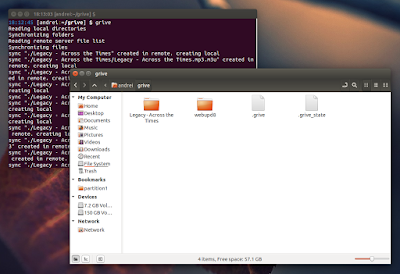
- supports the new Drive REST API
- added partial sync
- major code refractoring: a lot of dead code removed, JSON-C is not used any more, API-specific code is split from non-API-specific
- some stability fixes
- slightly reduce number of syscalls when reading local files
- bug fixes
Also, just like the old app, Grive2 does NOT support:
- continuously waiting for changes in file system or in Google Drive to occur and upload. A sync is only performed when you run Grive, and it calculates checksums for all files every time;
- symbolic links;
- Google documents.
Install Grive2 in Ubuntu or Linux Mint via PPA
sudo add-apt-repository ppa:nilarimogard/webupd8
sudo apt-get update
sudo apt-get install griveArch Linux users can install Grive2 via AUR (its actually the old "grive" package, updated with the new Grive2 fork).
For other Linux distributions, see the Grive2 GitHub page.
Using Grive2
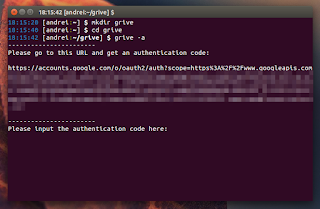
mkdir -p ~/grive2. Next, navigate using the terminal into the newly created "grive" folder:
cd ~/grivegrive -agrive -s SUBFOLDERTo see all the available options, type:
grive --help
Available link for download
Saturday, March 11, 2017
GTK3 Tiling Terminal Emulator Terminix 1 1 0 Beta Released With UI Changes Background Image Support
GTK3 Tiling Terminal Emulator Terminix 1 1 0 Beta Released With UI Changes Background Image Support

 |
| Terminix 1.1.0 with the default Ubuntu 16.04 wallpaper used as background image |
Other changes in the latest Terminix 1.1.0 beta:
- support for background images;
- limited support for automatic profile switching;
- option to globally disable shortcuts;
- option to automatically copy text to clipboard when selecting;
- support for a Visual Bell;
- numerous bug fixes.
Download Terminix
sudo apt-get install wget unzip libglib2.0-bin
cd /tmp
wget https://github.com/gnunn1/terminix/releases/download/1.2.0/terminix.zip
sudo unzip terminix.zip -d /
sudo glib-compile-schemas /usr/share/glib-2.0/schemas/sudo gtk-update-icon-cache --ignore-theme-index -f -q /usr/share/icons/hicolor/Or build it from source. For other Linux distributions, see THIS page.
Available link for download
Thursday, March 9, 2017
Gigaware 26 339 Compatiable With Windows 7
Gigaware 26 339 Compatiable With Windows 7
Here you can download gigaware 26 339 compatiable with windows 7?? for Windows. Its 100% safe, uploaded from safe source and passed McAfee virus scan!
Driver Info:
File name: gigaware-26-339-compatiable-with-windows-7??.zip
Driver version: 1.0.8
File size: 12 237 KB
OS: Win 7, Win Vista, Win 270
Upload source: manufactuter website
Available link for download
Tuesday, March 7, 2017
GIGABYTE X99 SOC Champion Debuts at CES 2015 with One More WR Under its Belt
GIGABYTE X99 SOC Champion Debuts at CES 2015 with One More WR Under its Belt
Today, Jan. 5th 2015, GIGABYTE held it’s pre-CES Press Event in the Caesar’s Palace Neopolitan ballroom. One of the main focus of that event was the launch of a new overclocking board, the GIGABYTE X99-SOC Champion. 

http://www.gigabyte.us/press-center/news-page.aspx?nid=1342
One of the main feature of the X99 SOC Champion is the SMT mounted DIMMs for improved signal quality and their location which is closer to the CPU socket. The DIMM’s shorter trace path enables the DDR4 memory to communicate faster with the CPU, enabling the overclockers to reach higher DDR4 memory frequencies. Additionally, the motherboard includes a CPU Mode Switch; this switch allows the overclockers to switch between CPU default socket mode and OC socket mode.
The Press Event was crown by a live overclocking demonstration held by GIGABYTE famous overclockers Dinos22, Sofos1990 and HiCookie. The skilled trio managed to impress the crowd with a 1 World Record, 3 Global First and 3 Hardware First on the X99-SOC Champion! Nice going guys! Here are the submissions:

3004 Marks on XTU with Intel Core i7 5960X
http://hwbot.org/submission/2722703
2317 Marks on XTU with Intel Core i7 5820K
http://hwbot.org/submission/2722904
84470 Marks on 3D Mark Vintage with x1 GPU
http://hwbot.org/submission/2722892
Ian from Anandtech already had a look at the X99-SOC Champion. Although he couldn’t test the board on its true intent, LN2 overclocking, Ian gave the Champion a good thorough testing. You can read the results and his opinion here:
http://www.anandtech.com/show/8804/gigabyte-x99-soc-champion-motherboard-review-low-cost-x99-overclocking
Here are a few pictures of the event:


Available link for download
Friday, March 3, 2017
How To Lose Weight With Indian Vegetarian Diet Can Hgh Sprays Quite Help Your Weightlifting Program
How To Lose Weight With Indian Vegetarian Diet Can Hgh Sprays Quite Help Your Weightlifting Program

How To Lose Weight With Indian Vegetarian Diet : numerous companies that sell products to body builders have started selling human growth hormone supplementsrofessional athletes have used HGH to improve their performanceiven that it is not a steroid, it can be sold in small doses without a prescriptionhe doses sold in over-the-counter oral supplements add considerably less Human Growth Hormone than the average adult produces on a daily basishe body produces this hormone in the pituitary glandt is crucial in building muscle and other body parts natural drop off has been associated with signs of agingoctors may well prescribe HGH to individuals to counteract the effectumerous supplements sold to help body builders increase their muscle mass consist ofs precursors that must be processed or a small amount that does not the human body cannot absorbGH sprays offer one way to get around the problem of the body not being able to absorb the product in throughout the stomach, but they are not necessarily the proper sup ... [Read More @ How To Lose Weight With Indian Vegetarian Diet]
Currently Celebrity Thinspiration and Pro Ana Secrets Leaked and Revealed For The 1st Time! is amongst the the majority of hunted product or service with Us. This system good quality can be very good. Quite a few Opinions possesses verify this these products offers best value, therefore almost all of the customers are generally content. It is possible to study the item by buyer evaluations that have provided positive tendencies. Should you be engaged using this nearly all needed on sale merchandise, you should purchase quickly to avoid discouragement, result in this supplement tends to sold out prematurely.

Celebrity Thinspiration and Pro Ana Secrets Leaked and Revealed For The 1st Time! ! How To Lose Weight With Indian Vegetarian Diet


How To Lose Weight With Indian Vegetarian Diet : Can Hgh Sprays Quite Help Your Weightlifting Program > Hey girls, my identify is Christina and I have an uncommon weight loss story to share with you these days. I want to share my story of desperation, I know how it feels like when you are hunting for aid but do not know whom to approach.
Most of the customer critiques notify how the How To Lose Weight With Indian Vegetarian Diet tend to be quality product or service. Its also good merchandise In addition to inexpensive way too. You can study almost all evaluations through consumers to find out more using their company experience. This testimonials gives you a great indicator on the benefit in addition to consistency in the items. Many thanks intended for traveling to. And also seriously trust that site could possibly be necessary to anyone.

Possibly You Want To Read About :



Look Video on How To Lose Weight With Indian Vegetarian Diet
Popular Search : how to lose weight with indian vegetarian diet
Available link for download
Thursday, March 2, 2017
GNOME 3 20 Released With Various Refinements And Application Updates
GNOME 3 20 Released With Various Refinements And Application Updates

Changes in GNOME 3.20


Other changes include:
- Wayland improvements that should provide a usable day to day experience, including: kinetic scrolling, drag-and-drop, application startup notification, middle-click paste and more;
- Cantarell, the default GNOME font, has received lots of improvements for this release and overall, the text has a far better appearance, with more harmonious and consistent letters at all sizes, as well as new supported character sets, like Vietnamese, Cyrillic and Devanagari;
- theres a new option that allows displaying the battery charge percentage in the GNOME Shell Top Bar. This can be found in dconf Editor: org > gnome > desktop > interface > show-battery-percentage;
- GTK+ CSS theming has had a major overhaul, which should result in easier theme writing and more dynamic interfaces;
- gspell, a new spell-checking library for GTK applications, has been introduced with GNOME 3.20 and is already used by Gedit;
- xdg-app, the cross-distro framework for building and distributing desktop apps on Linux, has matured for the 3.20 release and it includes xdg-app-builder, a tool that makes it easy to build apps, along with other important changes such as support for creating single-file application bundles and more. More info available in the GNOME 3.20 release notes for developers.
GNOME applications


Note that for the screenshot above, Ive used the Ubuntu-patched GNOME Software because its the only way to see the user reviews in action at this point, at least as far as Im aware of.


Other changes in Files 3.20 include:
- a new, more compact preferences dialog;
- new settings to show action to create symbolic links and to permanently delete files and folders, as well as recursive search settings (to search in subfolders: local only, all locations or never);
- extra zoom level in the list and grid views;
- display available / remaining space for drives listed in Other Places.


Other changes in Polari 3.20 include:
- the application now supports pasting images directly into chats;
- server properties are now accessed from the sidebar;
- added support for traditional IRC features, such as tab completion for IRC commands, the ability to open IRC links, support for the /msg command and more;
- Polari can now handle server passwords;
- improved look and feel, with a restyled input bar and new text animations;
- more.

Other changes in the Web application include:
- support for advanced we-based graphics and audio, with WebGL and Web Audio;
- feedback when visiting non-HTTPS sites has been improved;
- new tabs now inherit browsing history when opened from a link (this restores behavior that was lost in a previous version);
- the cookies dialog has a built-in search now.
With GNOME 3.20, Maps includes improvements such as:
- the application now allows adding and editing place information from OpenStreetMap;
- place popovers now include more information, like phone numbers or website address;
- the application now supports adding custom layers using common mapping file formats like GeoJSON, KML and GPX;
- added support for printing route directions;
- the application now supports exporting maps as PNGs;
- a new scale ruler was added;
- the app can now open links prefixed by "geo:".
Heres the latest GNOME Maps 3.20:


 |
| image via chergert |
GNOME Builder, the relatively recently introduced IDE for GNOME, includes quite a few new features and improvements, such as:
- the app now supports building xdg-app bundles and within a JDBuild environment;
- a new multi-process plugin framework, which adds a wide rage of functionality to Builder, including auto indenters, autocompletion providers, tools, services, search providers, version control systems and more;
- overhauled application preferences;
- autocompletition is now faster and supports fuzzy matching;
- a new To Do plugin was added to track to do items;
- improved VIM emulation;
Other changes in the GNOME 3.20 apps include:
- Nibbles comes with updated artwork as well as a new retro arcade style, along with a new game screen and better high scores integration;
- the quick add popovers used in GNOME Calendar now allow selecting the calendar to which you want to add the event to;
- tasks in the scheduled view are now grouped under date headings in the To Do application. To Do also includes a new plugin system which will allow the app to integrate with various online task managers (but no plugins are available for now);
- Documents app now allows listing the documents by name, date or author
- Boxes application was updated to automatically create a snapshot after creating a virtual machine;
- GNOME Games now supports MAME (Multiple Arcade Machine Emulator) and Neo-Geo Pocket.
Here are the changes mentioned above, for Nibbles, Calendar and To Do:


GNOME 3.20 video
Below you can watch a GNOME 3.20 overview video (via GNOME Desktop YouTube channel):
(direct video link)
Getting GNOME 3.20
In OpenSUSE Tumbleweed, GNOME 3.20 should be available by the end of this month or in early April.
You may also want to check out the official GNOME 3.20 release notes.
Available link for download