Showing posts with label es. Show all posts
Showing posts with label es. Show all posts
Monday, April 10, 2017
How To Backup APK Using ES File Manager Latest Version Now You Cant See The Old App Manager Menu Item
How To Backup APK Using ES File Manager Latest Version Now You Cant See The Old App Manager Menu Item
 Along with bug fixes,performance improvements and other feature enhancements the ES team brought a modified Fast Access menu on the recent version of ES File Explorer File Manager. In the previous version of ES File Manager there was an App Manager menu item in the Fast Access menu, Which is used to mange User and System apps. The App Managers apk backup feature is very useful as we can backup and reinstall the app later without downloading from Google Play. One of my old post titled "How To Backup Android Apps As APK using ES File Explorer ?" mentioned the steps do the same.
As the recent version modified the Fast access menu, now you cant find the App Manger there. Its renamed to APP and placed in Library menu. The New APP is same as the old App Manager and which can do all the old stuffs like Uninstall, backup, etc. The process of backup apk is same and I included the complete steps in this post.
Backup Android App Using ES File Explorer File Manager
1. Open ES File Explorer - Download2. Tap on Fast Access icon or option soft key or swipe from left to right.
3. In Fast Access menu tap on Library then APP.
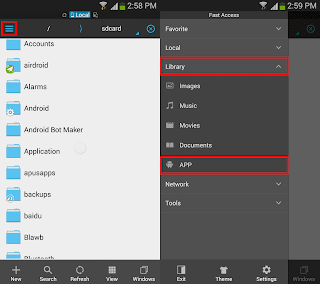
4. In the APP grid long press on the desired app you wish to back up and finally tap on Backup.
(If you wish to backup multiple apps, just tap on other apps too)

Thats it.. You can grab the backed up app apk from /sdcard/backups/apps/.
Available link for download

Wednesday, December 7, 2016
How To Backup Android Apps As APK using ES File Explorer
How To Backup Android Apps As APK using ES File Explorer

Downloading apps or games from Google Play on each Factory reset or format is always not possible, As it needs a better 3G plan or WiFi. So making the apk backups of installed apps will help you to install those apps later without Google Play or any other Android app store.
In this post I included the steps to backup android apps or games as apk using ES File Explorer.
How To Backup Android Installed Apps and Games using ES File Explorer ?
1. Install ES File Explorer from Google Play(Skip it if you already installed)
2. Open ES File Explorer.
3. Tap on Fast Access icon (top left) or options soft key.

4. Now in the swipe menu tap on App Manager.
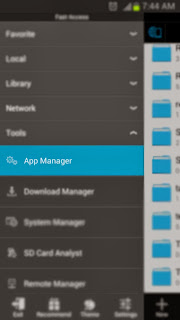
5. In user app list ... Long press on the app or game you wish to backup as apk.
6. Finally Tap on Backup in the bottom menu.

Thats it...
Note:
To get the backed up apk files browse to /sdcard/backups/apps/.
Available link for download
Subscribe to:
Posts (Atom)