Tuesday, April 11, 2017
How To Manually Update Galaxy S3 GT I9300 to Official Android Jelly Bean 4 1 2 XXEMH4 Using Odin
How To Manually Update Galaxy S3 GT I9300 to Official Android Jelly Bean 4 1 2 XXEMH4 Using Odin

In this I included the steps to manually flash Android 4.1.2 Jelly bean XXEMH4 to Galaxy S3 I9300 International version using Odin.
Firmware Details
PDA: I9300XXEMH4
CSC: I9300ODDEMI2
MODEM: I9300DDEMG2
Note :
1. Backup your important data.
2. Enable USB debugging in your phone.
3. Battery must have 60% or more charge.
4. Disable or Exit Antivirus and Kies if you are installed.
5. Your PC must install Kies or Galaxy S3 driver.
6. This Firmware is only for Galaxy S3 I9300 International Version.
How To Flash Official Android 4.1.2 I9300XXEMH4 in Galaxy S3 I9300 using Odin ?
1. Download Official Android Jelly Bean 4.1.2 I9300XXEMH4 for your country from below links.India | Sri Lanka | Bangladesh | Nepal
2. Extract the downloaded firmware zip.
3. Download Odin v1.85 - Download
4. Now, Extract and Open odin3 v1.85.exe.
5. Power off your phone.
6. Now boot in to download mode. ( Press and hold : Volume down key and Home button ( Center button ) ,now press and hold the power button to boot in to download mode and Press Volume up on Warning)
7. In download mode connect your phone to PC.
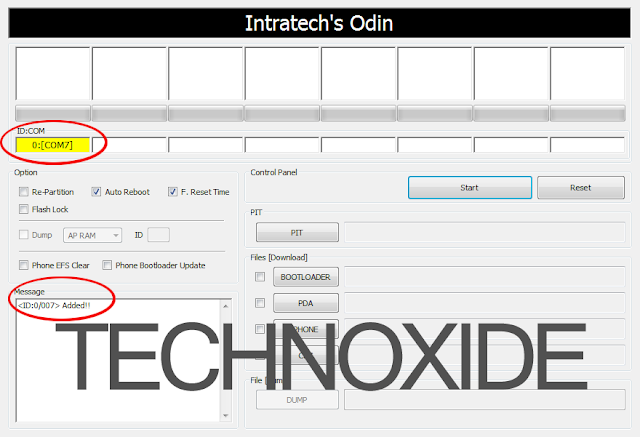
8. Now look in to Odin... ID:COM box, it will be yellow with a port name and Added! message will be displayed.
( If not it will the problem of driver or USB ... check both )
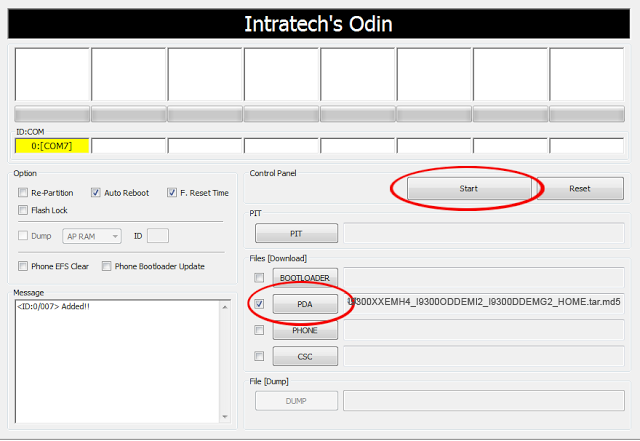
9. In Odin..Click PDA and browse the extracted firmware folder and select I9300XXEMH4_I9300ODDEMI2_I9300DDEMG2_HOME.tar.md5 finally Click Start button.
10. After complete update Odin will show PASS on top left and phone will reboot. now unplug phone from USB.
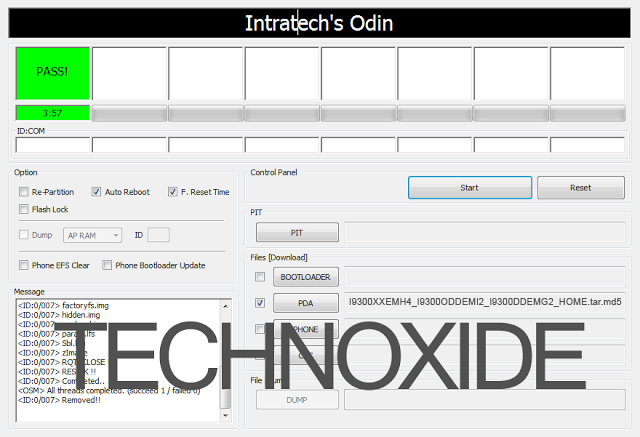
Thats it .... Done .
Note :
If the phone stuck at the boot screen...
1. Remove and reinsert your battery.
2. Now boot into recovery mode. (Volume up + Home + Power )
3. Apply wipe data/factory reset.
4. Apply wipe cache partition.
5. Finally reboot system...
Done !
Go to the below post to root the firmware
How To Root Samsung Galaxy S3 Jelly Bean 4.1.2 XXEMH4 ?
Available link for download

Monday, April 3, 2017
GT N7000 running LOLLIPOP 5 0 2
GT N7000 running LOLLIPOP 5 0 2
Testing Lillipop 5.0.2 on my Galaxy Note GT-N7000
Let see the result. Coming soon...
What you need?
1. cm-Resurrection_Remix_LP_v5.3.8-20150309-n7000.zip.
2. gapps-lp-20141109-signed.zip.
3. philz_touch_6.48.4-n7000.zip.
If you are coming from 4.1.2, make sure you had installed philz above and reboot recovery before flashing lolli
How to install?
- Reboot recovery using Philz Touch
- Full wipe and factory reset
- Flash ROM
- Flash Gapps
- Reboot.
- Enjoy!
Its that easy? YES!
Source: Click here
Available link for download
Monday, March 27, 2017
How to Set A Password to Samsung Galaxy Gio GT S5660
How to Set A Password to Samsung Galaxy Gio GT S5660

Setting a strong password to your Samsung Galaxy Gio GT-S5660 is greatly helpful in protecting the personal and confidential phone data. Therefore, do not hesitate a moment to follow the steps introduced in this article to set a password to your phone.
Related Articles:
How to Set Pattern Lock on Samsung Galaxy Gio GT-S5660
Android USB Driver for Samsung
Available link for download
Sunday, March 26, 2017
How to add more notification toggles to our Samsung Galaxy Core GT I8262
How to add more notification toggles to our Samsung Galaxy Core GT I8262
Okay.. so, heres what you need:
(1) Rooted Galaxy Core in Easy Way
(2) Sqlite editor app
Dts all!!
So heres what you need to do:
(1) Open sqlite and give root permission. It should show a list
(2) Scroll down to "Settings Storage" and open it
(3) Open "Settings.db"
(4) Next, tap "System"
(5) Scroll down until you find "notification_panel_active_app_list" NOT the notification_panel_default_active_app_list.Tap it. If its not present (well... it was not present for me atleast)(Make sure to Check Properly),then tap the menu key and then tap new record. Set the name to "notification_panel_active_app_list" and under value type the following.
Wifi;Location;SilentMode;Bluetooth;MobileData;AutoRotate;WiFiHotspot;SmartStay;AirplaneMode;DormantMode;PowerSaving;DrivingMode;Sync
(6) ReBoot
(7) Congratzz... U have successfully customized the notification panel..

You can press the thanks button if you think ive helped you as ive researched alot on this.. This is my first post here and i hope to see some warm welcomes

If you have any questions regarding this then im always ready to help..
Thank you,
Ansley
Available link for download
Saturday, February 18, 2017
GT N7000XXLT9
GT N7000XXLT9
Download GT N7000XXLT9 here
Im downloading it as well and see whats new.

Model: GT-N7000
Country: United Kingdom (Orange)
Version: Android 4.1.2
Changelist: 1103517
Build date: Tue, 04 Jun 2013 11:29:01 +0000
Product Code: ORA
PDA: N7000XXLT9
CSC: N7000ORALT3
MODEM: N7000XXLT3
Available link for download
Thursday, February 16, 2017
How to Set Password on Galaxy S4 GT I9500 GT I9508
How to Set Password on Galaxy S4 GT I9500 GT I9508

The way to set password on Samsung Galaxy S4 GT-I9500 phone is identical with that of Galaxy S4 GT-I9508 phone, and it will be clearly illustrated by the following steps.
Related Articles:
Available link for download
Wednesday, February 15, 2017
How To Root Galaxy Core Duos GT I8262 Without PC
How To Root Galaxy Core Duos GT I8262 Without PC

In this post I included the simple steps to root Galaxy Core Duos GT-I8262 using a single Android app Framaroot. Framroot is the free Android app developed by alephzain, which helps to root Android device without using a PC. Framroot root also supports many other Android devices, the list is too big so I am not including it here, check out the official thread for all the available device.
Note:
- Backup all important data
- Required minimum 30% battery
- Rooting will void warranty (You can get warranty back by unrooting)
Disclaimer
Rooting may brick your device .. I am not responsible for any damage .. Do at your risk.
Galaxy Core Duos I8262 Root Without PC ?
1. Download the Latest Framaroot - Download2. Install the downloaded apk to your device.
3. Open Framroot app
4. Select Install SuperSU and tap on Gandalf.

5. On Success you will get a Success dialog ... tap OK.

6. Finally, Reboot device to complete root process.
Thats it.
Available link for download
Sunday, February 12, 2017
GT N7000 Andorid 5 1 Battery Life
GT N7000 Andorid 5 1 Battery Life


Available link for download
Thursday, February 9, 2017


Thursday, January 26, 2017
GT N7000 Galaxy Note 1 PIT File
GT N7000 Galaxy Note 1 PIT File
If you are looking for Galaxy Note GT-N7000 PIT file. Below are the links:
1. Q1_20110914_32GB.pit
2. Q1_20110914_16GB.pit
Partition Information Table = PIT
Very useful when your phone seems like brick or stuck on the Samsung Logo screen.
Note:
-Make sure no KIES running. Uninstall KIES would be good
-Use ODIN to flash PIT file. Try latest ODIN or older version. Find here
MORE!
Now you can change you Storage > Device Memory to 4, 6, 8 or 12 GB. Download PIT file for you GT-N7000 16GB version here. If you would like to have bigger internal storage for you application installation.
Select you desired PIT file version of Device Memory. Enjoy!

Available link for download
Wednesday, December 28, 2016
How To Manually Update Galaxy S3 GT I9300 to Android 4 3 Leaked firmware
How To Manually Update Galaxy S3 GT I9300 to Android 4 3 Leaked firmware
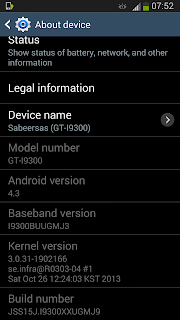
Follow the steps below to manually flash the Galaxy S3 Android 4.3 leaked firmware using Odin 3.09.
Firmware Info:
Model: GT-I9300
Country: Germany (Vodafone)
Version: Android 4.3
Changelist: 1902166
Build date: Sat, 26 Oct 2013 12:24:03 +0000
Product Code: VFG
PDA: I9300XXUGMJ9
CSC: I9300VFGGMJ5
MODEM: I9300BUUGMJ3
Note:
- This firmware is only for Galaxy S3 International version (GT-I9300)
- Backup all important data
- Battery must be 60% or above
- Kill all the kies processes in Task Manager
- Disable Antivirus
Update:
This leaked version have an annoying deepsleep issue...so better dont flash it. Official 4.3 firmware from Samsung started rolling out yesterday. so wait for that official version for your country.
Update 2:
Samsung Galaxy S3 Official Stock Android 4.3 update started rolling out click the below link to the Official firmware post.
Galaxy S3 GT-I9300 Official Stock Android 4.3 Update Using Odin
Available link for download
Saturday, December 10, 2016
How to Create A PIN Lock for Samsung Galaxy Gio GT S5660
How to Create A PIN Lock for Samsung Galaxy Gio GT S5660

Locking phone screen to prevent other people from easily accessing the phone seems to be a must-to-do thing to protect the private data. And among all available methods, a relatively effective method is creating a PIN lock. Moreover, this post primarily introduces the steps to create a PIN lock on Samsung Galaxy Gio GT-S5660.
Related Articles:
Available link for download
Monday, November 7, 2016
GT N7000 running LOLLIPOP 5 1
GT N7000 running LOLLIPOP 5 1
GT-N7000 running Android LOLLIPOP 5.1
I dont have to say much.


Wanna try. Get it here
What you need?
1. cm-Resurrection_Remix_LP_v5.4.0-20150401-n7000.zip. Find it here
2. gapps-lp-20141109-signed.zip
3. philz_touch_6.48.4-n7000.zip
If you are coming from 4.1.2, make sure you had installed philz above and reboot recovery before flashing lolli
How to install?
- Reboot recovery using Philz Touch above
- Full wipe and factory reset
- Flash ROM
- Flash Gapps
- Reboot.
- Enjoy!
Its that easy? YES!
Available link for download
Sunday, November 6, 2016
GT I9500 MT6572
GT I9500 MT6572


MT6572 | I9500XXUAMDE | Dual-Core 1209MHz | 467MB RAM | 1.27GB ROM
SamClone ID : 5332
User : Admin
Model Number :
GT-I9500 (Settings) , (MTK Droid Root & Tools)
Android version :
Android 4.2.2 (Settings) , (MTK Droid Root & Tools)
Baseband version :
I9500XXUAMDE (Settings) ;
MOLY.WR8.W1315.MD.WG.MP.V2, 2013/07/02 17:21 (MTK Droid Root & Tools)
Kernel version :
3.4.5 , soft02@cc-desktop #1 , Mon Sep 30 15:53:23 CST 2013 (Settings) ;
3.4.5 (soft02@cc-desktop) (gcc version 4.6.x-google 20120106 (prerelease) (GCC) ) #1 SMP Mon Sep 30 15:53:23 CST 2013 (MTK Droid Root & Tools)
Build number :
JDQ39.I9500ZSUAMDF (Settings) ;
ALPS.JB3.MP.V1.2 (MTK Droid Root & Tools)
Custom build version :
Galaxy.20130930.A9F.QHD.V001 (Settings)
Build date UTC :
20130930-075711 (MTK Droid Root & Tools)
CPU Hardware :
MT6572 (MTK Droid Root & Tools) , (CPU-Z)
CPU Core :
Dual-Core (Vellamo) ;
1209MHz (Genuine Galaxy S4/Note 3) , (CPU-Z)
GPU
Mali-400 (CPU-Z)
RAM :
467.41MB (Genuine Galaxy S4/Note 3) , (CPU-Z)
ROM :
1.27GB (Genuine Galaxy S4/Note 3) , (CPU-Z)
Number of SIM :
1
Camera :
8MP Rear (Camera ICS+) ;
13MP , 3MP , 1MP Rear (Camera) ;
0.3MP Front
Display :
540 x 960px (Vellamo) ;
5 inch
Density :
240dpi (CPU-Z)
Multitouch point :
2 (MultiTouch Tester)
Sensors :
Accelerometer , Proximity Sensor , Light Sensor (CPU-Z) ;
Hand Gesture (One-Way Only) , Eye Sensor (Settings)
Others :
GPS , Bluetooth , 3G Internet Speed , FM Radio , LED Flash (Settings)
Cons :
- Blue light on capacitive button.
- Annoying blue charging light.
- Camera so bad. Feel like 3MP cam. Bad stabilization. Dual shot pic frame boring. Front cam shows green.
- Hand gesture only occur in one directions.
- Non-customizable lock screen.
- Main time widget does not have Accuweather.
- No S-Note , no S Health.
- System shows the wrong specs.
- 2-Point Multitouch.
- Custom ROM like real Samsung Galaxy S4


Download backup or ROM for this phone :
Note :
|
-----------------~
TitaniumBackup
Info :
Titanium Backup (System Data Only). For lost stock app or data.
Backup on :
29 November 2013
Size :
192MB
How-To :
- Extract the backup using WinRar. Copy it to your phone SD card.
- Install Titanium Backup and open it.
- Root needed. Root your phone using MTK Droid Root & Tool. (click root)
- Click Batch actions (on top right).
- Click to restore. (select your desire restoration option)
- Wait and install.
CWM Backup
Sorry. No backup for this method.
-----------------~
MTK Droid Root & Tools Backup
Buy Backup (USD 20)
Info :
Backup using MTK Droid Root & Tools Backup. Backup with error because of limitations of space. Please check the log file. This is my final backup (last upload).
Backup on :
31 December 2013
Size :
891MB
See log file :
Tinypaste
How-To :
- Open MTK Droid Root & Tool.
- Recover from backup.
Support us by donate via Paypal. Your donations will be very helpful. Please consider making a donation of $10 , $20 or whatever you can to protect and sustain Samsung Clone. Thanks from Sam Clone Donate $10 Donate $20 |
Comment Below | Post Your Phone | Report Dead Links
Available link for download
Monday, October 31, 2016
How to install CM12 Android L into GT N7000
How to install CM12 Android L into GT N7000
How to install CM12 Android L into GT-N7000
- Download n7000-CWM-KitKatCompatible.zip OR
- V1.2.1-bauner-kernel-cm-aokp-kitkat-linaro4.9.2-n7000.zip
- Download CM12 Alpha 3
- Download Android L GAPPS
- Copy Rom + Google Apps + KK Kernel into SDCard
- Reboot into recovery
- Flash KK Kernel
- Reboot recovery
- Factory reset
- Flash the rom and gapps zip files
- Reboot
- DONE!
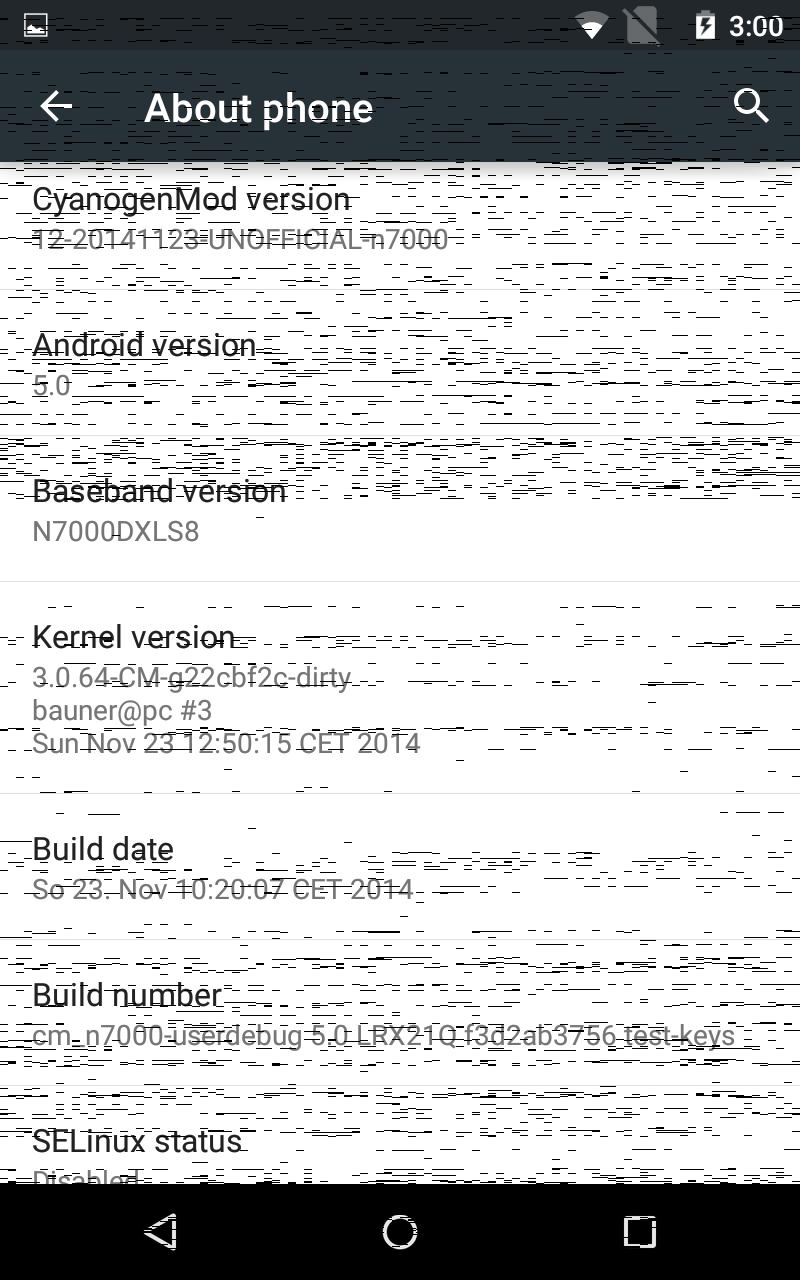
- CM12 continue reading here.
- Bauner kernel continue reading here
Available link for download
Friday, October 28, 2016
GT N7000 Running Jelly Bean 4 2 2
GT N7000 Running Jelly Bean 4 2 2


Notification center...


Battery life


Next project..... here
Available link for download