Showing posts with label i9300. Show all posts
Showing posts with label i9300. Show all posts
Tuesday, April 11, 2017
How To Manually Update Galaxy S3 GT I9300 to Official Android Jelly Bean 4 1 2 XXEMH4 Using Odin
How To Manually Update Galaxy S3 GT I9300 to Official Android Jelly Bean 4 1 2 XXEMH4 Using Odin

In this I included the steps to manually flash Android 4.1.2 Jelly bean XXEMH4 to Galaxy S3 I9300 International version using Odin.
Firmware Details
PDA: I9300XXEMH4
CSC: I9300ODDEMI2
MODEM: I9300DDEMG2
Note :
1. Backup your important data.
2. Enable USB debugging in your phone.
3. Battery must have 60% or more charge.
4. Disable or Exit Antivirus and Kies if you are installed.
5. Your PC must install Kies or Galaxy S3 driver.
6. This Firmware is only for Galaxy S3 I9300 International Version.
How To Flash Official Android 4.1.2 I9300XXEMH4 in Galaxy S3 I9300 using Odin ?
1. Download Official Android Jelly Bean 4.1.2 I9300XXEMH4 for your country from below links.India | Sri Lanka | Bangladesh | Nepal
2. Extract the downloaded firmware zip.
3. Download Odin v1.85 - Download
4. Now, Extract and Open odin3 v1.85.exe.
5. Power off your phone.
6. Now boot in to download mode. ( Press and hold : Volume down key and Home button ( Center button ) ,now press and hold the power button to boot in to download mode and Press Volume up on Warning)
7. In download mode connect your phone to PC.
8. Now look in to Odin... ID:COM box, it will be yellow with a port name and Added! message will be displayed.
( If not it will the problem of driver or USB ... check both )
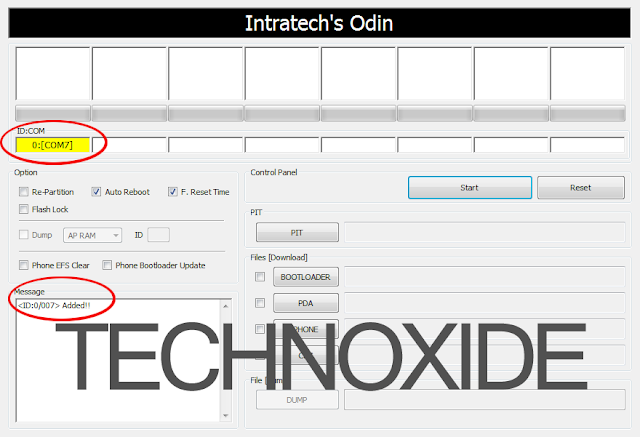
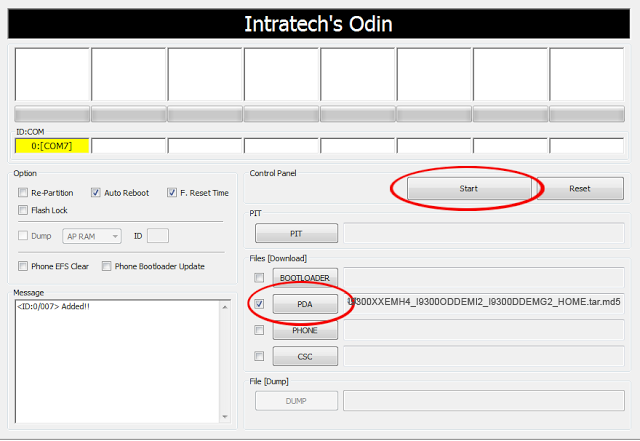
9. In Odin..Click PDA and browse the extracted firmware folder and select I9300XXEMH4_I9300ODDEMI2_I9300DDEMG2_HOME.tar.md5 finally Click Start button.
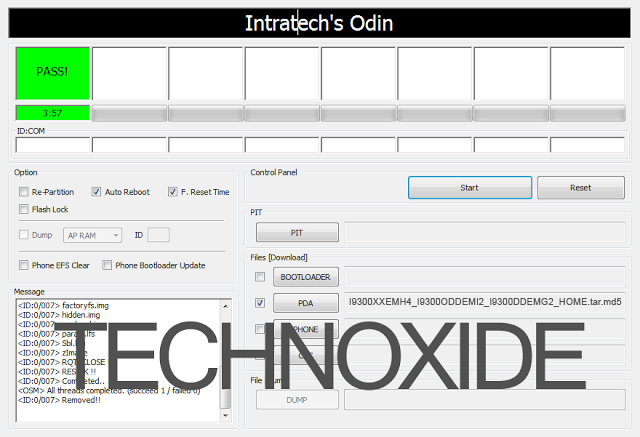
10. After complete update Odin will show PASS on top left and phone will reboot. now unplug phone from USB.
Thats it .... Done .
Note :
If the phone stuck at the boot screen...
1. Remove and reinsert your battery.
2. Now boot into recovery mode. (Volume up + Home + Power )
3. Apply wipe data/factory reset.
4. Apply wipe cache partition.
5. Finally reboot system...
Done !
Go to the below post to root the firmware
How To Root Samsung Galaxy S3 Jelly Bean 4.1.2 XXEMH4 ?
Available link for download

Wednesday, December 28, 2016
How To Manually Update Galaxy S3 GT I9300 to Android 4 3 Leaked firmware
How To Manually Update Galaxy S3 GT I9300 to Android 4 3 Leaked firmware
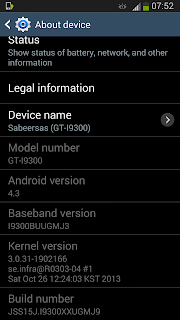
Follow the steps below to manually flash the Galaxy S3 Android 4.3 leaked firmware using Odin 3.09.
Firmware Info:
Model: GT-I9300
Country: Germany (Vodafone)
Version: Android 4.3
Changelist: 1902166
Build date: Sat, 26 Oct 2013 12:24:03 +0000
Product Code: VFG
PDA: I9300XXUGMJ9
CSC: I9300VFGGMJ5
MODEM: I9300BUUGMJ3
Note:
- This firmware is only for Galaxy S3 International version (GT-I9300)
- Backup all important data
- Battery must be 60% or above
- Kill all the kies processes in Task Manager
- Disable Antivirus
Update:
This leaked version have an annoying deepsleep issue...so better dont flash it. Official 4.3 firmware from Samsung started rolling out yesterday. so wait for that official version for your country.
Update 2:
Samsung Galaxy S3 Official Stock Android 4.3 update started rolling out click the below link to the Official firmware post.
Galaxy S3 GT-I9300 Official Stock Android 4.3 Update Using Odin
Available link for download
Subscribe to:
Posts (Atom)