Showing posts with label 3. Show all posts
Showing posts with label 3. Show all posts
Thursday, April 13, 2017
GNOME 3 18 Released See What s New
GNOME 3 18 Released See What s New

After six months of work, GNOME 3.18 was released today, bringing some important Files application improvements, built-in Firmware upgrades, as well as a new preview application called To Do.
Changes in GNOME 3.18
Unlike most of the previous GNOME 3.x releases, the latest GNOME 3.18 focuses more stability and under the hood features and less on redesigning applications or GNOME Shell.
One of the most important new features in GNOME Shell 3.18 is the ability to access Google Drive directly from Files (Nautilus) and file chooser dialogs (via GVFS). This allows easily downloading your Google Drive files directly from the Files app as well as uploading new files:

Other similar (well, more or less) solutions were already available for some time, like google-drive-ocamlfuse, but having this built-in is definitely a nice feature, especially since its very easy to setup: all you have to do is add your Google account to Online Accounts.
Another useful new feature is the integration of the Linux Vendor Firmware Service with GNOME. This is a project that aims to make it possible for hardware manufacturers to distribute firmware updates for Linux (like a BIOS update, network card firmware, etc.). With GNOME 3.18, Software automatically displays firmware just like any other software updates and furthermore, this feature should also work with other devices such as monitors or USB hubs.
Yet another new feature in GNOME 3.18, which you might not notice at first, is automatic screen brightness, for computers that have an integrated light sensor. This feature is enabled by default and it can be disabled from the Power settings.
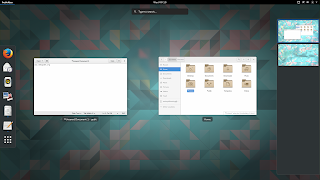
As for GNOME Shell, there arent any major new features or changes, just a few minor enhancements, like showing Display Settings entry in the background menu, using the same style for the system modal dialogs as GTKs modal dialogs and a menu option to allow moving a window to a different monitor, along with bug fixes.
Other changes:
- improved touchscreen support: its now easier to select, cut, copy and paste text using a touchscreen, via new popovers and also, the handles used to adjust text selections have been made bigger;
- Kinetic scrolling (scrolling feels physical) is now handled by GTK+ - this should fix this type of scrolling if it didnt work for you previously. Furthermore, a new auto-scroll feature has been added (to activate it, press the scrollbar with the right mouse or touchpad button);
- the latest GTK+ 3.18 includes new typographic features such as colored underlines, letterspacing and translucent font colors as well as support for custom font maps and font options;
- various Wayland improvements, including HiDPI support (as well as HiDPI cursor support), support for copy, paste and drag and drop between windows, including between two Wayland apps and between Wayland and X11 apps, GTK+ OpenGL support under Wayland and more. Also, its now possible to use multitouch gestures such as pinch to zoom and rotate with a touchpad (previously, they were only available with a touchscreen);
- Bluetooth sharing has been merged into the main Bluetooth settings, so it is easier to find;
- The animation of progress spinners has been made super smooth.
GNOME applications
The application that has received most attention this development cycle is Files (Nautilus), which includes the following changes:
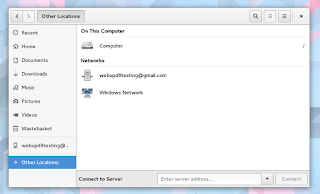
- the files places sidebar, displayed in the Files app and in open and save dialogs, has been reworked and it now includes a new location, called "Other Locations", which provides a useful overview of local and network locations;
- the copy/move dialog is now in the form of a button on the Files toolbar which shows progress information along with more information when pressed;
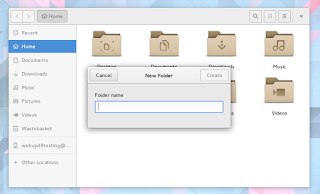
- improved folder creation as well as file and folder renaming - these now use dialogs and popovers (according to the release notes, these changes were introduced following user testing results);
- search as you type has been added to the open and save dialogs;
- placeholders are now displayed when folders are empty, or when no search results are found;
- recursive search is now automatically disabled when searching remote locations, in order to prevent performance problems;
- theres a new option in Dconf (org > gnome > nautilus > preferences) which allows disabling recursive search. When disabled, the search will only look for files and folders in the current directory, ignoring subfolders.
- recent files lists have been improved, and now show the full location of each file;
- Google Drive integration (which I already mentioned above).


The latest Gedit 3.18 brings a new minimap, which shows an overview of a file next to the scrollbar, as well as a new plugin which allows searching in all files:

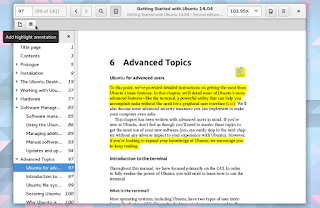
Evince, the GNOME document viewer, was updated with just a few, but important new features. The app can now display inline multimedia, such as video and audio by using GStreamer and it supports adding highlight annotations. Also, text annotations can now be moved:
Changes in other GNOME applications:
- Maps is now able to indicate your direction as well as location. It is also possible to enter latitude/longitude coordinates or a geoURI;
- Web, the GNOME browser is faster and also, the screen will no longer automatically lock when you are watching a fullscreen video in Web;
- Builder has a new workspace system which allows different panels to be added and removed, a new appearance for the pop-up command bar, a new shortcuts window (to open it, use Ctrl + Shift + ?) as well as a new plug-in system which allows plug-ins to be written using Python 3, C or Vala;
- the collections dialog has been greatly improved in Documents, with a better layout and easier renaming and deletion;
- the layout of the Logs application has been improved, so that it is more efficient and easier to read. It is also possible to select which boot to view logs from;
- GNOMEs IRC application, Polari, has received paste service integration along with other improvements such as a better first run experience, improved feedback for connection errors and better indicators for new messages;
- Boxes includes a new list view with more details about your boxes along with other improvements.
 |
| GNOME Builder |
With GNOME 3.18, there are two new official applications, which have graduated from the "preview" status they had in the previous GNOME release: Calendar (calendar app) and Characters (character map app):

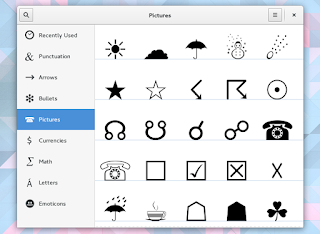
GNOME Calendar features month and year views, search, allows adding calendars from files or remote URLs, it integrates with GNOMEs Online Accounts integration and more.
And finally, a brand new application is available as a technical preview with GNOME 3.18: To Do, which you can see in the screenshots below:


As you may have guessed from its name, this is a todo list management application and in this early release, it allows creating new tasks (and schedule tasks), grouping, prioritizing tasks and attaching notes to tasks. Furthermore, the app integrates with GNOME Online Accounts, which means it can keep your tasks in sync with Google Tasks.
Getting GNOME 3.18
Among the Linux distributions that will ship with GNOME 3.18 are Fedora 23 (currently in beta) as well as the next openSUSE release (scheduled for November 4, 2015).
GNOME 3.18 isnt yet available in Debian Unstable (though some GNOME 3.18 RC packages are available in Experimental) or Arch Linux at the time Im writing this article.
As for Ubuntu / Ubuntu GNOME, part of GNOME 3.18 is available in the GNOME 3 Staging PPA for Ubuntu 15.10 only (there are still missing pieces, like Gedit 3.18 and others).
You may also want to check out the official GNOME 3.18 release notes.

Available link for download

Wednesday, April 12, 2017
How To Install GNOME 3 20 In Ubuntu GNOME 16 04 Xenial Xerus
How To Install GNOME 3 20 In Ubuntu GNOME 16 04 Xenial Xerus
Now that Ubuntu GNOME 16.04 (Xenial Xerus) is out, you may want to install the latest GNOME 3.20. I wont get into details about whats new in GNOME 3.20 since Ive already covered that.
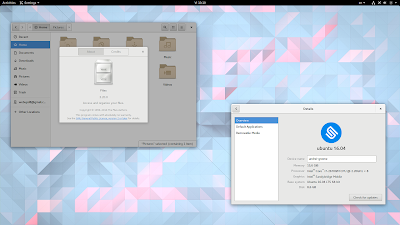
Ubuntu GNOME 16.04 uses GNOME 3.18 for the most part: GTK 3.18, along with GNOME Shell 3.18, GDM 3.18 and the 3.18.x release for most GNOME applications. Exceptions are Nautilus (3.14), GNOME Software and GNOME Calendar (both updated to version 3.20.x).
To upgrade to GNOME 3.20 in Ubuntu GNOME 16.04, youll have to use the GNOME 3 Staging PPA.
The PPA doesnt have the complete GNOME 3.20 though. On a first look, I can tell you that the following packages werent updated to version 3.20 in the PPA: Bijiben, Cheese, Epiphany, Evince, Boxes, Disks and probably others.
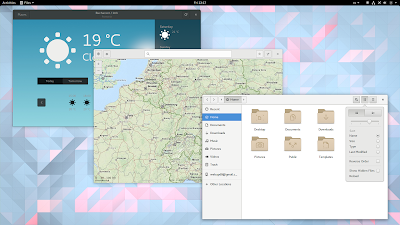
Nautilus (Files), Gedit, Maps, Documents, System Monitor, Terminal and so on, along with GTK+, Settings (Control Center / Settings Daemon), GNOME Shell, and GDM were all updated to version 3.20.
To see all the packages available for Ubuntu (GNOME) 16.04 in the GNOME 3 Staging PPA, click HERE.
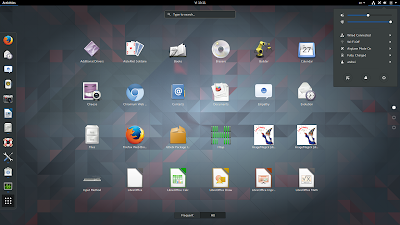
Ive been using GNOME 3.20 in Ubuntu GNOME 16.04 for a few hours and I didnt encounter any major issues however, there might be things I didnt notice. Furthermore, bugs can be introduced with future updates, especially since the PPA packages are not as widely tested as the packages available in the official Ubuntu repositories.
So use the PPA with care and only if you know what youre doing!
So use the PPA with care and only if you know what youre doing!
Update: pierremichaud points out in a comment below that the GNOME Calendar and Evolution calendar synchronization with Google doesnt work for now.
If something doesnt work the way its supposed to or you simply dont want to use GNOME 3.20 any more, you can purge the PPA and go back to the default GNOME version (3.18) available in Ubuntu GNOME 16.04. Youll find instructions for how to do this at the end of the article.
How to upgrade to GNOME 3.20 in Ubuntu GNOME 16.04 (Xenial Xerus)
Before proceeding, its important to mention that you should only use this PPA in Ubuntu GNOME. In Unity for instance, updating GTK and other libraries, along with applications without Unity patches can result in quite a bad desktop experience, crashes, etc.
Also, I recommend switching to the default GNOME theme (Adwaita), to avoid any issues that may occur with a newer GTK+ version and the theme youre using.
To add th GNOME 3 Staging PPA and upgrade to GNOME 3.20 in Ubuntu GNOME 16.04, use the following commands (read the important notice below before running the "dist-ugrade" command):
sudo add-apt-repository ppa:gnome3-team/gnome3-staging
sudo apt update
sudo apt dist-upgrade
Important! Read the output of "apt dist-upgrade" before entering Y to make sure important packages wont be removed! This is up to you to figure out.
For instance, in my test, the "dist-upgrade" command displayed a message saying that "grilo-plugins-0.2-base" was about to be removed. I knew thats ok because "grilo-plugins-0.3-base" was mentioned below, in the section that lets you know about new packages that will be installed:
$ sudo apt dist-upgrade
Reading package lists... Done
Building dependency tree
Reading state information... Done
Calculating upgrade... Done
The following packages will be REMOVED:
 grilo-plugins-0.2-base grilo-plugins-0.2-extra libmutter0g
The following NEW packages will be installed:
 gir1.2-geoclue-2.0 gir1.2-grilo-0.3 gir1.2-lokdocview-0.1 grilo-plugins-0.3
 grilo-plugins-0.3-base grilo-plugins-0.3-extra libcamel-1.2-57 libgexiv2-2
 libgrilo-0.3-0 libgspell-1-1 libjpeg62 libmutter0h libreoffice-gtk3
The following packages will be upgraded:
...................
The same goes for "grilo-plugins-0.2-extra" and "libmutter0g". This is just an example though!
Once the upgrade is completed, its best to restart your system to avoid running into issues.
How to revert the changes and go back to GNOME 3.18 in Ubuntu GNOME 16.04
If you want to revert the changes and go back to GNOME 3.18 in Ubuntu 16.04 (Xenial Xerus), you can purge the PPA. To purge the PPA, use the following commands:
sudo apt install ppa-purge
sudo ppa-purge ppa:gnome3-team/gnome3-stagingAvailable link for download
Sunday, April 2, 2017
Gridinsoft Anti Malware 3 0 17 Full Terbaru
Gridinsoft Anti Malware 3 0 17 Full Terbaru
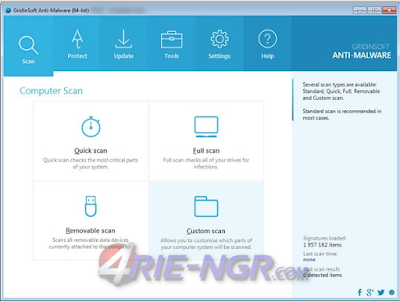
Gridinsoft Anti-Malware 3.0.17 Full Terbaru.
Gridinsoft Anti-Malware Full version ini merupakan suatu software yang akan berguna untuk membasmi Malware yang terdapat pada Komputer atau Laptop anda. Selain itu software ini juga akan melindungi Komputer anda dari serangan berbagai macam Malware maupun Adware yang hingga saat ini sudah banyak tersebar di internet.
Gridinsoft Anti-Malware Full ini sangat berbeda dengan antivirus standar lainya, karena Gridinsoft Anti-Malware Full ini telah di buat khusus untuk menagani segaja jenis malware serta adware, sehingga kemampuannya dalam menangani penyakit tersebut jauh lebih bagus dibandingkan dengan antivirus standar lainya.
Features:
- Agile and Powerful
Eliminates any sneakiest malware with ease. GridinSoft Anti-Malware helps in difficult cases where well-known and complicated antivirus products get stuck.?
- Easy to use
User-friendly, beautiful and simple Anti-Malware interface. Defeat malwares within few clicks instead of long-lasting and really boring manual procedures?.
- High-speed system scan
No slowdowns in your system in proactive mode. Slow computers are really annoying, as well as the programs. This is not the case with Anti-Malware.??
- Lightning Fast
High-speed system scan. No slowdowns in your system in proactive mode. Slow computers are really annoying, as well as the programs. This is not the case with Anti-Malware.??
Langkah Install dan Aktivasi
- Lakukan Instal dahulu Software nya
- Setelah Instalasi selesai, Lalu Exit
- Gunakan Patch untuk aktivasi
- Klik kann Patch, lalu Run Ad Administrator
- Klik Patch
- Selesai
Gridinsoft Anti-Malware 3.0.17 Full Terbaru
Size: 49 Mbvia Rpidgtor
=> Gridinsoft Anti-Malware 3.0.17 Final
via Ntroflare
=> Gridinsoft Anti-Malware 3.0.17 Final
via Uploder
=> Gridinsoft Anti-Malware 3.0.17 Final
Patch Only
=> Patch_Gridinsoft Anti-Malware Terbaru
Sekian artikel yang saya tulis ini, semoga bisa bermanfaat dan berguna untuk anda, jika ada yang kurang jelas, bisa langsung anda tanyakan pada kolom komentar dibawah in.
Available link for download
Saturday, March 25, 2017
Guide How to Flash Stock ROM on Android OPPO NEO 3 to Fix a Bootloop Removing Malware Stuck
Guide How to Flash Stock ROM on Android OPPO NEO 3 to Fix a Bootloop Removing Malware Stuck
[Guide] How to Flash Stock ROM on Android OPPO NEO 3 to Fix a Bootloop, Removing Malware, Stuck.
Flash Stock ROM on Android OPPO NEO 3. This guide will help you to Flash Stock ROM on Android OPPO NEO 3 Smartphone. By flashing your Android phone you can get something new on your phone, such as new experience to use latest update of Stock ROM, or new installed Stock ROM after your phone died or bootloop, and much more. Before we proceed to flash this Android OPPO NEO 3 Smartphone, let we know what is detail specification of this Android smartphone.OPPO NEO 3 was released On 2014, August. And OPPO NEO 3 is the smartphone that comes with 4,5 Inches IPS LCD capacitive touchscreen, 16M colors, Run on Android OS, v4.2.1 (Jelly Bean) - ColorOS v1.4 UI as it Operating System and Dual-core 1.3 GHz CPU, combined with 1 GB of RAM as their engine. And you can enjoy exciting 5 MP on main camera, and 2 MP on secondary camera.
Now, we start to flash Stock ROM on Android OPPO NEO 3 Smartphone. Just follow this guide below carefully. take your own risk, a damage or broken phone by following this tutorial is not our responsibility.
Guide Flash Stock ROM OPPO NEO 3.
Before you flash OPPO NEO 3 you must read this instruction carefully, so. you can get best result at the end of your flash.
Preparation.
- Make sure you have enough battery capacity on your OPPO NEO 3. Its recomended you have at least 80% of battery capacity.
- Always backup your important file (contact, music, video, app) that stored on OPPO NEO 3,
- Prepare the Memory Card / SD Card which has a V-Gen Brand. For some reason OPPO NEO 3 does not recognized besides V-Gen Memory card.
- Then download OPPO NEO 3 Stock ROM.
- Oppo NEO 3
- Once download finish, now copy Stock ROM from computer to the phone memory or SD Card. but note that you copy this ROM at outside not to the public folder for easy finding. (if you download ROM Via PC)
- But, Stock ROM can be download directly from yourAndroid phone. And you must have a good and stable internet connection for it, such as Wi-Fi connection.
- Rom download directly from the Android phone located in the File Manager / phone / download.
http://assorted.downloads.oppo.com/firmware/R831K/R831K_11.A.16_OTA_INT_016_all_151103.zip
Flashing Stock ROM.
- To start flashing Stock ROM on OPPO NEO 3 you must enter Recovery Mode. how to do it ?
- Press and Hold Power Button + Volume Down.
- Then you will see menu like this picture. You can select English
- Select Wipe data and cache by pressing the power button. for Up and down choice, use the volume keys Up / Down, on the next Popup screen select Wipe your data cache to make faster process.
- If appears confirmation you can select : "YES"
- Then you will bring to previous menu, and you can select Install form sd.
- Now you will see 2 options. From mobile phone storage & form SD,.
- Previously you have copy firmware file on SD Card, So. now you must select From SD. and now you can see your Firmware file name on this screen.(Stock rom name is similar as shown on the picture below)
- Select this file name using Power Button
- For Up or Down navigation you can use volume Up and Down Button.
- Then you will see a confirmation page, and you can select yes to proceed this flash on OPPO NEO 3
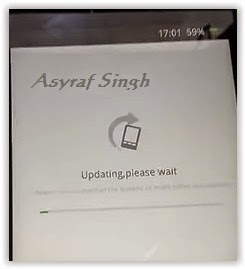
- Just wait the process finish updating system, and your OPPO NEO 3 will ask to you to reboot the device.
- Now you have finished flash Stock ROM on Android OPPO NEO 3 Smartphone.
 |
| Flash Bootloop OPPO NEO 3 |
 |
| Flash Bootloop OPPO NEO 3 |
 |
| Flash Bootloop OPPO NEO 3 |
 |
| Flash Bootloop OPPO NEO 3 |
 |
| Flash Bootloop OPPO NEO 3 |
 |
| Flash Bootloop OPPO NEO 3 |
 |
| Flash Bootloop OPPO NEO 3 |
 |
| Flash Bootloop OPPO NEO 3 |
Available link for download
Sunday, March 5, 2017
Game PC Just Cause 3 XL Edition Repack
Game PC Just Cause 3 XL Edition Repack
Pagi kali ini game-pc8 akan berbagi game yang baru rilis kemarin. Game ini adalah lanjutan dari Just Cause 2 berarti game ini adalah game "Just Cause 3: XL Edition"

Just Cause 3: XL Edition - adalah game Square Enix dan dideveloperi oleh Avalanche Studios. Game ini melanjutkan misi dari game just cause yang sebelumnya. Game ini memiliki grafik setara ps4, oleh karena itu untuk memainkan game ini anda harus punya pc dengan spek yang mewadahai. Game ini bergenre open world, jadi kalian dapat menjelajahi seluruh map yang ada.
ScreenShoot :


System Requirements :
1. Ekstrack game
2. Install Game
3. Play
Enjoy
Just Cause 3: XL Edition - adalah game Square Enix dan dideveloperi oleh Avalanche Studios. Game ini melanjutkan misi dari game just cause yang sebelumnya. Game ini memiliki grafik setara ps4, oleh karena itu untuk memainkan game ini anda harus punya pc dengan spek yang mewadahai. Game ini bergenre open world, jadi kalian dapat menjelajahi seluruh map yang ada.
ScreenShoot :
System Requirements :
- OS : Windows Only
- Ram : 6 GB or High
- Processor : CoreI 5 3.4 Ghz
1. Ekstrack game
2. Install Game
3. Play
Enjoy
Size Game 15 GB
Part 1 - Just Cause 3: XL Edition
Part 2 - Just Cause 3: XL Edition
Part 3 - Just Cause 3: XL Edition
Part 4 - Just Cause 3: XL Edition
Part 5 - Just Cause 3: XL Edition
Part 6 - Just Cause 3: XL Edition
Part 7 - Just Cause 3: XL Edition
Part 8 - Just Cause 3: XL Edition
Part 9 - Just Cause 3: XL Edition
Part 10 - Just Cause 3: XL Edition
Part 11 - Just Cause 3: XL Edition
Part 12 - Just Cause 3: XL Edition
Part 13 - Just Cause 3: XL Edition
Part 14 - Just Cause 3: XL Edition
Part 15 - Just Cause 3: XL Edition
Part 16 - Just Cause 3: XL Edition
Part 1 - Just Cause 3: XL Edition
Part 2 - Just Cause 3: XL Edition
Part 3 - Just Cause 3: XL Edition
Part 4 - Just Cause 3: XL Edition
Part 5 - Just Cause 3: XL Edition
Part 6 - Just Cause 3: XL Edition
Part 7 - Just Cause 3: XL Edition
Part 8 - Just Cause 3: XL Edition
Part 9 - Just Cause 3: XL Edition
Part 10 - Just Cause 3: XL Edition
Part 11 - Just Cause 3: XL Edition
Part 12 - Just Cause 3: XL Edition
Part 13 - Just Cause 3: XL Edition
Part 14 - Just Cause 3: XL Edition
Part 15 - Just Cause 3: XL Edition
Part 16 - Just Cause 3: XL Edition
Available link for download
Saturday, March 4, 2017
Google Playstore 4 3 10 Update
Google Playstore 4 3 10 Update

Bagi kalian yang tidak sabar menuggu update OTA dari Playstore, androidpolice telah mengeluarkan update manual untuk versi 4.3.10. Tidak seperti update sebelumnya pada versi 4.2.9, pada versi 4.3.9 lebih menonjolkan tampilan antar muka.
Apa yang baru?
recently update : Kita bisa tahu aplikasi apa saja yang baru di update di menu install. Berguna bagi yang mengaktifkan menu automatically update.

combined update notifications : Kombinasi notifikasi program dimana downloading update dan updated bila ada beberapa maka akan digabungkan menjadi satu. Tidak memakan ruang dengan list satu-satu pernotifikasi.

Sebenarnya ada fitur - fitur lain dari update Playstore versi 4.3.10 ini, cuma sepertinya tidak berlaku karena restricted country kalian bisa mengunduh apk dari androidpolice atau dari link yang disediakan oleh longorism
Available link for download
Thursday, March 2, 2017
GNOME 3 20 Released With Various Refinements And Application Updates
GNOME 3 20 Released With Various Refinements And Application Updates
After the usual 6-month development cycle, GNOME 3.20 was released today and it includes changes such as updated Software app, which can now handle operating system upgrades, image editing capabilities for the Photos app, a new shortcuts window which displays the available keyboard shortcuts in most GNOME apps, and much more.

Changes in GNOME 3.20

For the GNOME 3.20 release, the developers have focused more on the GNOME apps, while GNOME Shell has only received minor changes for the most part.
There is one change that stands out though: media controls are now displayed in the notification / clock area, so users have quick access to music and video apps (which support MPRIS) that are currently in use:

With GNOME 3.20, users have more control over the location services. Until now it was possible to either enable or completely disable the location services however, with this release, access to location services can be decided on a per-application basis:

Thats not the only Settings module that was improved for this release. Mouse & Touchpad preferences was overhauled to make it easier and quicker to locate the relevant settings. The touchpad settings are only displayed if you have a touchpad for instance, and more explanations are provided:

Another interesting change is the addition of a shortcuts window to quite a few GNOME applications, like Files (Nautilus), Gedit, Maps, Videos, Photos and others. The shortcut window displays the keyboard shortcuts as well as available multitouch gestures, and can be accessed from the application menu or by using Ctrl + ? or Ctrl + F1 shortcuts. Heres the Files shortcuts window as an example:

Other changes include:
- Wayland improvements that should provide a usable day to day experience, including: kinetic scrolling, drag-and-drop, application startup notification, middle-click paste and more;
- Cantarell, the default GNOME font, has received lots of improvements for this release and overall, the text has a far better appearance, with more harmonious and consistent letters at all sizes, as well as new supported character sets, like Vietnamese, Cyrillic and Devanagari;
- theres a new option that allows displaying the battery charge percentage in the GNOME Shell Top Bar. This can be found in dconf Editor: org > gnome > desktop > interface > show-battery-percentage;
- GTK+ CSS theming has had a major overhaul, which should result in easier theme writing and more dynamic interfaces;
- gspell, a new spell-checking library for GTK applications, has been introduced with GNOME 3.20 and is already used by Gedit;
- xdg-app, the cross-distro framework for building and distributing desktop apps on Linux, has matured for the 3.20 release and it includes xdg-app-builder, a tool that makes it easy to build apps, along with other important changes such as support for creating single-file application bundles and more. More info available in the GNOME 3.20 release notes for developers.
GNOME applications

With GNOME 3.20, the Software application now supports upgrading to new major versions of the operating system, along with other changes, such as support for user reviews, support for xdg-app and Limba bundles and more:


Note that for the screenshot above, Ive used the Ubuntu-patched GNOME Software because its the only way to see the user reviews in action at this point, at least as far as Im aware of.
The Files (Nautilus) 3.20 application ships with revamped search filters as well as a faster and more responsive search:


Other changes in Files 3.20 include:
- a new, more compact preferences dialog;
- new settings to show action to create symbolic links and to permanently delete files and folders, as well as recursive search settings (to search in subfolders: local only, all locations or never);
- extra zoom level in the list and grid views;
- display available / remaining space for drives listed in Other Places.
The latest 3.20 version of the Photos application brings image editing support. The application now includes functions such as crop, rotate, color adjustment and picture enhancement, as well as some Instagram-like filters:


The changes made using Photos are non-destructive: the original photo is preserved and the changes can be undone. Theres also a new feature that allows exporting images from Photos, which includes an option to export the image at a reduced size.
The latest version of the GNOME IRC application, Polari, ships with a built-in server list, so all you have to do to add a server is to select it from the app, instead of manually adding it.


Other changes in Polari 3.20 include:
- the application now supports pasting images directly into chats;
- server properties are now accessed from the sidebar;
- added support for traditional IRC features, such as tab completion for IRC commands, the ability to open IRC links, support for the /msg command and more;
- Polari can now handle server passwords;
- improved look and feel, with a restyled input bar and new text animations;
- more.
Web (Epiphany) is another application that has received a lot of attention for this release, and it includes changes like an improved session restore feature. Besides restoring tabs, like in previous releases, the new session restore feature also restores each tab browsing history, scroll position and more.
Another improvement in the latest Web is a new popover that displays the downloads, which can be accessed from the header bar:

Other changes in the Web application include:
- support for advanced we-based graphics and audio, with WebGL and Web Audio;
- feedback when visiting non-HTTPS sites has been improved;
- new tabs now inherit browsing history when opened from a link (this restores behavior that was lost in a previous version);
- the cookies dialog has a built-in search now.
With GNOME 3.20, Maps includes improvements such as:
- the application now allows adding and editing place information from OpenStreetMap;
- place popovers now include more information, like phone numbers or website address;
- the application now supports adding custom layers using common mapping file formats like GeoJSON, KML and GPX;
- added support for printing route directions;
- the application now supports exporting maps as PNGs;
- a new scale ruler was added;
- the app can now open links prefixed by "geo:".
Heres the latest GNOME Maps 3.20:

For the GNOME 3.20 release, dconf Editor was updated to give a better overview. The application now uses a header bar, with a standard search design which can be found throughout most GNOME applications:


Other dconf Editor changes include a new bookmark feature, useful to quickly access some often-used settings, a redesigned entry editor (Im not sure exactly how this is called), which integrates a "use default value" switch that allows you to easily revert the changes to default, along with other useful improvements, like options to copy current path and reset visible keys.
 |
| image via chergert |
GNOME Builder, the relatively recently introduced IDE for GNOME, includes quite a few new features and improvements, such as:
- the app now supports building xdg-app bundles and within a JDBuild environment;
- a new multi-process plugin framework, which adds a wide rage of functionality to Builder, including auto indenters, autocompletion providers, tools, services, search providers, version control systems and more;
- overhauled application preferences;
- autocompletition is now faster and supports fuzzy matching;
- a new To Do plugin was added to track to do items;
- improved VIM emulation;
Other changes in the GNOME 3.20 apps include:
- Nibbles comes with updated artwork as well as a new retro arcade style, along with a new game screen and better high scores integration;
- the quick add popovers used in GNOME Calendar now allow selecting the calendar to which you want to add the event to;
- tasks in the scheduled view are now grouped under date headings in the To Do application. To Do also includes a new plugin system which will allow the app to integrate with various online task managers (but no plugins are available for now);
- Documents app now allows listing the documents by name, date or author
- Boxes application was updated to automatically create a snapshot after creating a virtual machine;
- GNOME Games now supports MAME (Multiple Arcade Machine Emulator) and Neo-Geo Pocket.
Here are the changes mentioned above, for Nibbles, Calendar and To Do:


GNOME 3.20 video
Below you can watch a GNOME 3.20 overview video (via GNOME Desktop YouTube channel):
(direct video link)
Getting GNOME 3.20
GNOME 3.20 will be available by default in Fedora 24 (alpha release scheduled for March 29).
In OpenSUSE Tumbleweed, GNOME 3.20 should be available by the end of this month or in early April.
In OpenSUSE Tumbleweed, GNOME 3.20 should be available by the end of this month or in early April.
Arch Linux users can install GNOME 3.20 from the GNOME Unstable Arch repository.
In Debian, GNOME 3.20 is 32% ready in Unstable and 30% in Testing, according to THIS page.
Ubuntu GNOME (and Ubuntu with Unity) 16.04, which will be released next month, wont include GNOME 3.20, but GNOME 3.18 for the most part. A few packages are updated to the latest 3.20 version (or, to be more specific, 3.20 release candidate) though, like Software and Calendar.
However, GNOME 3.20 should be available with Ubuntu 16.10. Also, the GNOME 3 Staging PPA is in the process of being updated to GNOME 3.20 for Ubuntu 16.04 Xenial Xerus.
You may also want to check out the official GNOME 3.20 release notes.
information via
Available link for download
Subscribe to:
Posts (Atom)