Showing posts with label 4. Show all posts
Showing posts with label 4. Show all posts
Tuesday, April 11, 2017
How To Manually Update Galaxy S3 GT I9300 to Official Android Jelly Bean 4 1 2 XXEMH4 Using Odin
How To Manually Update Galaxy S3 GT I9300 to Official Android Jelly Bean 4 1 2 XXEMH4 Using Odin

In this I included the steps to manually flash Android 4.1.2 Jelly bean XXEMH4 to Galaxy S3 I9300 International version using Odin.
Firmware Details
PDA: I9300XXEMH4
CSC: I9300ODDEMI2
MODEM: I9300DDEMG2
Note :
1. Backup your important data.
2. Enable USB debugging in your phone.
3. Battery must have 60% or more charge.
4. Disable or Exit Antivirus and Kies if you are installed.
5. Your PC must install Kies or Galaxy S3 driver.
6. This Firmware is only for Galaxy S3 I9300 International Version.
How To Flash Official Android 4.1.2 I9300XXEMH4 in Galaxy S3 I9300 using Odin ?
1. Download Official Android Jelly Bean 4.1.2 I9300XXEMH4 for your country from below links.India | Sri Lanka | Bangladesh | Nepal
2. Extract the downloaded firmware zip.
3. Download Odin v1.85 - Download
4. Now, Extract and Open odin3 v1.85.exe.
5. Power off your phone.
6. Now boot in to download mode. ( Press and hold : Volume down key and Home button ( Center button ) ,now press and hold the power button to boot in to download mode and Press Volume up on Warning)
7. In download mode connect your phone to PC.
8. Now look in to Odin... ID:COM box, it will be yellow with a port name and Added! message will be displayed.
( If not it will the problem of driver or USB ... check both )
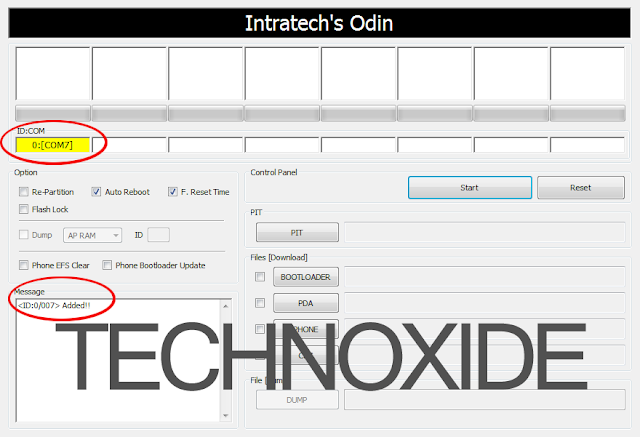
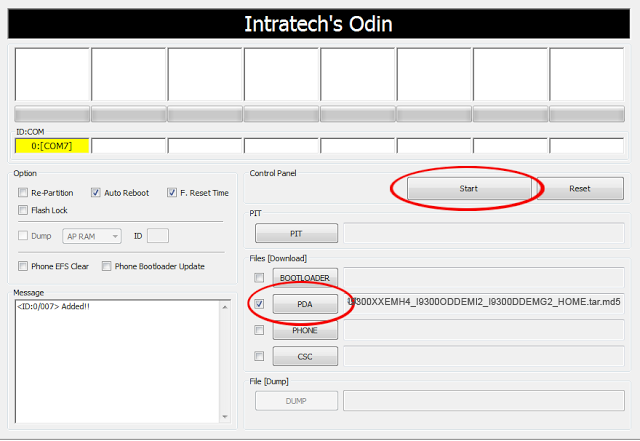
9. In Odin..Click PDA and browse the extracted firmware folder and select I9300XXEMH4_I9300ODDEMI2_I9300DDEMG2_HOME.tar.md5 finally Click Start button.
10. After complete update Odin will show PASS on top left and phone will reboot. now unplug phone from USB.
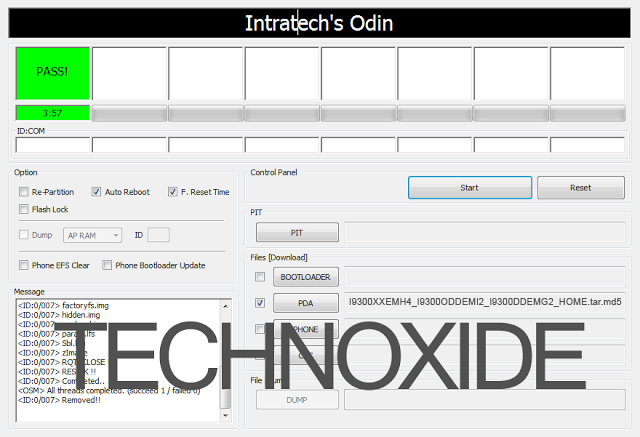
Thats it .... Done .
Note :
If the phone stuck at the boot screen...
1. Remove and reinsert your battery.
2. Now boot into recovery mode. (Volume up + Home + Power )
3. Apply wipe data/factory reset.
4. Apply wipe cache partition.
5. Finally reboot system...
Done !
Go to the below post to root the firmware
How To Root Samsung Galaxy S3 Jelly Bean 4.1.2 XXEMH4 ?
Available link for download

Monday, April 10, 2017
How To Remove bypass ICloud ID on Iphone 4
How To Remove bypass ICloud ID on Iphone 4
How To Remove iCloud ID on Iphone 4 iOS 7.1.2
How to remove iCloud account from iphone 4
how to remove icloud id without password iOS 7
step by step how to tutorial

Note:- This tutorial is only for educational purpose . Android soldier does not support any illegal activities or stolen devices, even we condemn this kind of activities. The tutorial was written on the request of my followers . This tutorial is for those who originally bought devices,original owner and forget their icloud password or icloud id or they have bought 2nd hand iphone and previous owner block it , not for them who are involved in any illegal activities.
Understanding iCloud .
iCloud is backup service from APPLE . iCloud was the greatest addition in all Apple OS platforms to secure the consumers from lost , theft . This is best protection feature which every iphone user must use to backup his/her personal data . The main feature of Icloud is called "find my phone" option. If you ever have turn this option on ,then you can locate your stolen iphone , erase it and block it to prevent from misuse . Even restore ,flashing or upgrading iOS will not work until you know the exact icloud id which used to backup data or block the iphone. All you have to do login on icloud website , use your Apple ID, password which were installed on stolen or lost iphone. Icloud can also be used to transfer your data from iphone to another iphone (Contacts,sms,picture 5gb maximum).
How to remove Icloud account from iphone 4
By following this tutorial you can only bypass iphone 4 which is not activated yet and stuck on icloud id . After bypass you will not be able to use cellular services any more . "NO MORE SIM". however there is method in which you can use cellular services as well after bypassing but for that you need to be on ios 7.1.1.
First download bypass package .The package include two software, one is called ssh_rd_rev04 and another one called winSCP. unzip folder and install winSCP .
- Put your iphone 4 into DFU mode . (press power + home button together and count 10 , then leave power button but keep pressing home button and count 01-30.) Now connect your iphone to computer . Windows will recognize iphone and install drivers for DFU Mode. do not run itunes during all procedure.
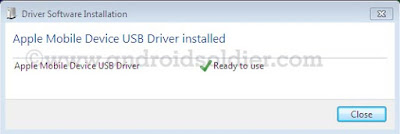
- Now open ssh.jar file . Make sure you have java installed on your computer

- Ssh.jar will download firmware . After few minutes ssh.jar will exploit bootrom. When the romdisk loaded your iphone will be reboot and freeze on apple logo throw out the whole process. Do not turn off your iphone.
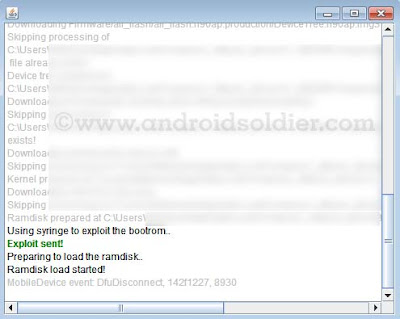
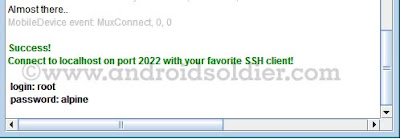
- Ssh.jar will do some more changes and at the end you will see the username and password shown by ssh.jar . Login:root password:alpine
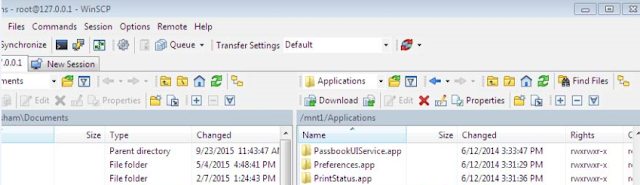
- Now double click on winSCP icon and run it , and write information which is indicated in image below then click on login.
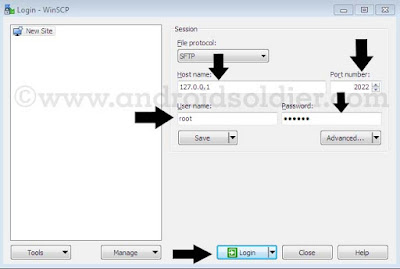
- A pop up window will be come forward and will search for host throw IP.

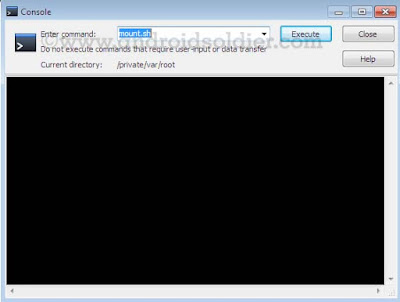
- winSCP window will open . Now open console by press CTRL+T or click on console option.
- Now write "mount.sh" and execute while winSCP window will remain open.
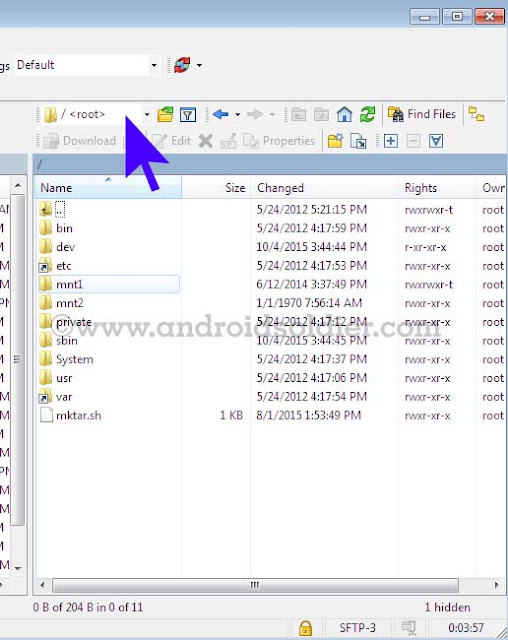
- Now you are in winSCP windows where you see root directory of your iphone. winSCP will display two windows , left will be show your desktop and right side will show your iphone root directories. Select /root as mentioned in image below .
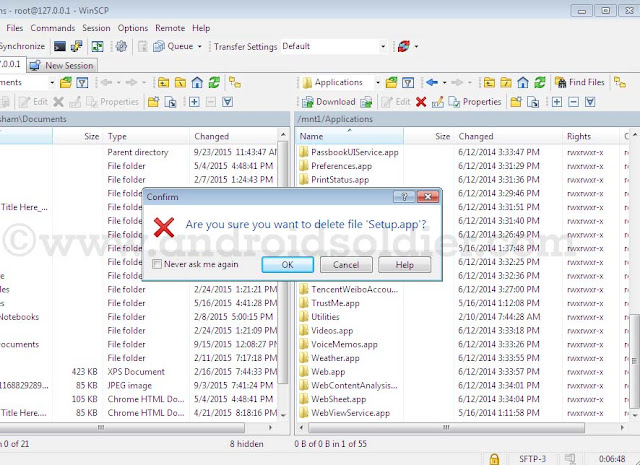
- Now go to var then application . you will see setup.app . Delete setup.app by right click .
- you are done . You iphone 4 will be automatically reboot in recovery mode . An itunes and cable option will be come to screen on your iphone. If your phone does not reboot automatically , reboot it manually by pressing power button. Download TinyUmbrella , open and click on exit recovery. you are done .

There are many icloud bypass methods are available but this method is 100% successful method. So do not waste your time trying short methods.
Things to remember:-
This tutorial is only work with iphone 4 and not applicable on iphone 4s , iphone 5,5s,5c ,iPhone 6,6+,6s,6+s because except A4 Chip exploit of bootrom is not possible until now.
After bypass icloud account you will not be able to use cellular services .
You will not be able to use your iphone with iTunes.Wifi only.
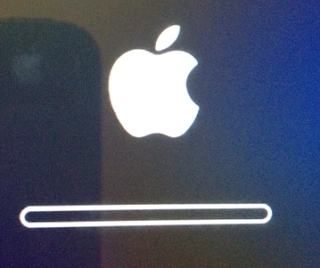
During all procedure your iphone must stay on apple logo with flashing bar( see image ) . If your phone turn on at some point you have repeat all these steps again.
Available link for download
Monday, March 20, 2017
How To Root Galaxy S2 Jelly Bean 4 1 2 XXLSJ
How To Root Galaxy S2 Jelly Bean 4 1 2 XXLSJ
We should thank to XDA senior member PhilZ for the zip package with a short time. The package contains root files , CWM6 and SuperSu.
Warning : Rooting will void phones Warrenty ! Rooting / Flashing may brick your phone ! We are not responsible for any damage do at your risk !
Note:
1. Backup Importent Data
2. Battery charge must be 60% or more
Root Galaxy S2 Jelly Bean 4.1.2 XXLSJ using zip package
1. Download 4.1.2 XXLSJ Root zip package from here (v3.75)2. Copy the downloaded zip package XXLSJ-ROOT-CWM6.zip to external SD card.
3. Switch off your phone and wait till vibrate.
4. Boot in to stock recovery ( Volume up + Home + Power )
5. In recovery select apply update from external storage.
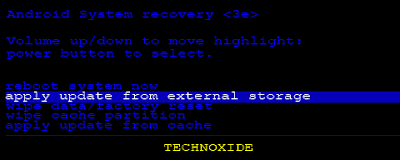
6. Select copied zip file XXLSJ-ROOT-CWM6.zip
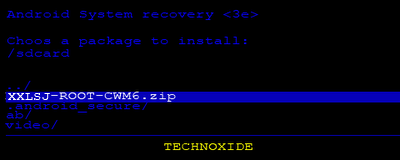
7. After installation ....select reboot system now...
Thats it...Now you are successfully rooted Galaxy S2 4.1.2 XXLSJ.
Available link for download
Sunday, March 12, 2017
How to Remove All Contacts in Android ICS 4 0
How to Remove All Contacts in Android ICS 4 0
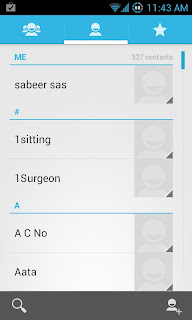
Like the earlier versions of android, latest update ice cream sandwich (4.0+) does not have an option to delete all the contacts in Default Contacts application. In Android 4.0+ we can only delete each contacts separately in Default Contact Application. If we want to delete all the contacts it is annoying that we should delete the all the contacts separately.Here is the simple solution to clear all the contacts ....
UPDATE : You can also apply the same method to delete contacts from jelly bean.
How to :
- Navigate to Settings--->Apps--->Contacts Storage
- Now Click Clear data
Done ! Now Check your Contact Application All contacts will be deleted !
Available link for download
Saturday, March 4, 2017
Google Playstore 4 3 10 Update
Google Playstore 4 3 10 Update

Bagi kalian yang tidak sabar menuggu update OTA dari Playstore, androidpolice telah mengeluarkan update manual untuk versi 4.3.10. Tidak seperti update sebelumnya pada versi 4.2.9, pada versi 4.3.9 lebih menonjolkan tampilan antar muka.
Apa yang baru?
recently update : Kita bisa tahu aplikasi apa saja yang baru di update di menu install. Berguna bagi yang mengaktifkan menu automatically update.

combined update notifications : Kombinasi notifikasi program dimana downloading update dan updated bila ada beberapa maka akan digabungkan menjadi satu. Tidak memakan ruang dengan list satu-satu pernotifikasi.

Sebenarnya ada fitur - fitur lain dari update Playstore versi 4.3.10 ini, cuma sepertinya tidak berlaku karena restricted country kalian bisa mengunduh apk dari androidpolice atau dari link yang disediakan oleh longorism
Available link for download
Thursday, February 23, 2017
How To Flash Official Android Jelly Bean 4 1 2 XWLS8 on Galaxy S2 I9100
How To Flash Official Android Jelly Bean 4 1 2 XWLS8 on Galaxy S2 I9100
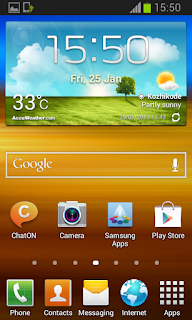
If your phone not showing any update dont worry , Samsung will provide the update very soon to Your country or you can manually install the update by following the simple steps here.
Some great features in the new Jelly Bean Update:
- Buttery Smooth Performance & Great Stability
- Full User Interface Revamp (Same UI as of the Galaxy S III and Galaxy Note II)
- TouchWiz Nature UX
- S Cloud services by Samsung
- Improved Camera features
- New Lockscreen With Many Customization Options
- New Features like Direct Call, Smart Stay and Pop-up Play
- New Widgets (From Galaxy S III)
- 2 Home screen modes
- New Notification bar With More Notification Toggles
- Google Now
Firmware Details:
Android Version: 4.1.2 – Build JZO54K
PDA: I9100XWLS8
CSC: I9100FOPLS3
MODEM: I9100XXLS8
Changelist: 816988
Build Date: 14 January 2013
Must Note :
1. This update only for Samsung Galaxy S2 International variant I9100
2. Make sure that your phone is factory unlocked not locked for specific carrier
3. Backup All the Data in your Phone
4. Your Phone Charge Must Be 80% or above
5. Enable USB Debugging
6. Make sure you have installed Kies or S2 driver
7. Exit Antivirus, Kies etc .. before start flashing.
How To manually update Galaxy S2 I9100 to Official Android Jelly Bean 4.1.2 XWLS8?
1. Search Samfirm to download the Specific 4.1.2 to your country Or Download Galaxy S2 4.1.2 XWLS8 (Spain) firmware and Extract it to PC2. Download Odin3 v1.85 and Extract it
3. Power off and boot Galaxy S2 in to download mode. ( Volume down + Home + Power )
4. In download mode connect your phone to PC.
5. Now Open Odin 1.85 and look in to ID:COM box it will be yellow with a port name and a "Added!" message will be displayed in Message box.
6. In Odin..Click PDA and select I9100XWLS8_I9100XXLS8_I9100FOPLS3_HOME.tar.md5 from Extracted firmwares folder.

7. Click Start button. Odin will show PASS on top left and phone will reboot.

Thats it done ....You are succefully flashed your Galaxy S2 to Official Android Jellybean 4.1.2.
If you face boot loop after flashing ...go to recovery mode and do a factory reset and wipe cache....done...
ROOT FOR GALAXY S2 4.1.2 XWLS8 IS AVAILABLE HERE
Available link for download
Monday, February 13, 2017
How To Root Samsung Galaxy S3 Jelly Bean 4 1 2 XXEMH4
How To Root Samsung Galaxy S3 Jelly Bean 4 1 2 XXEMH4
So far this is the fastest and simplest method of rooting Galaxy S3 I9300 Jelly Bean 4.1.2 XXEMH4. The Root is developed by XDA Elite Recognized Developer Chainfire. This post is specific for Galaxy S3 I9300. If you have other Galaxy S3 variants follow the post here
Requires:
- A windows computer with Galaxy s3 driver installed ( Use Kies ).
- Odin
- Any of the Galaxy S3 model listed in the Supporting Models with more than 50% battery.
- USB Cable
Note:
- Backup all your important data.
- Kill all the Kies processes using Windows Task Manager.
- Disable Antivirus.
- This Root is Only for Galaxy S3 I9300 International version
Disclaimer:
Rooting or installing recovery may brick your phone or void warranty. I am not responsible for anything. Do at your risk.
How To Root Galaxy S3 Jelly Bean 4.1.2 XXEMH4 ?
1. Download and extract CF-Auto-Root-m0-m0xx-gti9300.zip from here ( Odin Included )
2. In the extracted folder open Odin3-v1.85.exe.
3. Click PDA button and select CF-Auto-Root-m0-m0xx-gti9300.tar.md5.
4. Boot your phone to download mode ( Turn off phone, after all the lights gone press volume Down + Home + Power .If it asks to press a button to continue, press the listed button ).
5. Now, Connect the phone to PC using USB cable.
6. If everything correct Odins ID:COM box it will be in yellow or blue color with a port name.
7. Make sure Re-partition is NOT checked.
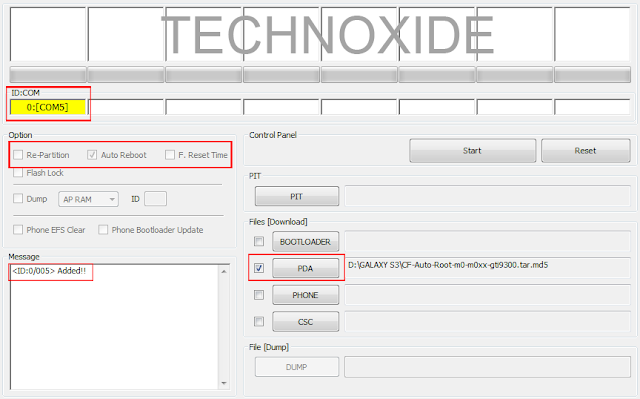
8. Finally Click Start button and wait till the phone reboot.
After complete update Odin will show PASS on top left and phone will reboot.

Thats it....You are successfully Rooted your phone....
How To Install TWRP Custom Recovery in Galaxy S3
Available link for download
Monday, February 6, 2017
HaSa MIUI 3 1 25 for Xperia Mini Mini Pro Active and Live With Walkman based on Android 4 0 4
HaSa MIUI 3 1 25 for Xperia Mini Mini Pro Active and Live With Walkman based on Android 4 0 4


Working :
-Audio
-Gsm
-Wifi
-Gps
-Bluetooth
-2D/3D
-Touch
-Backlight
-Vibrations etc.
-Rotation/G-Sensor
-Buttons backlight
-Camera
-Data Transfer
-And many more
bug:
auto brightness disabled..
Not working :
You tell me
only for locked/unlocked bootloader..
HOW TO INSTALL:
flash the kernel
go to cwm
wipe factory
wipe cache
go to mounts & storage-format system
go to advanced -wipe dalvik cache
flash the rom
reboot..
NOTE: if anyone having problems flashing this rom..1st flash another custom like real ics or exmiui then make a full wipe and flash my rom
LWW user: if walkman button and music lights are not working use the fix from 4th post..
-Audio
-Gsm
-Wifi
-Gps
-Bluetooth
-2D/3D
-Touch
-Backlight
-Vibrations etc.
-Rotation/G-Sensor
-Buttons backlight
-Camera
-Data Transfer
-And many more
bug:
auto brightness disabled..
Not working :
You tell me
only for locked/unlocked bootloader..
HOW TO INSTALL:
flash the kernel
go to cwm
wipe factory
wipe cache
go to mounts & storage-format system
go to advanced -wipe dalvik cache
flash the rom
reboot..
NOTE: if anyone having problems flashing this rom..1st flash another custom like real ics or exmiui then make a full wipe and flash my rom
LWW user: if walkman button and music lights are not working use the fix from 4th post..
Quote:
| DOWNLOADS STABLE VERSIONS REBUILT FOR MORE STABILITY (note these stable versions can be use on any ics based kernel and themes are fully working.) And these stable roms will work for both locked and unlocked bootloader 2.10.19  http://d-h.st/4v1 2.10.26 ROM-http://d-h.st/KNU control panel mod-http://d-h.st/GUR (plz note i forgot to cahnge the build prop for lww in 2.10.26 rebuilt ver so while flash the rom replace this build prop in rom zip in HASAMIUI/dev/lww http://d-h.st/RbZ ) NEW UPDATES 3.1.25 http://d-h.st/edF 3.1.11 http://d-h.st/cfn 2.12.29 http://d-h.st/G27 2.12.21 http://d-h.st/yE4 2.12.14 [HOT update to be flashed on top of 2.12.7] http://d-h.st/GHa 2.12.7 http://d-h.st/3zo 2.11.30 http://d-h.st/878 2.11.23 http://d-h.st/tge 2.11.16 http://d-h.st/gw5 2.11.2 http://d-h.st/dET 2.10.12 http://d-h.st/1jW 2.9.29 http://d-h.st/jkT 2.9.21 http://d-h.st/Whm 2.9.14 http://d-h.st/vVS 2.9.7 http://d-h.st/dMp 2.8.31 http://d-h.st/1Hp 2.8.24 http://www.mediafire.com/download.php?yyzw5841rnho3bm 2.8.17 r1 http://www.mediafire.com/download.php?v69um3ga6c6aawh r1.1 http://www.mediafire.com/download.php?n1pmzlelywlbk7z 2.8.10 http://www.mediafire.com/download.php?cdzwbgwe1hqtgds |
MULTI LANGUAGE PACK
Quote:
| Wipe only dalvik and flash the pack 2.12.7 http://www.mediafire.com/download.php?314qsyhixun5m1p 2.11.16 http://d-h.st/O9E 2.10.26 https://dl.dropbox.com/u/44281412/Mi...pi-2.10.26.zip 2.8.24 http://api.viglink.com/api/click?for...13459823459146 2.8.31 http://goo.im/devs/ibotpeaches/miuia...18i-2.8.31.zip 2.9.7 http://goo.im/devs/ibotpeaches/miuia...T18i-2.9.7.zip 2.9.14 http://goo.im/devs/ibotpeaches/miuia...18i-2.9.14.zip 2.9.21 http://d-h.st/O3o |
FAQs
1-does the rom works on locked bootloader.
yes it does i have fixed 2.12.29 so it will work on any kernel and even on locked BL(no need to flash my kernel)
2-how can i apply themes
u just need a xaiomi ac to apply themes...just setup the xaiomi ac in settings.
plz dont ask these questions again.
1-does the rom works on locked bootloader.
yes it does i have fixed 2.12.29 so it will work on any kernel and even on locked BL(no need to flash my kernel)
2-how can i apply themes
u just need a xaiomi ac to apply themes...just setup the xaiomi ac in settings.
plz dont ask these questions again.
Quote:
| Screenshots-2nd post Changelog-3rd post Addons & Fix-4th post |
 | RingtonePicker.apk - [Click for QR Code] (39.7 KB, 1183 views) |
 | Flashlight Fix...zip - [Click for QR Code] (190.7 KB, 793 views) |
Screenshots


Available link for download
Subscribe to:
Posts (Atom)