Sunday, April 2, 2017
How to increase ram in android by sdcard
How to increase ram in android by sdcard

Methods To Increase RAM of Android Device : -
Basically there are two methods to boost or increase your phone RAM in Android phone. The first method uses an application, available for free and premium pack, in the Google play store or Android market. Download them and extend your RAM easily. The second method is done manually to increase RAM in Android phone.
METHOD 1:-
INCREASE RAM IN ANDROID PHONE USING APP
ROEHSOFT RAM EXPANDER
Roehsoft RAM Expander is a wonderful application where you can create partitions in your SD card or Memory card and convert and use it as your RAM. Your SD card will now act as a Virtual RAM for your Android phone.
Click here to Download the app
Free SD card memory as a RAM use (SWAP RAM / SWAP MEMORY)
- Swapfile RAM expansion up to 4.0 GB (file system limit)
- There is No limit on SWAP partition.
- The usual performance degradation when paged not occur with sd card from class-8
- Widget for PNP swap (swap on / off swap)
- Detailed Memory Information & Analysis
- Autorun
- Swappiness kernel parameter set
- Easy foolproof use
- Supporting Tung all Android devices (root access and Kernelswap support)
- Check for the compatibility of the app with your android device before downloading it. You can use a testing app, MemoryInfo & Swapfile Check, to check for it before buying the app.
- Install the App on your Android phone.
- Create Swap file by clicking Swap Active and Enable it.
- Click Active Swap.
METHOD 2:-
METHOD TO INCREASE RAM FOR YOUR ANDROID SMART PHONE
- SD Card of Class 4 or Higher.
- Rooted Android Smart Phone or tablet.
- Windows Pc
- SD Card Reader
STEP 1:-
Check If Your Android Phone Supports Swapping
Partition your SD Card or Memory Card
- Download the mini tool partition wizard from the link: Mini tool partition wizard
- Insert the SD card you want to make partition into your PC.
- Open Mini tool partition and format the inserted SD card.
- Now Make partition by right clicking on your SD card. Select the partition as primary and file system as FAT32 for card more than 4GB.
- Leave about 1 GB memory for next partition.
- Then select done and again click on make partition option select primary partition but change the file system to EXT2, EXT3 or EXT4.
- Click on apply changes and your partition is completed.
STEP 3:-
Link with your Rooted Android Device.
- Download Link2SD from Click here!
- Launch the app and give root permission. Choose the “.ext” partition.
- Start linking them.
STEP 4:-
Increase RAM for your Android Device
- For this you need to Download Swapper for Root.
- Launch the app and select the amount of RAM you want to increase.
- This will create a .swp file and it will increase the RAm of your Android Device.
*********************************************************
Available link for download

Friday, March 31, 2017
GIGABYTE Z97X Gaming G1 Black selected as “Motherboard of the Year” by PC PowerPlay Magazine
GIGABYTE Z97X Gaming G1 Black selected as “Motherboard of the Year” by PC PowerPlay Magazine
GIGABYTE Z97X Gaming G1 Black has been selected as the “Motherboard of the Year” by PC PowerPlay Magazine in Australia. PC PowerPlay Magazine is the biggest gaming magazine in Australia and clearly rates our top spec Z97 Gaming board as the best of the best. Make sure you get one on your next upgrade! The magazine doesn’t have a definite pick on the CPU side so we’ll take the liberty of suggesting for a good match. We’d recommend the Intel 4690K or 4790K for high end or as a pure gamer even the Intel Pentium G3258 Anniversary Edition is a killer performer in 3D!

Available link for download
Friday, March 17, 2017
GIGABYTE X99 Case mode Made By Kier
GIGABYTE X99 Case mode Made By Kier
Available link for download
Saturday, February 18, 2017
How To Get Ex Back By Being Friends Helpful Ways To Get Over Your Ex Wife
How To Get Ex Back By Being Friends Helpful Ways To Get Over Your Ex Wife

How To Get Ex Back By Being Friends : Helpful Ways To Get Over Your Ex Wife : Marriage is an institution that was made in the society many years ago, and has been followed from generationshe changing times has seen this institution falter a lotompared to earlier the number of divorces has gone up significantly leading to more stress and tensions in our livesrust has taken a backseat and distractions around us have increasednlike a regular breakup a marriage falling apart if viewed really differently, it still has the stigma of carrying the divorcee tagowever its important you get over your ex wife and try to see life in a new lightt is essentially the most difficult things to come to term with but you have to Manage it with utmost attention and self confidenceamily and Loveyouve got been so used to being married that now it will be a little difficult to do all the chores and activities all by yourselft would be a good idea to go and stay with your family for a little while and get your thoughts off your ex wife and start thinking of your ... [Read More @ How To Get Ex Back By Being Friends]
How To Get Ex Back By Being Friends - How To try and do This! What Most Folks Do not Know About Obtaining An Ex Back Here is 3 Straightforward Re-Attraction Steps That Will Get Your Ex Chasing Right after You! ! This precise solution you should probably be within the appearout intended for. This can be see how to get it done, you should utilize it really perfectly. If you are about the seemout for fredgen, this site offers just what you need to be mindful regarding the take great pride in assurance and money-back for anyone who is not happy. You need to have a glimpse on the facts. .

How To Get Ex Back By Being Friends > What Most Folks Do not Know About Obtaining An Ex Back Here is 3 Straightforward Re-Attraction Steps That Will Get Your Ex Chasing Right after You!


What Most Folks Do not Know About Obtaining An Ex Back Here is 3 Straightforward Re-Attraction Steps That Will Get Your Ex Chasing Right after You! / Hi, I have a extremely odd story to inform. Or at least to me it is odd. So I was hoping to get some opinions or tips. I had a girlfriend and we broke up about 1 month in the past. We were together for about a month only although. Through out the partnership, she advised me about no difficulties and I imagined almost everything was fine and dandy. But to tell the reality, I knew I was getting above paranoid and I got jealous quite merely, but I dont mention it to her much. And then a single fine day, she called and told me to be just friends and that was the end of the romantic relationship. To me the reason is not precisely really robust, and so far Ive gotten practically nothing about why we broke up. At first in the course of the initial and 2nd week, we each just clammed up. Then in the course of the third week, she tried to speak to me, I ignored her. Then the forth week, I tried speaking to her but she ignored me. And now, in the course of the fifth and sixth week, we have gone back to speaking like standard. I dont recognize what is going on and Ive talked about it to her best pal and she stated in her viewpoint almost certainly she felt I transformed throughout the relationship which I did. And as considerably as I detest it, my mind just can not get my thoughts off her. She...
How To Get Ex Back By Being Friends - How To complete The idea! What Most Folks Do not Know About Obtaining An Ex Back Here is 3 Straightforward Re-Attraction Steps That Will Get Your Ex Chasing Right after You! ! The particular mathematical solution you should probably be around the appearout with regard to. That is learn how to practice it, you will need to put it to use extremely neatly. If you are on the seemout for fredgen, we offer exactly what you want to take care in regards to the pride assurance along with money back if you are not pleased. You should have a very look on the details. .

Possibly You Want To Read About :


Look Video on How To Get Ex Back By Being Friends

Popular Search : how to get ex back by being friends
Available link for download
Thursday, January 5, 2017
Hasil Kerajinan tangan dari kain flanel by Localtechno
Hasil Kerajinan tangan dari kain flanel by Localtechno

Assalamualaikum agan-agan semua... kembali lagi dengan kami localtechno kali ini localtechno pengen share hasil kerajinan tangan by localtechno.... nah kerajinan tangan ini sebenarnya adalah salah satu kerajinan tangan dari kain flanel yang dibentuk sedemikian rupa sesuai dengan pesanan yang pernah localtechno dapatkan, salah satunya tempat tissu dan gantungan kunci serta furniture-furniture lainnya... he he he maklum sob... bosen posting tutorial komputer melulu sekali-kali yang ringan-ringan he he he :D
Nah di bawah ini adalah hasil foto yang bisa sobat lihat dan nikmati... kalau pengen pesen... monggo silahkan... he he he bisa kirim via TIKI, JNE POS dll, harga cukup terjangkau sekitar 45-50 ribu... dijamin puas dech.. ha ha ha... khusus gantungan kunci cuman seharga Rp.2500 per biji itu jika pesennya banyak... silahkan jika pengen pesen bisa invit di PIN BB : 554D549F kami senantiasa membiasakan pelayanan 5 S "senyum,salam,sapa,sopan,santun" he he he :D


Available link for download
Wednesday, December 28, 2016
GIGABYTE New 100 Series Overview by Sin0822
GIGABYTE New 100 Series Overview by Sin0822
Many of you guys are very excited at the coming of the next generation of CPU from Intel and also at the next gen. of mobos that comes along with it. And so we are!!!
As you all know I am sure, Computex 2015 took place in our backyard last week and we had the visit of a very well known reviewer/overclocker/blogger/party animal at our suite, Sin0822. Of course we couldnt stop him for doing a good coverage of the new Z170X-Gaming G1... so here it is for you alls pleasure:
Available link for download
Saturday, December 24, 2016
How to increase ANDROID performance by AGGRESSION V2 RC1
How to increase ANDROID performance by AGGRESSION V2 RC1
This mod is to increase performance on Android based 4.3 rom (official & leaked)
Q. what is this mod? A. basically just a bunch of init.d tweaks, some build.prop, kernel tweaks and binaries. Q. is this stable? A. yes. however i always recommend backing up before hand. Q. what does it do? A. i could go on for ages but it fixes the long wait for the device to wake, quicker booting time(not on first boot), sets the governer to ondemand at boot, enables the entropy pool, improves scrolling, touch, internet speed, better LMK config etc... |
DOWNLOAD Installation 1- Boot into recovery 2- Install AGGRESSION-V2-RC1.zip 3- Reboot 4- MOST IMPORTANTLY ENJOY THE SPEED & SMOOTHNESS |
Available link for download
Wednesday, December 7, 2016
GIGABYTE X99 SOC Champion voted the best overclocking board by European Hardware Awards
GIGABYTE X99 SOC Champion voted the best overclocking board by European Hardware Awards

EHA was formed by KitGuru, Hardware.Info (The Netherlands), Hardwareluxx (Germany), Cowcotland (France), Hardware Upgrade (Italy), Hispazone (Spain), PurePC.pl (Poland) and Lab 501 (Romania).
Combined, the European Hardware Association reaches a vast and unique audience. Here are some of the stats:-
Over 20 million hardware enthusiast visitors a month
Millions of interactions on Facebook
A combined database of more than 100,000 articles
Millions of individual, scientific hardware tests, going back man years
Source: http://www.kitguru.net/channel/computex/andrzej/european-hardware-awards-winners-announced/
Available link for download
Saturday, November 26, 2016
Hello H2 Flash file With out password tested by me
Hello H2 Flash file With out password tested by me
SPD6531_00400000_GD25LQ32



Available link for download
Sunday, October 23, 2016
How To Fix Custom Binary Blocked by FRP on Samsung Galaxy J1 J5 J7
How To Fix Custom Binary Blocked by FRP on Samsung Galaxy J1 J5 J7
How To Fix Custom Binary Blocked by FRP on Samsung Galaxy J1-J5-J7
please subscribe my youtube channel
youtube:.youtube.com/howtounlock
like us on facebook.com
facebook:. www.facebook.com/libuledi
Google Plus:. https://plus.google.com/+Howtounloc
blogger:. http://how-2unlock.blogspot.com/
tags
samsung, frp, custom binary blocked by frp lock, custom binary blocked by frp, lock, j7, j5, galaxy, j2, binary, custom, custom binary blocked by frp lock s6 edge plus, custom binary blocked by frp lock samsung galaxy core prime, custom binary blocked by frp lock note 5, by, note 5, j3, blocked, fix, how to, s6, bypass, factory, reset, frp lock, samsung galaxy s5 neo, kies 3, recovery g925p, how to fix brick error custom binary blocked by frp all samsung mobile, s5, smart switch, j1, , phone, edge
Available link for download
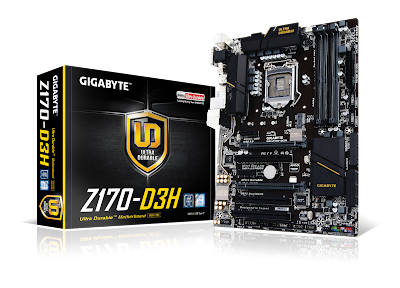
Having Trouble Installing Windows 7 By USB With Your GIGABYTE 100 Series Motherboard
Having Trouble Installing Windows 7 By USB With Your GIGABYTE 100 Series Motherboard
We understand that some users are having trouble installing Windows 7 by USB drive on their systems that have a GIGABYTE 100 series motherboard inside.

Thankfully there is a fix for this which allows you to package the updated driver on to your USB driver.
In order to build the patched version of Windows 7, youll need a few things:
1) A genuine copy of Windows 7 or iso file
2) A USB drive with over 4GB of storage
3) A separate computer
4) The Windows Image Tool available for free from GIGABYTE
Once you download the Windows Image Tool from GIGABYTE the process is fairly easy. Heres the process you need to follow step-by-step:
1) Open the tool from GIGABYTE. Theres no need to install it.
2) In the source option select your disc drive
3) In the destination path pick your USB drive.
4) Make sure the add USB drivers option is selected
5) Click start and wait for the process to finish.
Note: if you just need to add the USB drivers to an existing ISO you can do that from the source option.
Check out this video from our YouTube channel to learn more:
Available link for download
Wednesday, October 19, 2016
How to Fix Task Manager hes been disabled by Your Administrator
How to Fix Task Manager hes been disabled by Your Administrator
Its very important problem i have ever known, but it first time i can post to this blog. Some other sites explain it more than once, but i will write to remind me whenever i be. I hope it will remind you too.
 |
| How it can be appeared? |
Then, How to Fix Task Manager hes been disabled by Your Administrator? Its simple, just follow the instruction below
It applicable to Windows XP, WIn Vista, Win7 and Win8.
#1. Go to star menu - Search, then type "gpedit.msc" (without quote) then Press Enter
 |
| Task Manager hes been disabled by Your Administrator |
#2. Choose Administrative Templates - System (double click)
#3. Choose Remove Task Manager (double click) then set value to Disable. After finish, restart your computer. When computer star, check your system.
Available link for download
Monday, October 3, 2016
How To Change NotePad Default Shortcut Keys For Plugins Like Emmet Intent By Fold Etc
How To Change NotePad Default Shortcut Keys For Plugins Like Emmet Intent By Fold Etc
 In Windows Platform, Notepad++ is the most popular code Editor among the developers. Its code highlighting available on a wide range of languages includes Java, PHP,HTML,CSS, XML, etc. The availability of wide range of plugins extends Notepad++ to the level of premium IDEs.
Shortcut keys will be more helpful when the keys are handy for the user. It depends by the user. Most of the popular Notepad++ plugins like Emmet, Indent By Fold, etc. has a default shortcut to execute the command. But many users like to change it to another hot-key which feels more comfortable for them.
Luckily in Notepad++ we have the option to change or assign new shortcut keys for the built-in Notepad++ commands and the third party plugin commands. In this post I included the simple steps to change the default shortcut keys in Notepad++ code editor.
Change Notepad++ Short cut Keys
1. Open Notepad++2. Goto Settings -> Shortcut Mapper..
3. To change plugin shortcut click on Plugin Command tab
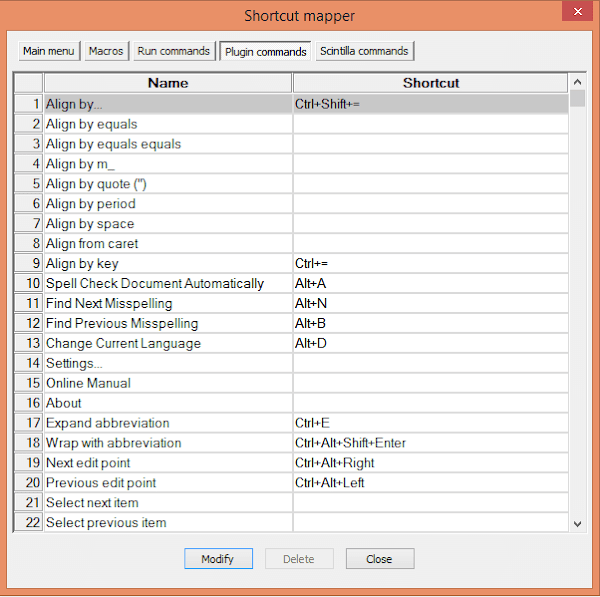
4. In the shortcut mapper window...double click on the desired command you wish to change or select the command and click Modify.
5. Modify to the desired one...
(For example, if You need Ctrl + E for Expand Abbreviation, then the selection will be like in the image below)

6. Finally, Click OK...Restart NotePad++. Thats it.
Available link for download