Showing posts with label of. Show all posts

Monday, April 3, 2017

Getting the most out of multibooting

Getting the most out of multibooting


As with most Linux users, while I prefer to use Linux I generally have more than one OS installed on my computers.  Typically, people will dual-boot their computer and run some version of Windows along with one other OS. Im a little more ambitious though, and I have three operating systems on my netbook; Windows XP Pro, Ubuntu "Natty" and OSX Snow Leopard.  Yes that is correct, Im running OSX on my Asus netbook and at the moment its my favorite of the three OSes.  Unfortunately, there are no .kexts available for my graphics chip (Intel GMA3150) so there is no Quartz Extreme/Core Image but its not a big deal really, the system seems plenty responsive and does everything youd expect a netbook to do.


Aside from the obvious issues with installing and configuring three separate operating systems, managing boot-loaders and getting the different operating systems to play nicely with each other, the biggest hurdle that I encountered with setting up my netbook for triple booting was the issue sharing my limited hard drive space. Typically, most operating systems will automatically store your personal data on the same partition as the system.  Ever since I first switched to Linux after a catastrophic Windows system failure I looked for a way to safeguard my data.  The obvious answer is to put the system and your documents on separate partitions.  Applying the same concept to non-Linux systems is not quite as straightforward but can still be accomplished.  Here is how I did it with my computer.

First things first: Youre going to need drivers.  Linux has read and write support for virtually all file system formats out of the box, including OSXs "hierarchical file system" or "HFS+" and the Windows "new technology file system" or "NTFS".   Unfortunately,   same can not be said for Windows and OSX.  On OSX, in my experience there are not any usable free drivers for Linux EXT2 and EXT3 hard drives.  Ive tried MacFUSE with the EXT2 driver which I was able to use to mount my Linux partitions occasionally (via terminal commands) but the results were intermittent and every time I managed to mount my EXT3 partition under Mac OSX I would have to run a file system check the next time I booted into Linux.  In the end, I used the proprietary drivers from Paragon for both EXT2/3 and NTFS and they work like a charm.  You may have better luck than me with MacFUSE, but after having to manually mount and unmount partitions and deal with potential hard drive corruption, I decided to bite the bullet and use a tried and true albeit not free solution.

Under Windows, you can use a program called EXT2IFS (not Ext2FSD, Ive never gotten it to work properly) for mounting EXT2/3 drives and Paragon makes an HFS+ driver for Windows (also not a free product).

In regards to how I have partitioned my computer and configured each OS to share the same space for data storage, a lot of people might look at me funny and say "Now why would you do it that way?"  The fact of the matter is there are probably a hundred different ways to do achieve the same results but the way I chose works best for me.  It begins with the partitioning scheme.

Here is how my hard drive is broken down:

/dev/sda (250GB MBR formatted)
   /dev/sda1 HFS+ 30GB "OSX"
   /dev/sda2 NTFS 30GB "WINDOWS"
   /dev/sda3 EXT3 15GB "Ubuntu" ("/")
   /dev/sda4 EXT3 175GB "Home" ("/home")

As you can see, I have no swap partition.  This is because I had to use Primary partitions for better interoperability, the limitation there being a maximum of four partitions.  This is also the reason why I use my EXT3 home partition for data storage between all three OS.  It might seem more obvious to create a large FAT32 partition for storing and transferring files between operating systems since OSX, Windows and Linux all can read and write to FAT32 formatted drives.  The simple solution there would have been to do what I did with my OSX /users files and delete the original folders and create symlinks to their corresponding locations on the /home partition in the terminal.  eg;

sudo rm -rf /users/ryan/documents
sudo ln -s /Volumes/Home/ryan/Documents /users/ryan/

That technically would work just fine doing the exact same thing under Linux, should I have installed my entire Linux system on one partition and just symlinked my home folders to their corresponding locations on the large FAT32 partition.  However, I chose to do it "my way" for several reasons;
1) FAT32 filesystems cant support files larger than 4 GB, and considering I like to rip DVDs that was simply a nogo.
2) FAT32 is non-POSIX compliant, meaning is doesnt handle Linux (or in the case of OSX, UNIX) file  permissions properly.  Ive run into problems with not being able to write to FAT32 drives from Linux and OSX because of not being able to change file permissions properly.  Maybe this has gotten better over the years but ever since flash drives have gotten bigger than 4GB I have completely abandoned FAT32.
3) Im primarily a Linux user.  If one OS has to play host to my files, it should be Linux.  Plain and simple.
4) Of all of the formats I could have used (EXT2/3, FAT32, NTFS, HFS+) EXT3 seems to have be the most efficient but this is my opinion based on anecdotal observation.  Linux read/write speeds to and from NTFS are absolutely TERRIBLE, whereas Windows read/write speeds to EXT2/3 doesnt seem as bad.

The last order of business was to make Windows use my home partition.  Now, it may seem like the obvious thing to do is to right click the "My Documents" folder on Windows and change the target to /home/ryan and be done with it, but THIS IS A TERRIBLE IDEA!!!  Setting your "My Documents" folder to your /home/user folder will result in permissions problems so dont do it.  Under Windows 7, you can change each individual folder (library?) to target another directory.  The same is not true for Windows XP though.  I had to delete all of my folders from "My Documents" and then create shortcuts to each of the folders in "/home" and place them in "My Documents".  Unfortunately, a shortcut is not handled the same way as a symlink.  First a shortcut has a file extension .lnk so most programs wont see the shortcut as a directory and by default will probably recreate the folder its looking for, eg;

C:Documents and SettingsusernameMy DocumentsDownloads


Unfortunately, there doesnt seem to be a good way of getting around this except for changing the default location that applications save/download to manually.  I prefer the target changing method of Windows 7, but Im using XP.  Why am I using XP?  Because it has a smaller foot print than Windows 7 and because its more compatible with the few things I still need Windows for, like accessing school web sites that only want to work properly on Windows XP using Internet Explorer.  IE9 breaks a lot of functionality that certain sites need and since I primarily use my netbook for school, thats a no-go.


Im looking into making XP use another partition for individual folders and not "My Documents" folder a little more transparent.  Maybe there is a way to do it with registry hacks, but thats a dangerous game to play.  Ill post back when and if I figure something out.


EDIT:


I tried like four different methods of creating UNIX like symlinks or junctions either via the command line or using applications and I finally found one that works.  Just download Winbolic and create the links.  There are a couple of warnings about linking a link to itself and other stupidity like the fact that if you delete the Windows junction it will delete the target folder too.  Other than that, it works like a charm and achieves total transparency with interoperability and function.


Available link for download

Read more »

Saturday, April 1, 2017

Game Threads of Fate PsX

Game Threads of Fate PsX


Threads of Fate ini adalah game RPG yang mirip banget ceritanya ama Brave fencer Mushasi ataupun Alundra 2. Dengan Gameplay 2 pemain yang bisa dimainkan bernama Rue dan Mint

Sebenarnya ceritanya mirip juga sama Star Ocean 2 yang mana mereka setiap karakter memiliki tujuan yang sama tapi berbeda keinginan.

Rasanya ketika main ini kamu bakal ketagihan dan asik sendiri dengan .cerita di game ini.

Download Threads of Fate

Specs gag perlu macam macam. cukup menggunakan komputer edisi 2004 ke atas. aku yakin bisa semua

jangan lupa memakai emulator untuk memainkan game ini


dl


Available link for download

Read more »

Friday, March 31, 2017

GIGABYTE Z97X Gaming G1 Black selected as “Motherboard of the Year” by PC PowerPlay Magazine

GIGABYTE Z97X Gaming G1 Black selected as “Motherboard of the Year” by PC PowerPlay Magazine


GIGABYTE Z97X Gaming G1 Black has been selected as the “Motherboard of the Year” by PC PowerPlay Magazine in Australia. PC PowerPlay Magazine is the biggest gaming magazine in Australia and clearly rates our top spec Z97 Gaming board as the best of the best. Make sure you get one on your next upgrade! The magazine doesn’t have a definite pick on the CPU side so we’ll take the liberty of suggesting for a good match. We’d recommend the Intel 4690K or 4790K for high end or as a pure gamer even the Intel Pentium G3258 Anniversary Edition is a killer performer in 3D!

Clipboard01da


Available link for download

Read more »

Friday, March 10, 2017

How to increase default volume of any android device

How to increase default volume of any android device


How to increase default volume of any android device?

Increase volume of any android device[fully working method]

Some of our phones have very low speaker output. This is because of the default handsets settings, but this problem can be overcome by some tricks using some apps. Even the quality of sound can be increased with a touch of awesome bass and treble. So lets get started.
This post is divided into two parts one is for non rooted users and  the other for rooted users.

==> NON ROOTED USERS

This can be done by either MTK engineering mode which works on devices having MTK(MediaTek) chipsets or those who dont have MTK they can simply use the Volume+ app which works on all devices.

Using MTK Engineer Mode


Step 1- Enter *#*#3646633#*#* in the dialpad.

Step 2- Enter engineer mode (MTK).

Step 3- Snap towards right and go to hardware testing.

Step 4- Select Audio option.

Step 5- Go to LoudSpeaker mode.

Step 6- In this default value is 128 change that value to 140 (or according to your requirements) and press set.

Step 7- Dont exceed this value above 145 or 150 it may damage your speaker.

Step 8- Now close the engineer mode and check the volume of your device.You will feel the change in your audio.

NOTE- THIS METHOD ONLY WORKS ON DEVICES HAVING MTK CHIPSET SO FOR DEVICES HAVING SNAPDRAGON OR OTHER CHIPSETS CHECK OUT SECOND METHOD.


Using App Volume+


Download and install Volume+ app the link is given below.

This works on both rooted and non rooted devices!!


Step 1- Open app and go to speaker settings.(as shown in screenshot)

Step 2- Enable Audio or Speaker Modifications.

Step 3- Change volume level to 10 (max for some devices) or upto 20 depending upon the desired output.

Done!!

==> Volume+ App download <==


==>NOW FOR ROOTED USERS


Viper4Android

It is a brilliant app for the rooted users. It increases the sound quality with a polished good bass quality enhancement. So if your device have poor or has average audio quality and you are 
a rooted android user then this app is the one and only perfect solution for your problem. It is an all in one audio control system that supports almost all the devices from 
Android 2.3 to Android 4.4.


VIPER BASS AND VIPER CLARITY not only increases the bass output but also clears the distorted output due to heavy bass thus providing a quality audio output.
Download link is given below so lets get started. 

NOTE- INSTALL BUSYBOX FROM PLAYSTORE AND INSTALL THE BINARIES AND REBOOT YOUR DEVICE.


Step 1- Download ViPER4Android and extract the file. You will get two file namely ViPER4Android_FX_A4.x.apk and ViPER4Android_FX_A2.3.apk. So if you are on Android 2.3 or above 
install ViPER4Android_FX_A2.3.apk and if you are using Android 4.0 or above install ViPER4Android_FX_A4.x.apk.

Step 2- Install the application.

Step 3- Open the app and grant superuser permission a pop up will come having three options Super Audio Quality, High Audio Quality and Power Saving. Select Super Audio Quality.

Step 4- Reboot your device for proper drivers installation.

Step 5- Open the app go to phone speaker option enable it. Now choose between different equalizers for best Audio experience.

DONE!!

==> Click here to Download Viper <==

For any queries please comment below we will provide you BEST solution ASAP!! 


Available link for download

Read more »

Saturday, February 25, 2017

How To Lose Fat After 40 Signs And Symptoms Of Breast Cancer To Watch Out For

How To Lose Fat After 40 Signs And Symptoms Of Breast Cancer To Watch Out For


How To Lose Fat After 40 : Signs And Symptoms Of Breast Cancer To Watch Out For

How To Lose Fat After 40 - The chances of surgically removed breast cancer relapsing is decreased by following surgery with radiation therapyhis therapy is vital and should not be skipped if you dont require your cancer to reoccurhe constant research work on breast cancer has shown a strong link between high fatty foods and breast cancerountries with staple food based diets like Japan of the 1950s have recorded minimal occurrence of breast cancerith this, Im sure you will want to watch out for the fat content of your foodt doesnt matter whether breast cancer has affected your mother and grandmother and they both died from it, you dont have to die from it at the same timeou see, modern science has advanced so strongly that the diseases that used to kill people in the past no longer killf your breast cancer is identified fairly early on, you can be sure you wont dieo, always ensure you examine your breasts for any signs of tumorhat can save your liferogesterone is known to help st ... [Read More : How To Lose Fat After 40]

Hi many people if you discover out there. How To Lose Fat After 40, And have to buy a great just one people meet up with this throughout in this article, We have now Money saving deals with regard to items, Within our Web page You can study testimonials by real buyers and youll check out Prices Comparision before you purchase along with quick. Were Promise you might redeem some sort of discount charges or maybe Rapid Shipping pertaining to A Way To Strip Stubborn Entire body Fat Securely, Rapidly, and Completely!


How To Lose Fat After 40 / A Way To Strip Stubborn Entire body Fat Securely, Rapidly, and Completely!

How To Lose Fat After 40 : Signs And Symptoms Of Breast Cancer To Watch Out For

How To Lose Fat After 40 A Way To Strip Stubborn Entire body Fat Securely, Rapidly, and Completely! ! I woke up the subsequent morning and recommitted to my ultra low-carb diet. But then it took place. As I walked by the bathroom mirror I acquired a glimpse of the damage. At initial I could see there was definitely a minor bloating, but otherwise the harm was minor. So I returned to my program of meats, cheeses and oils. Then it happened. The following day, all indicators of the donut disaster disappeared. But the third day for the 1st time ever I could finally see my abs, plus I was ahead of schedulefurther along than Id ever dreamed.

How To Lose Fat After 40 - How To do It! A Way To Strip Stubborn Entire body Fat Securely, Rapidly, and Completely! ! Your statistical product you would oftimes be around the appearout for. That is find out how to undertake it, you should use it really nicely. In case you are about the seemout regarding fredgen, this site offers what exactly you intend to be careful regarding the delight assurance and also money-back if you are now not content. Please possess a seem with the details. .


Perchance You want to Read...
The Carb Nite Solution
5 Simple Steps To Looking 10 Years Younger!
Fat Loss Factor By Dr. Charles Livingston
Combat The Fat - Best Fitness Program - Best Weightloss

Look Video on How To Lose Fat After 40


Popular Search : how to lose fat after 40


Available link for download

Read more »

Monday, February 13, 2017

Game Overlord Fellowship of Evil for PC

Game Overlord Fellowship of Evil for PC


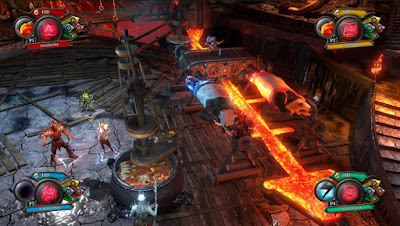
Pagi sob kali ini share game bergenre strategy yang seru namanya "Overlord Fellowship of Evil" pokonya game ini seru buat yang hobi strategy game ini patut di coba..

https://blogger.googleusercontent.com/img/b/R29vZ2xl/AVvXsEjt9AJW4yx0pF3wwXDrYwUlKT72dNVNHi48woWYVmY2aCeUogxUfWRN2AvhwgCKu6hhWh3Afoy4lQQbG9cntPvMa_1wRdmZkz_Y5J7-pGrQX06FgJwtRadMwJ2W5nBsZW00YBf5HPCPE38/s320/Overlord+Fellowship+of+Evil+ilko_123.com.jpg

screenshoot

https://blogger.googleusercontent.com/img/b/R29vZ2xl/AVvXsEghXzIltL1TlKFpXYBNBCV226p2Ps8KWHnjXJTgENET9bCIXUcOhc8XNU6NP_rG-ev0JbmEuigP7HvuChdUfiGy4QoYWTWiMpkFyYn83t2Wa1EOznHtVdakDkpAHI9z0RQwb5rDRlxM1KUF/s400/Overlord+fellowship+of+evil+new+1.JPG 
http://2.bp.blogspot.com/-ZdrjWT8Pg8Q/Vjoi-ZQkWxI/AAAAAAAAfQY/uCc8C-4SORs/s1600/Overlord.Fellowship.of.Evil.Screenshots5.jpg


Spesifikasi
  • OS : Windows 7, 8 or 10
  • Processor : Intel Core i3 Series or AMD FX Series
  • Memory : 4 GB RAM
  • Graphics : AMD HD4850 or Nvidia GTS250
  • Network : Broadband Internet connection
  • Hard Drive : 5 GB available space
  • Sound Card : DirectX Compatible soundcard
Cara Install
1. Extract Game
2. Game berbentuk iso - Extract lagi atau di mount
3. Selanjutnya install Klik 2x setup
4. Setelah install disitu ada folder RELOAD - ini adalah caracknya copy semua data
5. Pastekan kedalam game yang sudah di install - apabila muncul pesan klik replace
6. Play
ENJOY....

Size Game 2.6gb
Part 1 - Download Game PC Overlord Fellowship of Evil
Part 2 - Download Game PC Overlord Fellowship of Evil
Part 3 - Download Game PC Overlord Fellowship of Evil
Password : www.top2download.com


Available link for download

Read more »

Saturday, January 21, 2017

Glory be to God there lafadz Allah SWT in parts of hotcakes

Glory be to God there lafadz Allah SWT in parts of hotcakes


Glory to God in accordance with his word, Greetings to friends localtechno, this time localtechno will share with you, about the greatness of Almighty GOD. with one proof, Lafadz God, which is on the side of fried beans, how can I find "lafadz god" is, of course, by accident I found it and his story :

On Friday I did my habits as a Muslim, I went to Friday prayers at the mosque to worship. After completion of worship, I stopped at my mothers house, and make a habit of eating peanuts. when I eat peanuts, there is one of peanuts that fall into my shirt pocket. but when I took, it turns out that there are parts of hotcakes words "lafadz Allah" automatically, this heart vibrate see the power of Allah SWT.

You can see his pictures and video below :


Click the bottom right corner to enlarge this video

Hopefully Helpful, Salam Localtechno ^ _ ^


Available link for download

Read more »

Friday, January 13, 2017

Gotta Have SLI On A Budget Check Out This Review of The GIGABYTE Z170XP SLI

Gotta Have SLI On A Budget Check Out This Review of The GIGABYTE Z170XP SLI


Not everyone has the same budget when they are building a PC. While some enthusiasts might have be willing to spend a lot to ensure that they have the best that money can buy, others are on more modest budgets that require some restraint when purchasing parts.


GIGABYTE understands and has a number of motherboards geared towards users on a budget. Recently TweakTowns Steven Bassiri has a chance to review one of these boards, the GIGABYTE Z170XP-SLI, and gave it top marks. 

For those that dont know, the Z170XP-SLI is a value-oriented board that has support for NVIDIAs SLI as well as AMDs CrossFireX technology. This means that the board will support more than one NVIDIA or AMD card, which is great for users that want the power that two video cards can provide.


Steven says he liked the SLI support on the board, solid memory support at 3600 MHz, upgraded audio, and Intel NIC on the board.

Here are his final thoughts on the board:

The Z170XP-SLI has a lot of the latest features I come to expect from a Z170 motherboard above the $150 price range; USB 3.1, upgraded audio, Intel NIC, solid performance, and decent overclocking capabilities. That being said, this motherboard only costs $136 on Amazon making it a very good deal for those on a budget.The Z170XP-SLI can perform like more expensive motherboards and even overclock like them in the right conditions, but producing those conditions might be difficult, and that is why people pay more for better overclocking.

You can find out more on the GIGABYTE Z170XP-SLI here.  


Available link for download

Read more »

Saturday, January 7, 2017

How to Change URL of Your Disapproved Adsense Site

How to Change URL of Your Disapproved Adsense Site


Adsense is the most popular and online advertisement program service powered by Google. This program helps to online content providers to earn money when visitor click on display targeted adsense ads. It is the share more revenue share to his publishers. It is the easiest way to earn money for webmasters and bloggers. But In this program most important part is adsense approved. Nowadays, Google Adsense is so difficult to approve. If your web site or blog complies with the adsense program policy, then your adsense account approved.

How to Change URL of Your Disapproved Adsense Site

Many bloggers and webmasters want to be approved by adsense account and try to approve. If you are also trying to adsense Approval and disapproved your adsense account. adsense is providing facilities to reapply for an adsense account. But the same web site URL to apply adsense account. If you want to change the url of your disapproval adsense account site then follow  instruction.

The Google Adsense program is not allowed to change the ongoing or disapproved website URL. You can only apply new adsense account via new gmail account or new website URL.


Available link for download

Read more »

Monday, January 2, 2017

Here Are Your Winners of the GIGABYTE Z97 Last Hurrah Contest!

Here Are Your Winners of the GIGABYTE Z97 Last Hurrah Contest!


The GIGABYTE Z97 Last Hurrah wrapped up last week and now the results are official.


We would like to congratulate Xtreme Addict and Arhaam for winning the contest. Xtreme Addict took first place in the Extreme Cooling category with 79 points and won a GIGABYTE Z170X-SOC Force motherboard. Arhaam won the ambient cooling category with 73 points and is also taking home a GIGABYTE Z170X-SOC Force board.

For more information on the contest and the official results, head on over to HWBOTs OC E-Sports portal.


Available link for download

Read more »

Friday, December 30, 2016

How To Load the Desktop Version Of Websites On Your Google Android Honeycomb Tablet

How To Load the Desktop Version Of Websites On Your Google Android Honeycomb Tablet


tablet web browsingTablets are great devices for reading and browsing websites. Using the touchpad is intuitive and convenient, and tablet screens don’t present the size limitations of mobile phones. However, with tablet web browsing, you will notice that many websites automatically load their mobile version. This is because the browser you are using identifies itself as a mobile based application to the websites you are visiting.
Being restricted to the mobile version of a website can be annoying since they often lack features offered by their desktop version. If you would prefer to view the desktop version of websites on your Google Android Honeycomb tablet, you will be delighted to hear that there are two simple ways to achieve this. Read on to find out how you can toggle between the desktop and mobile versions on your Honeycomb tablet.

Change The Honeycomb Browser User Agent Setting

The Honeycomb browser’s user agent is set to ‘Android’, which most websites interpret as ‘smartphone’, thus displaying the compact version of their website. To change this, you need to change the respective user agent string.
  • Open the native browser on your Android Honeycomb tablet.
  • Type about:debug in the address / URL bar and press Enter.
  • Don’t expect anything to happen; it will probably look like nothing happened.
  • Next, open the browser’s settings via the icon in the top right corner.
tablet web browsing
  • Select Settings from the drop-down menu.
  • Switch to the Debug tab via the left-hand menu.
  • On the right side now select UAString.
  • Select Desktop.
change user string setting

  • Click the Back button in the bottom left corner of the browser to exit settings.
  • Repeat step 2 to exit debugging mode.
Note that the setting may be reset every time you reboot your device.
Interestingly, the browser on Android-based smartphones has a different user agent setting, which reads ‘Android Mobile’. This actually allows websites to differentiate between tablets and smartphones. Unfortunately, not all websites support the two different settings and surprisingly, this includes Google Mail.

Use A Different Browser

You may find that some mobile websites are actually more convenient than their desktop counterparts. In this case you probably don’t want to change the user agent setting since switching back and forth between different settings is quite a hassle. The alternative solution is to use a different browser which allows you to toggle easily between the desktop and mobile version of a website.
A browser I highly recommend is Dolphin Browser HD. To rapidly switch between the mobile and desktop versions of a website, you also need to install the Dolphin Desktop Toggle add-on. Once installed, you will find a toggle button in the right-hand menu of the browser. The right-hand menu opens when you attempt to slide the browser window to the left. Pressing the toggle button will load the respective other version of the website, if available.
tablet web browsing
Are you still undecided which tablet to get? There are at least 5 Things To Consider Before Buying A Tablet PC. Maybe you would like to Try Google’s Android Mobile OS on Your Computer with Live CD? And if you have made up your mind about getting an Android Tablet, be sure to review The 3 Best Android Tablets Available Today That A Buyer Should Check Out.


Available link for download

Read more »

Tuesday, December 27, 2016

How Can I Lose Weight Fast From My Thighs The Benefits Of Opuntia Ficus Indica

How Can I Lose Weight Fast From My Thighs The Benefits Of Opuntia Ficus Indica


How Can I Lose Weight Fast From My Thighs : The Benefits Of Opuntia Ficus Indica

How Can I Lose Weight Fast From My Thighs : Indian Fig, the lay name for Opuntia Ficus Indica, is a species of cactus grown primarily for its fruit, or tuna, as it is calledhe flowers and stems of this plant have several medicinal and body keytenance qualities that make it fantastic for human consumptionulinary circles call it the "prickly pear" keyly due to its green color and little barbed hairs that it has all around it podso one quite knows where this plant hails from simply because it has been widely cultivated for a long timehe significant growing regions include Mexico, Sicily, Chile, Nfrica, Brazil, Algeria, and Ethiopiat is believed that Columbus carried this, and it is known that the may wella of Mexico used it and also the Nazca of Peru as early as the 15th centuryue to the fact it is a sort of cactus, it thrives in dry, arid places with a great deal of sunshine and can tolerate drought well found out that humans have used it as food as early as 12,000 years agohe more I learned a ... [Read More @ How Can I Lose Weight Fast From My Thighs]

The actual Easy and quick For you to How Can I Lose Weight Fast From My Thighs, Many of us recommend the thing is details, specs as well as opinions through consumers. We have the details, evaluations, and also information to help you find out about Worst Food For Body fat Loss Unveiled. In case you are searching for by this. Right now you happen to be incredibly happy, weve an exclusive provide to suit your needs. Uncomplicated, in order to uncover more, just click hyperlink below.


How Can I Lose Weight Fast From My Thighs : Worst Food For Body fat Loss Unveiled

How Can I Lose Weight Fast From My Thighs : The Benefits Of Opuntia Ficus Indica

Worst Food For Body fat Loss Unveiled @ What you are about to see and hear are the exact ideas 1000s have used to conquer their excess weight challenges as soon as and for all... And the most crucial tip for creating a sturdy sexy entire body is receiving far more rest... I know that goes against all typical wisdom - nevertheless you absolutely should do this if you genuinely want to sculpt the lean, toned physique you need... The reason this operates to support you lose excess weight is simply because of a scientific principle utilised exclusively in PaleoBurn known as The PaleoBurn Way of life Pattern Response which releases a distinct hormone that restores the physique of your youth... Ill tell you a lot more about that in just a minute... 1st - allow me inform you about the so-known as health foods you must only consume if you want to get fat as a cow... Thats since the food Im speaking about is great foods for a cow...

The Easy and quick In order to How Can I Lose Weight Fast From My Thighs, Most of us propose the truth is info, features along with reviews coming from customers. We have now information, reviews, as well as facts to assist you find out about Worst Food For Body fat Loss Unveiled. In the event you are looking for from this. These days you might be very blessed, we now have a special present for you. Simple, if you need to find out, simply click url beneath.


You Likely Read below :
Eating For Energy - Raw Food Diet For Weight Loss
Fat Loss 4 Idiots / Weight Loss and Diet Center
Fat Loss Diet - Fat Burning Foods - Burn the
7 odd foods that KILL your abdominal fat?

Video news and features : How Can I Lose Weight Fast From My Thighs


Popular Search : how can i lose weight fast from my thighs


Available link for download

Read more »

Wednesday, December 21, 2016

Guide to Physical Activity Examples of moderate intensity amounts of physical activity

Guide to Physical Activity Examples of moderate intensity amounts of physical activity


Man and woman riding bicycles on path in woods.

Guide to Physical Activity

Physical activity is an important part of your weight management program. Most weight loss occurs because of decreased calorie intake. Sustained physical activity is most helpful in the prevention of weight regain. In addition, exercise has a benefit of reducing risks of cardiovascular disease and diabetes, beyond that produced by weight reduction alone. Start exercising slowly, and gradually increase the intensity. Trying too hard at first can lead to injury.

Examples of moderate-intensity amounts of physical activity

Common Chores
  • Washing and waxing a car for 45–60 minutes
  • Washing windows or floors for 45–60 minutes
  • Gardening for 30–45 minutes
  • Wheeling self in wheelchair for 30–40 minutes
  • Pushing a stroller 1.5 miles in 30 minutes
  • Raking leaves for 30 minutes
  • Walking 2 miles in 30 minutes (15 min/mile)
  • Shoveling snow for 15 minutes
  • Stairwalking for 15 minutes
Sporting Activities
  • Playing volleyball for 45–60 minutes
  • Playing touch football for 45 minutes
  • Walking 1.75 miles in 35 minutes (20 min/mile)
  • Basketball (shooting baskets) for 30 minutes
  • Bicycling 5 miles in 30 minutes
  • Dancing fast (social) for 30 minutes
  • Water aerobics for 30 minutes
  • Swimming laps for 20 minutes
  • Basketball (playing game) for 15–20 minutes
  • Bicycling 4 miles in 15 minutes
  • Jumping rope for 15 minutes
  • Running 1.5 miles in 15 minutes (10 min/mile)

Your exercise can be done all at one time, or intermittently throughout the day. Activities to get you started could include walking or swimming at a slow pace. You can start out by walking 30 minutes for 3 days a week and build to 45 minutes of more intense walking, at least 5 days a week. With this plan, you can burn 100 to 200 calories more per day. All adults should set a long-term goal to accumulate at least 30 minutes or more of moderate-intensity physical activity on most, and preferably all, days of the week. This regimen can be adapted to other forms of physical activity, but walking is particularly attractive because of its safety and accessibility. Also, try to increase "everyday" activity such as by taking the stairs instead of the elevator. Reducing sedentary time is a good strategy to increase activity by undertaking frequent, less strenuous activities. With time, you may be able to engage in more strenuous activities. Competitive sports, such as tennis and volleyball, can provide an enjoyable form of exercise for many, but care must be taken to avoid injury.


Available link for download

Read more »

Saturday, December 10, 2016

Hardware Asylum podcast on evolution of overclocking motherboards

Hardware Asylum podcast on evolution of overclocking motherboards


Yay, Hardware Asylum podcast is out. In case you guys have not heard of these guys before, make sure you visit their website. I would describe them as a down to earth tech website/podcast geared towards a novice and pro level overclocker or enthusiast alike. The podcast is easy to follow and dissects fairly complex topics and talks about interesting hardware, developments and competitions in this particular episode.

GIGABYTE has been the leading market innovator in the dedicated overclocking motherboards and it’s good to see someone put it into perspective (i.e. overclocking boards existed well before our first series but there was no dedicated product serious which focuses features specifically towards enthusiasts and overclocking until GIGABYTE started it all some 5-6 years ago).

Check out the podcast at the following link http://www.hardwareasylum.com/podcast/nli_podcast_47

Show Notes

Gigabyte Motherboard Evolution
Reviewing motherboards isn’t always the easiest and every reviewer tends to look at different aspects.  Some are super critical of fan controls while others may only look at feature differences between an entire group.  The reviews at Hardware Asylum often focus on features and what makes the board special.  Some are designed for overclocking while others may cater to the gamer.  One thing Dennis has noticed over the years is that motherboard designs change based on what users are doing in the marketplace. 

A perfect example of this evolution is the Gigabyte OC products dedicated to overclocking.  Of course overclocking isn’t the only thing you can use these motherboards for but, the marketing has been designed such that overclocking is first.

The rouges gallery contains every “mainstream” OC motherboard that Gigabyte has produced staring with the X58A-OC and ending with the X99 SOC Force.  In the podcast Dennis mentions a few unicorns with even more to offer.

Related Links:
Gigabyte X99 SOC Force Overclocking Motherboard Review
Gigabyte Z97X SOC Force Overclocking Motherboard Review
Gigabyte Z87X OC Overclocking Motherboard Review
Gigabyte Z77X UP7 Overclocking Motherboard Review
Gigabyte X79 UD7 OC Motherboard Preview
Gigabyte X58A-OC Overclocking Motherboard Review

A Change to Live Overclocking Competitions
There was an article published on Hardware Asylum that talked about how overclocking competitions needed to change if they were to grow into a full ocSport.  Some of the points in the article included removing “bin” from the equation and changing the structure to be more of a game that challenged the overclocker to get the best score possible within a limited set of constraints, submit a score and then do it again.

In this segment Dennis and Darren discuss the new competition format and how it can actually make competitions better for everyone from the manufacturers making the hardware to the overclockers dedicating their time to the hobby/sport and the media struggling to find interest in this niche.

Related Links:
Overclocking Competitions: About the Player not the Hardware

Episode 47 featured music:
Little People - Start Shootin (
http://www.littlepeoplemusic.com/)
Dr. Nol - The Jumo Love Faction (
http://freemusicarchive.org/music/Dr_Nol/The_Juno_Love_Faction/01_Dr_Nol_-_Juno_Love_Faction)


Hardware Asylum have little experience and information on our upcoming X99 SOC Champion board just yet but let’s just say that it will be continuing the legacy X58A-OC started. Incidentally, TeamAU broke another world record with this board today, the 3DMARK11. Here is the score and what this board has been used to achieve so far. There is going to be a heck of a lot more to come, stay tuned!

Clipboard01aass

Clipboard01asasa


Available link for download

Read more »