Showing posts with label bypass. Show all posts
Showing posts with label bypass. Show all posts
Monday, April 10, 2017
How To Remove bypass ICloud ID on Iphone 4
How To Remove bypass ICloud ID on Iphone 4
How To Remove iCloud ID on Iphone 4 iOS 7.1.2
How to remove iCloud account from iphone 4
how to remove icloud id without password iOS 7
step by step how to tutorial
Note:- This tutorial is only for educational purpose . Android soldier does not support any illegal activities or stolen devices, even we condemn this kind of activities. The tutorial was written on the request of my followers . This tutorial is for those who originally bought devices,original owner and forget their icloud password or icloud id or they have bought 2nd hand iphone and previous owner block it , not for them who are involved in any illegal activities.
Understanding iCloud .
iCloud is backup service from APPLE . iCloud was the greatest addition in all Apple OS platforms to secure the consumers from lost , theft . This is best protection feature which every iphone user must use to backup his/her personal data . The main feature of Icloud is called "find my phone" option. If you ever have turn this option on ,then you can locate your stolen iphone , erase it and block it to prevent from misuse . Even restore ,flashing or upgrading iOS will not work until you know the exact icloud id which used to backup data or block the iphone. All you have to do login on icloud website , use your Apple ID, password which were installed on stolen or lost iphone. Icloud can also be used to transfer your data from iphone to another iphone (Contacts,sms,picture 5gb maximum).
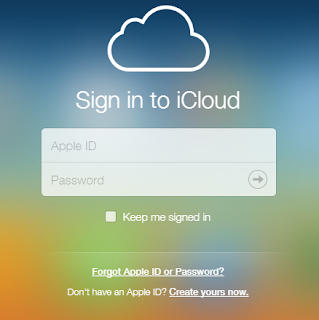
How to remove Icloud account from iphone 4
By following this tutorial you can only bypass iphone 4 which is not activated yet and stuck on icloud id . After bypass you will not be able to use cellular services any more . "NO MORE SIM". however there is method in which you can use cellular services as well after bypassing but for that you need to be on ios 7.1.1.
First download bypass package .The package include two software, one is called ssh_rd_rev04 and another one called winSCP. unzip folder and install winSCP .
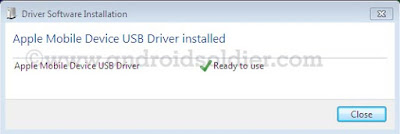
- Put your iphone 4 into DFU mode . (press power + home button together and count 10 , then leave power button but keep pressing home button and count 01-30.) Now connect your iphone to computer . Windows will recognize iphone and install drivers for DFU Mode. do not run itunes during all procedure.
- Now open ssh.jar file . Make sure you have java installed on your computer

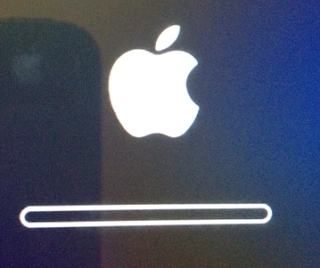
- Ssh.jar will download firmware . After few minutes ssh.jar will exploit bootrom. When the romdisk loaded your iphone will be reboot and freeze on apple logo throw out the whole process. Do not turn off your iphone.
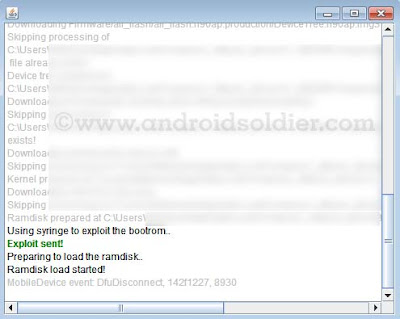
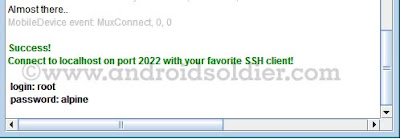
- Ssh.jar will do some more changes and at the end you will see the username and password shown by ssh.jar . Login:root password:alpine
- Now double click on winSCP icon and run it , and write information which is indicated in image below then click on login.
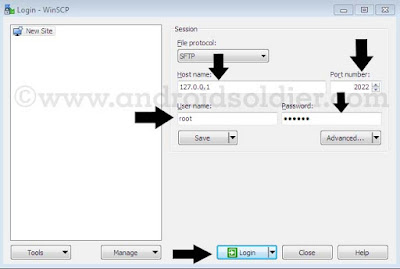
- A pop up window will be come forward and will search for host throw IP.

- winSCP window will open . Now open console by press CTRL+T or click on console option.
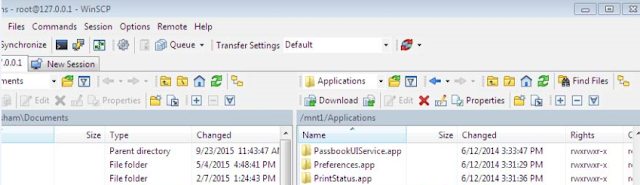
- Now write "mount.sh" and execute while winSCP window will remain open.
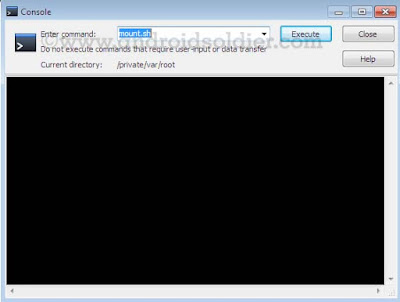
- Now you are in winSCP windows where you see root directory of your iphone. winSCP will display two windows , left will be show your desktop and right side will show your iphone root directories. Select /root as mentioned in image below .
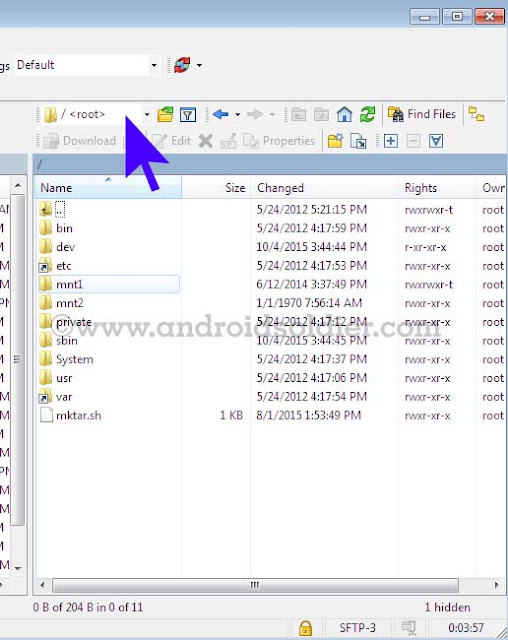
- Now go to var then application . you will see setup.app . Delete setup.app by right click .
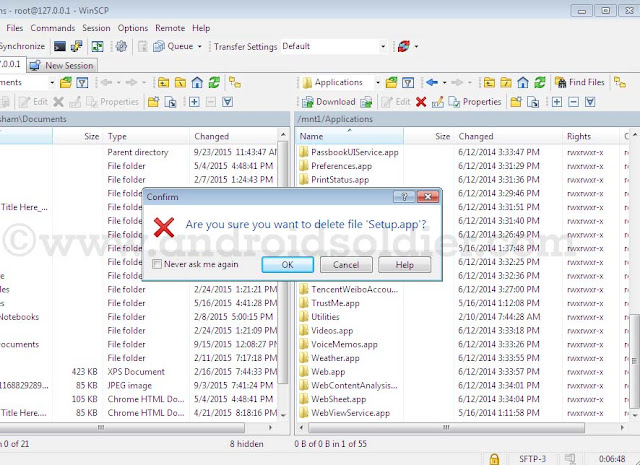
- you are done . You iphone 4 will be automatically reboot in recovery mode . An itunes and cable option will be come to screen on your iphone. If your phone does not reboot automatically , reboot it manually by pressing power button. Download TinyUmbrella , open and click on exit recovery. you are done .

There are many icloud bypass methods are available but this method is 100% successful method. So do not waste your time trying short methods.
Things to remember:-
This tutorial is only work with iphone 4 and not applicable on iphone 4s , iphone 5,5s,5c ,iPhone 6,6+,6s,6+s because except A4 Chip exploit of bootrom is not possible until now.
After bypass icloud account you will not be able to use cellular services .
You will not be able to use your iphone with iTunes.Wifi only.
During all procedure your iphone must stay on apple logo with flashing bar( see image ) . If your phone turn on at some point you have repeat all these steps again.
Available link for download

How to remove bypass please enter the Privacy Protection
How to remove bypass please enter the Privacy Protection
With this Miracle Box method, you wont need to flash the phones firmware to fix this "please enter the privacy protection password to unlock" error. Some Supported :- Spice , karbonn , lava , micromax , intex , vivo , and More
Requirement
* Download Miracle Box (MIRACLE BOX SETUP DOWNLOAD HERE)
* PC windows
* USB cord
* Manually Install Mediatek VCOM drivers (see MTK USB DRIVER DOWNLOAD )
IF YOU NEED FIRMWARE ALL MOBILES TO CLICK HERE
Note:-
If this method fails to work for whatever reason then you can always use the SP Flash tool format method (SP FLASH TOOL DOWNLOAD HERE)
Procedure
1. Extract the content of the Miracle Box to your desktop. Open the folder and run "Miracle_Loader_2.27A"

2. Wait till the Miracle Box program is launched
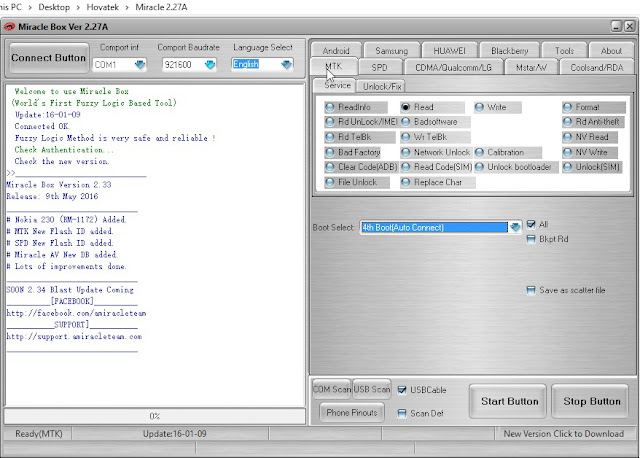
3. Click on the MTK tab
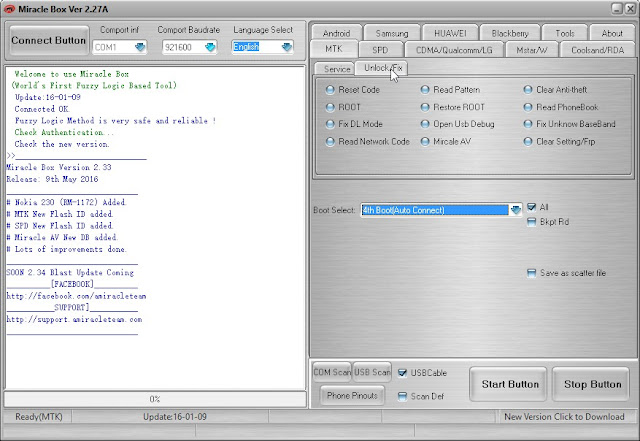
4. Click on the Unlock / Fix tab

5. Tick Clear Anti-theft

6. Click the dropdown box and select your chipset type MT****

7. Click the Start Button

8. Connect the phone to the PC (must be switched off still with battery inside)
9. Press the power button once (this is to ensure that your device is detected immediately). DO NOT hold down the power button else the phone will boot up normally
10. Wait for the message ">>Done. (Need to wait a few minutes the phone is switched)"
11. Disconnect and power on the phone !!!!! Download This App For future App !!!!!
Requirement
* Download Miracle Box (MIRACLE BOX SETUP DOWNLOAD HERE)
* PC windows
* USB cord
* Manually Install Mediatek VCOM drivers (see MTK USB DRIVER DOWNLOAD )
IF YOU NEED FIRMWARE ALL MOBILES TO CLICK HERE
Note:-
If this method fails to work for whatever reason then you can always use the SP Flash tool format method (SP FLASH TOOL DOWNLOAD HERE)
Procedure
1. Extract the content of the Miracle Box to your desktop. Open the folder and run "Miracle_Loader_2.27A"
2. Wait till the Miracle Box program is launched
3. Click on the MTK tab
4. Click on the Unlock / Fix tab
5. Tick Clear Anti-theft
6. Click the dropdown box and select your chipset type MT****
7. Click the Start Button
8. Connect the phone to the PC (must be switched off still with battery inside)
9. Press the power button once (this is to ensure that your device is detected immediately). DO NOT hold down the power button else the phone will boot up normally
10. Wait for the message ">>Done. (Need to wait a few minutes the phone is switched)"
11. Disconnect and power on the phone !!!!! Download This App For future App !!!!!
Available link for download
Tuesday, December 27, 2016
How to Bypass Factory Reset Protection on Nexus Devices FRP lock bypass
How to Bypass Factory Reset Protection on Nexus Devices FRP lock bypass
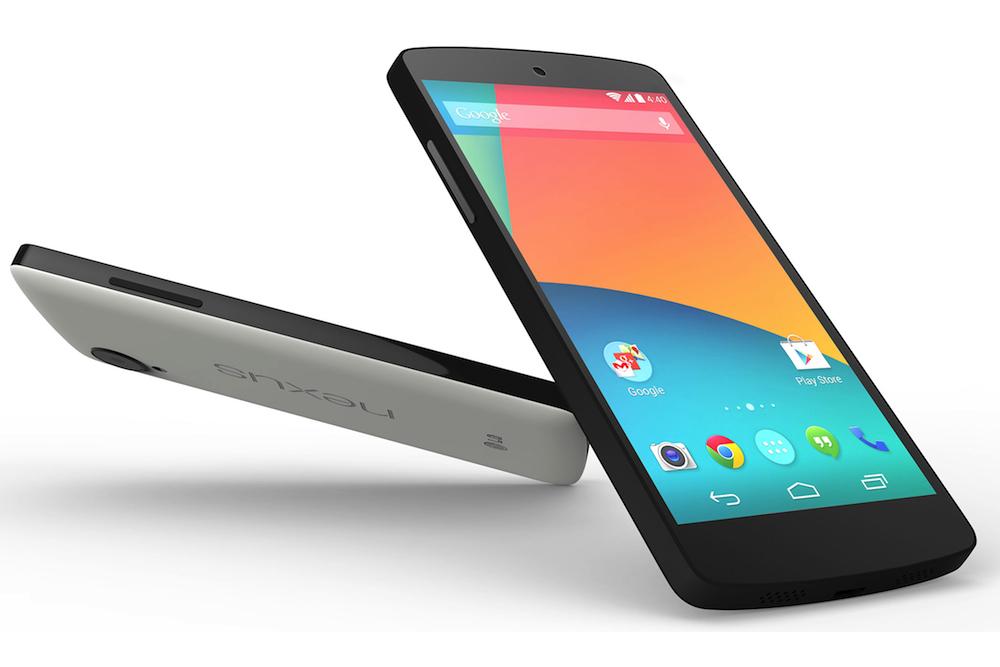
How to Bypass Factory Reset Protection on Nexus Devices- FRP lock bypass
Security is a major concern on every Android device. To make your device more secure Google introduced a new security measure in Android 5.0 A.K.A. Android Lollipop called Factory Reset Protection (FRP). If you are already familiar with the term factory reset, you may have figured out what FRP is. Factory Reset protection keeps your data safe in case your device gets stolen. It does so by requiring authentication after a factory reset to make the device usable.
Once the factory reset is done and the process to setup the device begins, the device will ask to enter the Google account and password that was previously linked with the device. This is Factory Reset Protection. Now, the device is not useful to the thief. Thank you, Google!
What if, instead of losing your device, you forget your password and Google account details? You are stuck; you can’t even make it usable via factory resetting your device (thanks to FRP). You already know that in order to activate FRP you must attach a Google account to your device, set a security option, and factory reset your device via stock recovery menu. If you happen to have a Nexus device (probably a recent one like Nexus 6P, 5X, Nexus 6, and 5) than the Factory Reset Protection can be bypassed in just a few minutes. Here’s how to do it.
Requirement for Performing This Procedure:
The device on which we performing this trick must have a SIM card in it.
Bypass Factory Reset Protection on Nexus Devices
Let’s begin!
Turn off your phone, enter into recovery menu, and factory reset your device.
Now you’ll see the setup wizard. Tap on any Wi-Fi connection to get the “enter password” field. But instead of entering the password hold down “,” button and go into settings.
Tap on language and then tap on the three vertical dots on the top right of the screen and then tap on “Help & feedback”.
Now you’ll get a search bar. Type anything there and hold the text and then select “Share” from the popup menu.
Choose the option to share it via Google messenger. Once the app opens, tap on “New message”.
Dial any number in the “To” input field and then tap on “Send to”.
You’ll see a contact’s like icon on the top right of the next screen. Tap on it and then tap on the “tick mark” icon. This will bring up phone icon that will let you make a call.
Once the call is placed hit the pause button and then hit add dialler button. This will bring up the dialler.
In the input field, type *#*#4636#*#*. Doing so will open up the test mode.
Tap on “Usage statistics” and then tap on the back option. Now you’ll be in device’s settings menu.
From the settings, you can factory reset your phone.
Now, the requirement for FRP to appear is that a Google account must be attached and your phone must have security option enabled. Since neither of these requirements is fulfilled while factory resetting the device for the second time, FRP will be bypassed.
Available link for download
Saturday, October 22, 2016
How to Bypass Factory Reset Protection on Samsung Devices
How to Bypass Factory Reset Protection on Samsung Devices
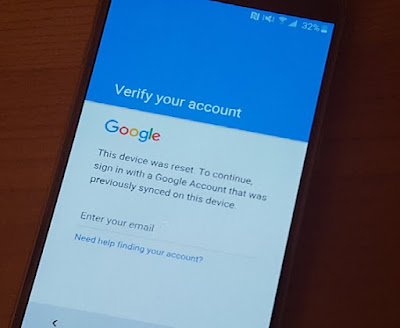
How to Bypass Factory Reset Protection on Samsung Devices
Security is a major concern on every Android device. To make your device more secure Google introduced a new security measure in Android 5.0 A.K.A. Android Lollipop called Factory Reset Protection (FRP). If you are already familiar with the term factory reset, you may have figured out what FRP is. Factory Reset protection keeps your data safe in case your device gets stolen. It does so by requiring authentication after a factory reset to make the device usable.
Imagine this scenario: You lost your device or your device got stolen. Now, the first thing that a thief will do is to factory reset your device so that he can use it by himself or sell it to someone else. But since you have already attached your Google account with your device and have set a security option (PIN, Password, etc.), the thief will not be able to factory reset it from the settings. He will have to do it via stock recovery option (which is pretty simple, BTW). Once the factory reset is done and the process to setup the device begins, the device will ask to enter the Google account and password that was previously linked with the device. This is Factory Reset Protection. Now, the device is not useful to the thief. Thank you, Google!
What if, instead of losing your device, you forget your password and Google account details? You are stuck; you can’t even make it usable via factory resetting your device (thanks to FRP). You already know that in order to activate FRP you must attach a Google account to your device, set a security option, and factory reset your device via stock recovery menu. If you happen to have a Samsung device (probably a recent one like Galaxy S6/S6 Edge, S7/S7 Edge, Note 5, etc.) than the Factory Reset Protection can be bypassed in just a few minutes. Here’s how to do it.
Requirements For Performing This Procedure:
- An OTG drive
- Download bypass Google verify.apk
Bypass Factory Reset Protection on Samsung Devices
- Turn off your phone and enter recovery menu by using the following combination: Home + Volume Up + Power
- Once the screen turns on, release the power button and keep holding the home and volume up button.
- Using the recovery menu perform a factory reset.
- Once the device is formatted and it is turned on, you’ll see a setup wizard. Follow the steps shown by the wizard till it asks you to enter the previous Google account details (which you don’t remember).
- Now here comes the fun stuff. Transfer that APK mentioned above in the OTG drive and connect it to the phone.
- Due to the built-in software, the device will launch file explorer even during the setup process.
- Locate the APK file and install it. You’ll get the option to activate unknown sources. Activate it and install the APK file. What this APK file does is help you get into the phone’s settings menu.
- Once you are in the settings menu, perform the factory reset again but this time from the Settings menu.
Now, the requirement for FRP to appear is that a Google account must be attached and your phone must have security option enabled. Since neither of these requirements is fulfilled while factory resetting the device for the second time, FRP will be bypassed.
Available link for download
Subscribe to:
Posts (Atom)