Showing posts with label miui. Show all posts

Monday, February 6, 2017

HaSa MIUI 3 1 25 for Xperia Mini Mini Pro Active and Live With Walkman based on Android 4 0 4

HaSa MIUI 3 1 25 for Xperia Mini Mini Pro Active and Live With Walkman based on Android 4 0 4


Working :
-Audio
-Gsm
-Wifi
-Gps
-Bluetooth
-2D/3D
-Touch
-Backlight
-Vibrations etc.
-Rotation/G-Sensor
-Buttons backlight
-Camera
-Data Transfer
-And many more

bug:
auto brightness disabled..

Not working :
You tell me

only for locked/unlocked bootloader..

HOW TO INSTALL:
flash the kernel
go to cwm
wipe factory 
wipe cache
go to mounts & storage-format system
go to advanced -wipe dalvik cache
flash the rom
reboot..
NOTE: if anyone having problems flashing this rom..1st flash another custom like real ics or exmiui then make a full wipe and flash my rom


LWW user: if walkman button and music lights are not working use the fix from 4th post..


Quote:
DOWNLOADS
STABLE VERSIONS REBUILT FOR MORE STABILITY 
(note these stable versions can be use on any ics based kernel and themes are fully working.)
And these stable roms will work for both locked and unlocked bootloader

2.10.19
http://d-h.st/4v1

2.10.26

ROM-http://d-h.st/KNU
control panel mod-http://d-h.st/GUR
(plz note i forgot to cahnge the build prop for lww in 2.10.26 rebuilt ver so while flash the rom replace this build prop in rom zip in HASAMIUI/dev/lww http://d-h.st/RbZ )


NEW UPDATES 

3.1.25
http://d-h.st/edF

3.1.11
http://d-h.st/cfn

2.12.29
http://d-h.st/G27

2.12.21
http://d-h.st/yE4


2.12.14 [HOT update to be flashed on top of 2.12.7]
http://d-h.st/GHa

2.12.7
http://d-h.st/3zo

2.11.30
http://d-h.st/878

2.11.23
http://d-h.st/tge


2.11.16
http://d-h.st/gw5


2.11.2
http://d-h.st/dET


2.10.12
http://d-h.st/1jW

2.9.29
http://d-h.st/jkT

2.9.21
http://d-h.st/Whm

2.9.14
http://d-h.st/vVS

2.9.7
http://d-h.st/dMp

2.8.31
http://d-h.st/1Hp

2.8.24
http://www.mediafire.com/download.php?yyzw5841rnho3bm

2.8.17

r1
http://www.mediafire.com/download.php?v69um3ga6c6aawh

r1.1
http://www.mediafire.com/download.php?n1pmzlelywlbk7z

2.8.10
http://www.mediafire.com/download.php?cdzwbgwe1hqtgds

MULTI LANGUAGE PACK
Quote:
Wipe only dalvik and flash the pack

2.12.7
http://www.mediafire.com/download.php?314qsyhixun5m1p


2.11.16
http://d-h.st/O9E
2.10.26
https://dl.dropbox.com/u/44281412/Mi...pi-2.10.26.zip

2.8.24
http://api.viglink.com/api/click?for...13459823459146
2.8.31
http://goo.im/devs/ibotpeaches/miuia...18i-2.8.31.zip
2.9.7
http://goo.im/devs/ibotpeaches/miuia...T18i-2.9.7.zip

2.9.14
http://goo.im/devs/ibotpeaches/miuia...18i-2.9.14.zip

2.9.21
http://d-h.st/O3o
FAQs

1-does the rom works on locked bootloader.

yes it does i have fixed 2.12.29 so it will work on any kernel and even on locked BL(no need to flash my kernel)

2-how can i apply themes
u just need a xaiomi ac to apply themes...just setup the xaiomi ac in settings.


plz dont ask these questions again.

Quote:
Screenshots-2nd post
Changelog-3rd post
Addons & Fix-4th post
ATTACHED FILES
File Type: apkRingtonePicker.apk - [Click for QR Code] (39.7 KB, 1183 views)
File Type: zipFlashlight Fix...zip - [Click for QR Code] (190.7 KB, 793 views)

Screenshots


Available link for download

Read more »

Sunday, February 5, 2017

How to install play store on MiUi easiest method

How to install play store on MiUi easiest method


Easiest & safest method to install Google Playstore on MiUi.

How to install play store on MiUi?(easiest method)


Many times we get bored by using the same user interface and make up our minds to switch onto some other Rom(s), like MiUi, Vibe, Cyanogen etc.
But recently when I switched onto Miui, I found that there was no Google Playstore, play services and other Google apps Pre-installed in it.
Also there was no separate Gapps.zip file that could be flashed. But there was a MiMarket app pre-installed instead where user have to create an user account to access the store plus found out the languages here and there were Chinese. As we know that all the other apps too needs play services to be installed to work,
so I found a way to install Google Playstore and all the other apps using the Google installer Apk.

It is the easiest and also the safest method out there because in the case of flashing Gapps.zip(if any)becomes more difficult if it crashes or turns up not responding, as flashing turns the apps (inside the zip file) to be the system app so for the non-rooted Rom it becomes difficult to remove all those system apps.

So this method is absolutely safe, So lets start the easiest steps.

Step 1:- Download and install the Google installer.apk (link is down below the post).

Step 2:- Make sure that you are connected to internet. 

Step 3:- Open up the app and start downloading the play store from it.

Step 4:- It will first install the Google play services and then automatically install the Play Store.apk.

Step 5(optional):- If you need all your synced Google contacts then you can install the Contacts.apk also from the Google installer and wait till it syncs.

>>>HERE IS YOUR GOOGLE INSTALLER APK<<<


Thats it! may it helped you with what you were searching for.
If not or have problems comment it down below will help you out.

Available link for download

Read more »

Wednesday, February 1, 2017

How To Disable Camera Shutter Sound in Redmi2 Redmi Note and Other MIUI Devices

How To Disable Camera Shutter Sound in Redmi2 Redmi Note and Other MIUI Devices


Previously, I wrote post a on disabling camera shutter sound on Samsung and many other Android devices using the app named Enforced Stream Silencer. Unlike Samsung and other Android devices, MIUI devices like Redmi 2S/2A, Redmi Note, MI 4i, etc. doesnt need a third party app to disable the Camera Shutter sound as the default Camera app in MIUI has a built in option to turn off the annoying capture sound.
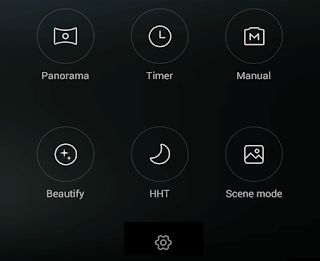
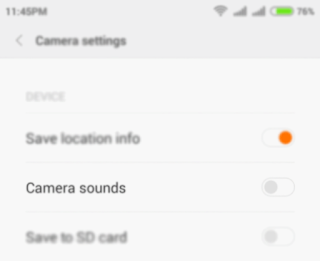
Here are the steps to turn off the camera sound in MI devices.
1. Open the Camera app.
2. Swipe Left and tap on the Settings icon.
3. In Camera Settings page tap on Camera sounds toggle button to turn off the sound.


Thats it.


Available link for download

Read more »