Showing posts with label a1. Show all posts
Showing posts with label a1. Show all posts
Wednesday, April 12, 2017
How to root karbonn A1
How to root karbonn A1
Requirements :
 ?Ginger break
?Root checker.apk
?Super user
?Ginger break?Root checker.apk
?Super user
Step-By-Step Instructions:-
1) Download the app Gingerbreak.apk. From Here.
2) Turn the USB Debugging mode on. From Settings>Applications>Development>USB Debugging.
3)Then install Gingerbreak.apk to your phone.
4) Open the Gingerbreak app.
5) Then click on Root Device.
6) You will have to wait for a minute
7) Then the phone will reboot.The reboot shows that the root is complete download super user from here
8) Using root checker check the rooting
9) download and install super user from here
8) Using root checker check the rooting
9) download and install super user from here
*********************************************************
Available link for download

Sunday, March 19, 2017
How to Flash or Upgrade Intex Aqua A1 with SP Flash Tool Tested
How to Flash or Upgrade Intex Aqua A1 with SP Flash Tool Tested
This is simple way for flashing or upgrade in Intex Aqua A1 device because this is tested by me without any error, this method you can use without any box its done from flash tool its also available here, and impotent of must be installed phones driver, you cant flash or upgrade if not installed in your computer or laptop it must be installed and also available in this post, here all are linked that tested and working fine just in one try, you can use this guide when your device in hang on logo, restarting, auto turn on internet connection, auto turn on wifi connection, auto apk installing, auto gone balance, pattern lock, screen lock etc
This flash file tested by me without any error working well, this is free for all who know about software in mobile, impotent for flashing first must check your micro USB cable if not good then you cant flash it so check micro USB cable second check your device battery that is impotent for flashing if your device battery low so stop your device between flash so this is impotent for flash, before you flash save your data like contact, videos, notes, emails, photos, videos etc because this is factory flash file so you cant save after full flash so must remember all are impotent notes.
If you want to repair your device, you can try to repair it by you.You have to charge your battery with any charger and charged it by 70%. Your data is very important for you so it is good to do a backup of your data it may consist like your contact details,your important messages, your emails or any other important thing which you feel to be the backup in your device. This backup can be done on another device. we have to do the backup because after a format of your device, all your data will be gone and it will not be recovered. For backup in other devices you can use other external device like your hard drive, sd card or any other suitable devices. If you are doing by your own.do it at your own risk as we dont take any responsibility if your device is damaged

This flash file tested by me without any error working well, this is free for all who know about software in mobile, impotent for flashing first must check your micro USB cable if not good then you cant flash it so check micro USB cable second check your device battery that is impotent for flashing if your device battery low so stop your device between flash so this is impotent for flash, before you flash save your data like contact, videos, notes, emails, photos, videos etc because this is factory flash file so you cant save after full flash so must remember all are impotent notes.
If you want to repair your device, you can try to repair it by you.You have to charge your battery with any charger and charged it by 70%. Your data is very important for you so it is good to do a backup of your data it may consist like your contact details,your important messages, your emails or any other important thing which you feel to be the backup in your device. This backup can be done on another device. we have to do the backup because after a format of your device, all your data will be gone and it will not be recovered. For backup in other devices you can use other external device like your hard drive, sd card or any other suitable devices. If you are doing by your own.do it at your own risk as we dont take any responsibility if your device is damaged
Required for Intex Aqua A1
- Intex Aqua A1 handset with good battery charged, do not try with low battery
- Intex Aqua A1 Stock ROM Firmware | Download here
- Intex Aqua A1 Flash tool | Download here
- Intex Aqua A1 USB Driver | Download here
- Micro USB Cable with Good Quality
- Computer or Laptop
Procedure for Intex Aqua A1
- Take files of required for this method from the above link, if link dead or broke just leave your comment on below comment box i will soon fix it if possible
- UnZip from WinZIP to anywhere you want from the ZIP, must be installed ZIP in your Computer or Laptop
- Open SP Flash tool folder and select and open flash_tool.exe file
- Click on Scatter-loading button and choose MT6572_Android_scatter.txt file from the Firmware folder
- Now click on Download button, and Just Insert USB Cable to device
- Wait until driver installing, if driver already installed in your Computer or Laptop then downloading start automatically
- If device dead for detection Press and hold Volume Up button and Insert USB Cable
- Wait until finished process, do not disconnect device while in flashing mode
- Congratulation you are done
Intex Aqua A1 Flash done Screenshot:
Available link for download
Sunday, January 8, 2017
How to root karbonn A1 plus champ
How to root karbonn A1 plus champ
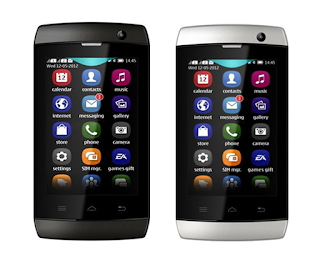
Hi guys this is raj techieguy in this tutorial i will show you how to root your Karbonn A1 plus champ with Cydia Impactor . Cydia Impactor is a GUI tool for working with Android devices. It has features already, but is still very much a work-in-progress. Right now, its key feature is an end-to-end exploit of the Android "Master Key" vulnerability, allowing a user to obtain root access on many Android devices (including Glass and TV). Almost all the android devices are support by this rooting method and download USB Driver for your mobile it will help you to connect your mobile with pc it able to update ROM or flash a custom rom very easy through pc.let us see how to root your karbonn A1 plus champ
REQUIREMENT
- Cydia Impactor
For windows : click here
For mac : click here
- Super user
- Root checker
- USB driver
STEPS TO ROOT
STEP 1 : Enable USB Debugging on your Android Smartphone. to enable USB debugging.
Open Settings > Developers Option > USB Debugging > Tick to Enable.
( if you dont know how to enable developer option click here )
( if you dont know how to enable developer option click here )
STEP 2: Download and extract Cydia Impactor on your computer. After extracting, you will be able to see the following files:
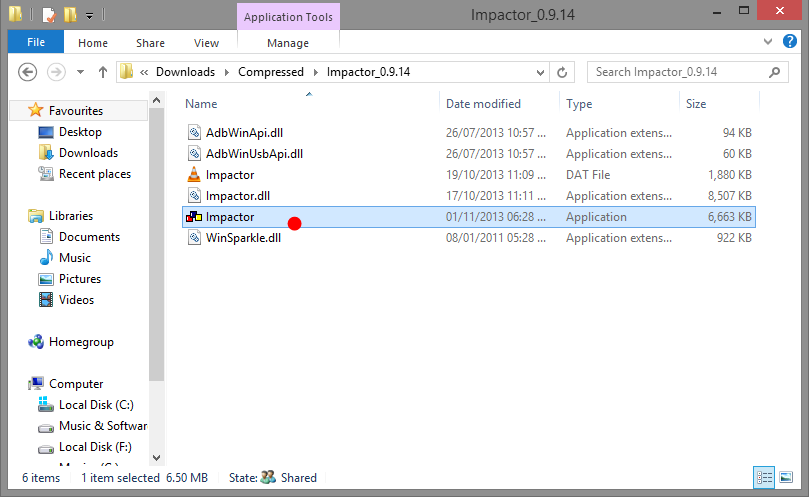
STEP 3: install necessary usb driver from the above link and Now, Open Impactor.exe (you have extracted this file in step#2)
STEP 4 : Once Cydia Impactor Application is launched, connect your Android device to the computer (with USB Debugging enabled).
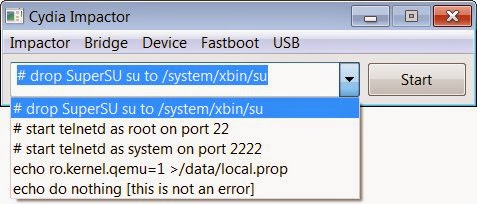
STEP 5 : Now, to begin the rooting process click on the Start Button
STEP 6: Now, Cydia Impactor will install SuperSU binary on your Android Device. Once, this process is completed, close the Cydia Impactor application and Disconnect your Android Device from the computer.
STEP 7: Now, Restart your Android Device.
STEP 8: Once your Android Device is restarted, and Install SuperSU application from the playstore.
STEP 9 : Now your karbonn Device is Rooted successfully. To check whether your phone is rooted correctly, open SuperSU application If you are able to use it without any error then it means your device is rooted successfully.
STEP 10 : Another way to check your mobile rooted or not using rootchecker to check (Below fig shows the rootchecker screenshot) Download root checker from the above link
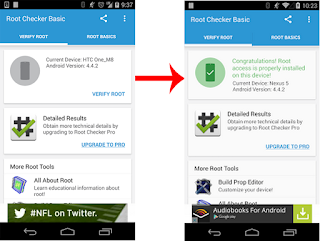
STEP 10 : Another way to check your mobile rooted or not using rootchecker to check (Below fig shows the rootchecker screenshot) Download root checker from the above link
Finally your karbonn mobile was sucessfully rooted :-)
Available link for download
Sunday, December 18, 2016
How to root karbonn A1 star
How to root karbonn A1 star
Requirements :
? frama root
? Root checker
Step-By-Step Instructions:-
1.Go To Settings>Security & Enable The Install From Unknown Source. (Skip If Already Enabled)
2.Open Settings>Application>Development>USB Debugging>Enable USB Debugging.(Skip If Already Enabled)
3.Download The frama root App From Above Link.
4.Copy It To Your Phone Sdcard. Install The App.
5.Open The App and install it
6. click super user And install super user
7.And reboot the device
8.your mobile is now rooted
9. using root checker check if the mobile rooting or not
*********************************************************
? frama root? Root checker
Step-By-Step Instructions:-
1.Go To Settings>Security & Enable The Install From Unknown Source. (Skip If Already Enabled)
2.Open Settings>Application>Development>USB Debugging>Enable USB Debugging.(Skip If Already Enabled)
3.Download The frama root App From Above Link.
4.Copy It To Your Phone Sdcard. Install The App.
5.Open The App and install it
6. click super user And install super user
7.And reboot the device
8.your mobile is now rooted
9. using root checker check if the mobile rooting or not
*********************************************************
Available link for download
Thursday, December 8, 2016
Gfive Spark A1 USB Driver For Windows 7Xp8 32Bit 64Bit
Gfive Spark A1 USB Driver For Windows 7Xp8 32Bit 64Bit
Free Download Gfive Spark A1 USB Driver For Windows 7 - Xp - 8 32Bit/64Bit

Driver Supported Following Models Of Gfive Spark A1 :
Gfive Spark A1 Modem / Com port / Android USB Driver
The package provides the installation files for Gfive Spark A1 ADB USB Driver.
Download File Contain Three Package:
1. All MTK USB Driver 2014 - Manual Installation
2. Universal ADB Android USB Driver - Installer
3. Latest PdaNet Driver V.A4150.exe - Installer
Drivers required to properly communicate with your MTK Phone for rooting etc...
These ADB drivers from PDA Net are the easiest to install and will work with most all MTK phones.
Direct Download USB Driver Gfive Spark A1 For Windows XP/Vista/7 x86-x64
Supported OS:
Gfive A1 Spark USB Driver For Windows 7
Gfive A1 Spark USB Driver For Windows 8
Gfive A1 Spark USB Driver For Windows XP
Gfive A1 Spark USB Driver For Windows Vista
Download Driver
[ Unchecked This Option: Use our download manager and get recommended downloads ]
[ Unchecked This Option: Use our download manager and get recommended downloads ]
Mirror Link
Download Driver
Mediafire Link
Download Driver
Available link for download
Wednesday, November 23, 2016
How to root karbonn A1 plus duple
How to root karbonn A1 plus duple
Requirements :
? z4 root
? Root checker
? super user
Step-By-Step Instructions:-
1.Go To Settings>Security & Enable The Install From Unknown Source. (Skip If Already Enabled)
2.Open Settings>Application>Development>USB Debugging>Enable USB Debugging.(Skip If Already Enabled)
3.Download The Z4root App From Above Link.
4.Copy It To Your Phone Sdcard. Install The App.
5.Open The App&You Will Be Seeing A Button "Permanent Root".Press That.
Your Phone Will Autoboot Once, & You Are Done With Rooting Your Karbonn A1 Plus duple
6. And install super user from here
7. using root check if the mobile rooting or not
*********************************************************
? z4 root? Root checker
? super user
Step-By-Step Instructions:-
1.Go To Settings>Security & Enable The Install From Unknown Source. (Skip If Already Enabled)
2.Open Settings>Application>Development>USB Debugging>Enable USB Debugging.(Skip If Already Enabled)
3.Download The Z4root App From Above Link.
4.Copy It To Your Phone Sdcard. Install The App.
5.Open The App&You Will Be Seeing A Button "Permanent Root".Press That.
Your Phone Will Autoboot Once, & You Are Done With Rooting Your Karbonn A1 Plus duple
6. And install super user from here
7. using root check if the mobile rooting or not
*********************************************************
Available link for download
Subscribe to:
Posts (Atom)