Showing posts with label url. Show all posts
Showing posts with label url. Show all posts
Sunday, March 5, 2017
How to Disable Blogger From Country Specific URL Redirection
How to Disable Blogger From Country Specific URL Redirection
 As we all know recently blogger blog get redirected to country specific URL from the .com URL. The redirecting URL depends by the country we visit from. for example if we are visiting from India URL will be blogspot.in from Japan it will be blogspot.jp.
Because of this Blogger redirection our social stats like Facebook Like and Twitter Tweet counts are different for different countries. So if you want to block blogger from country specific redirection just apply this simple hack.
Method:
1. In your Blogger dashboard Click Template > Edit HTML > Proceed
2. Now find <head> tag.
3. And paste the below script just after the <head> tag
 <script type="text/javascript">
 var blog = document.location.hostname;
 var slug = document.location.pathname;
 var ctld = blog.substr(blog.lastIndexOf("."));
 if (ctld != ".com") {
 var ncr = "http://" + blog.substr(0, blog.indexOf("."));
 ncr += ".blogspot.com/ncr" + slug;
 window.location.replace(ncr);
 }
 </script>
4. Click Save Template Done !
Thats all Now check your blog No More Blogger URL redirection !
Available link for download

Tuesday, February 7, 2017
How To Change Blogger Post URL Using Custom Permalink
How To Change Blogger Post URL Using Custom Permalink
 Whenever we publish a new post, Blogger automatically generates the post URL according to the title of the blog post. For example, if the post title is How To Change Blogger Post URL Using Permalink? then Blogger will generate http:// technoxide.blogspot.com /2012/07/ how-to-change -blogger-post- url-using.html as the post URL. If you want to change this URL to a small SEO friendly one here comes the solution.
Recently Blogger introduced an option named Permalink in Post settings to edit the post URL to your desired one. In this post I included the simple steps to use custom permalink in Blogger blog. Here are the steps.
Steps:
Note : If you have Permalink Option in your Blogger Post Settings Start from Step 2.
1. Open a post you wish to edit the URL or Create a New Post.
(If you are editing a published post, then click on Revert to draft button to enable Permalink editing.)

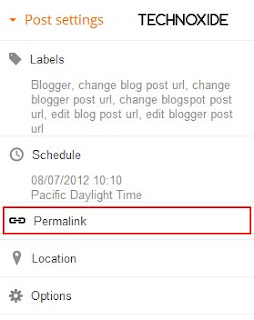
2. Then click Permalink in Post Settings.
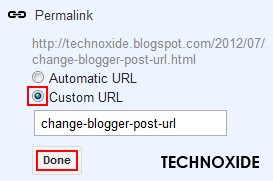
3. Now check the Custom URL radio button and type the new post URL in Custom URL text field. After changing the URL dont forget to click Done!
4.Finally, Click Publish .
Thats it...Now check the post URL it will be changed to the modified one !
Note : If you are changing URL of a old post, please note down the old URL before changing to a new one. Because your old post URL may be submitted to search engine or social websites.So If any one come to your blog using the old URL he will get a 404 not found error. Dont Worry ! you can Redirect your old URL to new URL using Custom Redirects feature of Blogger.
Available link for download
Saturday, January 7, 2017
How to Change URL of Your Disapproved Adsense Site
How to Change URL of Your Disapproved Adsense Site
Adsense is the most popular and online advertisement program service powered by Google. This program helps to online content providers to earn money when visitor click on display targeted adsense ads. It is the share more revenue share to his publishers. It is the easiest way to earn money for webmasters and bloggers. But In this program most important part is adsense approved. Nowadays, Google Adsense is so difficult to approve. If your web site or blog complies with the adsense program policy, then your adsense account approved.

Many bloggers and webmasters want to be approved by adsense account and try to approve. If you are also trying to adsense Approval and disapproved your adsense account. adsense is providing facilities to reapply for an adsense account. But the same web site URL to apply adsense account. If you want to change the url of your disapproval adsense account site then follow instruction.
The Google Adsense program is not allowed to change the ongoing or disapproved website URL. You can only apply new adsense account via new gmail account or new website URL.
The Google Adsense program is not allowed to change the ongoing or disapproved website URL. You can only apply new adsense account via new gmail account or new website URL.
Available link for download
Wednesday, November 30, 2016
How To Change Blogger Static Page URL
How To Change Blogger Static Page URL
 After publishing the post How To Change Blogger Post URL using Permalink? I got some mail and comment about changing the Blogger Static Page URL ! I didnt found any option given by Blogger for this purpose.
Like Blogger post , Page URL suddenly changed to match Page Title. After some Googling i got a simple solution to prevent changing the Blogger page URL match to page title.here it is.
Method:
1. In your Blogger dashboard Click Pages > New page > Blank page .

2. Now type the Page title as you want to show in the URL and click Publish. For example if you want to show about as your page URL,then you type about in the page title field.
3. Now revert back your blogger to Old Blogger interface.

4. Then click Edit Posts > Edit Pages.


5. Then click on Edit option of the page we recently created. In our example about.

6. Finally enter the Page Tile you wish to show in the page and click PUBLISH PAGE. In my casa I am typed About Technoxide.
Thats all ! Done !
Click here to Check my page URL i am created using this trick.
Available link for download
Subscribe to:
Posts (Atom)