Showing posts with label games. Show all posts
Showing posts with label games. Show all posts
Tuesday, April 4, 2017
How to Hack Android Games
How to Hack Android Games
DISCLAIMER: These methods will not work for all games. Dont ask me which games it will work for. I have no clue.
This method of hacking is similar to what one would do for regular flash games online:
STEPS:
1. Download and install GameCIH3
2.Start GameCIH (I suggest you set the hotkey to the FOCUS button on the side of the G2)
3. Go and start a game of your choice. And to use it, I suggest downloading CheatEngine 5.6 and going through their tutorial, because the principle is the same. Or, if you want a short summary, you would have to basically enter an initial value (could be your HP, or the number of coins, mana, ammo, whatever), do something in the game to change the value of it (get damaged, gain coins, fire a spell to use mana use up ammo etc), and search for the changed value. IE: You have 100 coins, and then you gain 2 more, your first search would be 100, then you get 2 more, then you search 102.
4. Change the number you managed to isolate from the list to whatever you wish.
5. Happy Hacking!
EDIT: ALSO, there is another way. You will need Root Explorer and a text editor for this to work.
1. Go open Root Explorer, and make sure you are in R/W mode (Read/Write)
2. Navigate to data/data/com.NAMEOFGAMEORGAMECOMPANY.BLAH.BLAH/shared_prefs
There you will find a .xml file
WARNING: MAKE A COPY OF YOUR ORIGINAL .XML FILE BEFORE TINKERING WITH IT
3. Open it in a text editor, and edit some values, and save it. (what you do in this step is up to you. Use your brain and logic and experiment; IE: If you see a thing like 1playergold=60, and you have 60 gold in your game, feel free and try and bump that to 99999)
4. DONE
This method of hacking is similar to what one would do for regular flash games online:
STEPS:
1. Download and install GameCIH3
2.Start GameCIH (I suggest you set the hotkey to the FOCUS button on the side of the G2)
3. Go and start a game of your choice. And to use it, I suggest downloading CheatEngine 5.6 and going through their tutorial, because the principle is the same. Or, if you want a short summary, you would have to basically enter an initial value (could be your HP, or the number of coins, mana, ammo, whatever), do something in the game to change the value of it (get damaged, gain coins, fire a spell to use mana use up ammo etc), and search for the changed value. IE: You have 100 coins, and then you gain 2 more, your first search would be 100, then you get 2 more, then you search 102.
4. Change the number you managed to isolate from the list to whatever you wish.
5. Happy Hacking!
EDIT: ALSO, there is another way. You will need Root Explorer and a text editor for this to work.
1. Go open Root Explorer, and make sure you are in R/W mode (Read/Write)
2. Navigate to data/data/com.NAMEOFGAMEORGAMECOMPANY.BLAH.BLAH/shared_prefs
There you will find a .xml file
WARNING: MAKE A COPY OF YOUR ORIGINAL .XML FILE BEFORE TINKERING WITH IT
3. Open it in a text editor, and edit some values, and save it. (what you do in this step is up to you. Use your brain and logic and experiment; IE: If you see a thing like 1playergold=60, and you have 60 gold in your game, feel free and try and bump that to 99999)
4. DONE
Available link for download

Tuesday, March 21, 2017
Guide To Port ARMv7 Games To ARMv6 Devices
Guide To Port ARMv7 Games To ARMv6 Devices
ARMv6 in Easy Words Can Be Said As A Architectural Core..


What To Know:
What All You May Require:
ZipSigner2 - ZipSigner2.apk
AutoAPKTool - Here
Libs From Unity - Here
Notepad++ - Here
WinRAR - Here
Checking Whether Game is Of Unity Engine:
Checking The Version Of Unity3D:
Now, Conversion Of The Apk:
Finally:
Sign The Apk Using ZipSigner2[ROOT] in phone or Use AutoAPKTool in Computer..
Enjoy
What To Know:
- Its A Educational Trick
- I am not responsible for Using It For Other Processes.
- The Guide Will Only help To Port Older Version Of UNITY Engine Games.
- Unity3D Apps which cannot be ported may have libs in there obb.
- Every Game Will not work if ported like NFSMW, Asphalt, etc.
What All You May Require:
ZipSigner2 - ZipSigner2.apk
AutoAPKTool - Here
Libs From Unity - Here
Notepad++ - Here
WinRAR - Here
Checking Whether Game is Of Unity Engine:
- Open The Apk Using WinRAR
- Check Libs/Armeabi-V7/ - Two Files
-Libmono.so
-Libunity.so - Above^ Files Present So The Game Can Be Ported..
Checking The Version Of Unity3D:
- Open The Apk Using WinRAR
- Go To assets/bin/data
- Open the file mainData using Notepad++

Now, Conversion Of The Apk:
- Delete Armeabi-V7 Folder From
- -apk/libs/>here<
- -apk/assets/libs/>here<
- Replace with the One In The Libs.rar As Per The Version[Here We Have=3.5.5f3]
Finally:
Sign The Apk Using ZipSigner2[ROOT] in phone or Use AutoAPKTool in Computer..
Enjoy
SOME PORTED GAMES HERE: Download
Available link for download
Saturday, March 11, 2017
How to download Games and Apps apks from Google Play to Computer
How to download Games and Apps apks from Google Play to Computer
How to download Games and Apps apks from Google Play to Computer directly
In this post you will learn how to download APK from google play to computer. By default Google play does not allow you to do so because in Google terms and Condition it is illegal. But today I am sharing a plugin by using it you can download apk from google play to your computer easily.
Please remember you can only download free apps and games apk files, you can not download paid apps and games.
1.Install Chrome Browser on your PC, if you have already installed then continue to next setup.
2. Download and Install APK Downloader Extension . To install this extension first download it from giving link then open Chrome Browser Go to Options > Extensions. Then Drag and drop Downloaded APK downloader Extension to center of page.
3. open Google play on your Smartphone then search and Install Android Device ID . After Downloading and installation process open it.
4. once Android Device ID application opens look for Google Service framework(GSF ID Key). you need to copy that 16 digit GSF ID key.
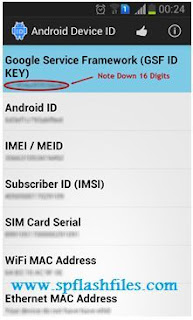 5. Now open Chrome Browser and Go to options > Tools > below the APK downloader Extension you will see a option link. click on that link to continue.

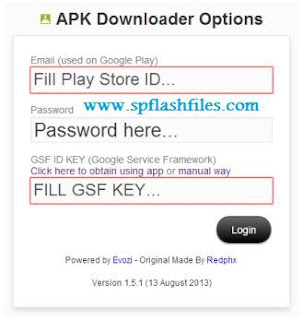
6. In APK Downloader Extension option Add Email ID and set Password of Play Store and then add GSF ID KEY which you have copies form Android Device ID. once you filled all the fields click login button.
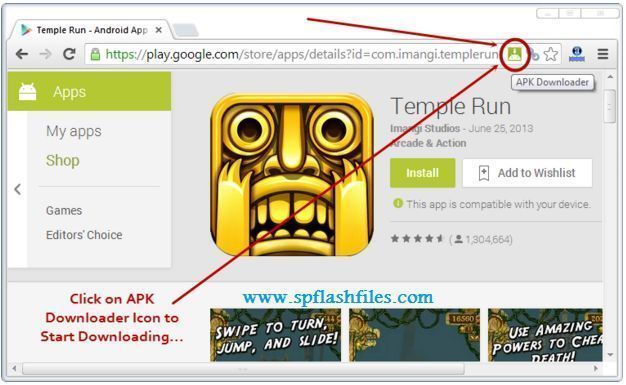
7. Now open play.google.com in chrome browser on your PC and search for any app or game which you want to download apk file on your Computer. Once the application page is opened, click on the APK downloader icon in the Address Bar to start downloading apk file.
Related Searches:
play store download
play store apk
google play download
google play store apk
google play store download
download play store
apk downloader
apk download
google play download apk
download play store apk
google play apk download
download google play store apk
download apk
play store apk download
download apk from google play
google play store apk download
download google play apk
play store download apk
play store download for pc
google play store download apk
download play store for pc
apk downloads
google play apk file
download google play store for pc
google play apk downloader
download apk files
free apk apps
free apk downloads
download google play apk file
apk files download
In this post you will learn how to download APK from google play to computer. By default Google play does not allow you to do so because in Google terms and Condition it is illegal. But today I am sharing a plugin by using it you can download apk from google play to your computer easily.
Please remember you can only download free apps and games apk files, you can not download paid apps and games.
To start downloading apps and games apk files from google play follow these simple and easy steps.
1.Install Chrome Browser on your PC, if you have already installed then continue to next setup.
2. Download and Install APK Downloader Extension . To install this extension first download it from giving link then open Chrome Browser Go to Options > Extensions. Then Drag and drop Downloaded APK downloader Extension to center of page.
3. open Google play on your Smartphone then search and Install Android Device ID . After Downloading and installation process open it.
4. once Android Device ID application opens look for Google Service framework(GSF ID Key). you need to copy that 16 digit GSF ID key.
6. In APK Downloader Extension option Add Email ID and set Password of Play Store and then add GSF ID KEY which you have copies form Android Device ID. once you filled all the fields click login button.
7. Now open play.google.com in chrome browser on your PC and search for any app or game which you want to download apk file on your Computer. Once the application page is opened, click on the APK downloader icon in the Address Bar to start downloading apk file.
Related Searches:
play store download
play store apk
google play download
google play store apk
google play store download
download play store
apk downloader
apk download
google play download apk
download play store apk
google play apk download
download google play store apk
download apk
play store apk download
download apk from google play
google play store apk download
download google play apk
play store download apk
play store download for pc
google play store download apk
download play store for pc
apk downloads
google play apk file
download google play store for pc
google play apk downloader
download apk files
free apk apps
free apk downloads
download google play apk file
apk files download
Available link for download
Saturday, January 28, 2017
How to Delete Locked Games in Corby 2
How to Delete Locked Games in Corby 2

eliminate this locked games? Follow these easy steps.
1. Gather the required things.
Deleting locked games cannot be done on your phone manually. You need to do it by plugging your phone ( Corby 2 ) on your computer. Prepare your Samsung USB Cord and configure your Corby 2. Remove your Sim card and Memory card for safety reasons.
If you havent installed Samsung USB Driver yet, download and install one so that your device will run smoothly. To make sure that you have successfully installed Samsung USB Driver, check it manually. Plug your phone on your Computer.
For Windows XP Users:
- Go to "Control Panel"
- Click "Performance and Maintenance"
- Click "System"
- Click "Hardware" then "Device Manager"
- Under "Modems", You should see "Samsung USB Modem"
For Windows 7 Users:
- Click "Start" then search "Device Manager"
- Under "Modems", You should see "Samsung USB Modem"
Now download TK File Explorer 2.4, this is the software that we are going to use to delete the locked games. Extract the file. File password is corbysociety.
2. Follow the steps carefully.
At this moment, your phone must be already plugged on your computer.
- Launch TK File Explorer 2.4
- Click "Connect" and set your "Port" ( Example COM5 ) then click "Ok". Click "Connect" once again.
Method # How to Know Your Port
- Using your keyboard, press the Windows logo+R (not CTRL+R) then type devmgmt.mschit enter and the Device Manager window should appear. Click "Modems" and right click SAMSUNG Mobile USB Modem. Select Properties. Click the Modem tab and you will see your Port number. Take note of that.
- Using Multiloader v5.65, you can also know what your port number is using. Download Multiloader v5.65 here. Launch Multiloader and then connect your phone in "Download Mode" in your computer. Now click "Port Search" you should see what your port number is.
- Click "AppEx" then click "User"


- Click "Java" then click "Games"

- You should see a list of your games. Finally, delete the locked games.
- Click "Disconnect" and unplug your phone ( Corby 2 ).
Watch Video tutorial by Hariz Zizi
If you have any questions/clarifications, just leave a comment.
Available link for download
Thursday, December 22, 2016
How to Download or Verify Gameloft Games without Wifi
How to Download or Verify Gameloft Games without Wifi

You love gameloft but sometimes u dont like them ,Reason? due to all new HD gameloft games requires WIFI Verification to start/play those gameloft games,but most of the users dose not have a wifi conection on their locations,so now? what to do? Dont be worry i have a simple trick to change WIFI mode to your Carrier Network Gprs/GPRS ,now u can verifygameloft games through ur mobile internet,and also u dont need to use Titanium backup again,
U have installed apk of the game and also placed data files in ur sdcards gameloft/games folder,but whenever u try to play that game it says download must be perform through wifi,this line dose not mean that u need to download data files again but this line means that u need wifi to verify data files,after verify data files u will be able to play those games again,so now u got it?do u think u need titanium backup again? so let us see how to do this trick
Required rooted phone?
Answer: No
Instruction:
Download This TXT file and place it into SDCard,it will be like this SDCard/qaWifiOnlyMode
Download TXT file from here:
Download Now
Available link for download
Subscribe to:
Posts (Atom)