Showing posts with label work. Show all posts

Sunday, March 5, 2017

How To Get Flash And H 264 To Work In Vivaldi Browser Ubuntu Linux Mint

How To Get Flash And H 264 To Work In Vivaldi Browser Ubuntu Linux Mint


Vivaldi 1.0 stable was released today and if you gave it a try, you might have noticed, at least on a fresh Ubuntu installation, that Flash and H.264 dont work out of the box.

Heres how to get Adobe Flash and H.264 (used, for instance, by the YouTube HTML5 player) to work with Vivaldi browser, in Ubuntu, Linux Mint and derivatives.


Get Vivaldi browser to support H.264


Vivaldi Browser no H.264
Before installing "chromium-codecs-ffmpeg-extra"

Vivaldi Browser h.264 enabled
After installing "chromium-codecs-ffmpeg-extra"

To enable H.264 support for Vivaldi in Ubuntu, you need to install a package called "chromium-codecs-ffmpeg-extra".

This is already available if Chromium browser is installed on your system. If you dont have Chromium browser, you can install the package that provides H.264 support by using the following command:
sudo apt-get install chromium-codecs-ffmpeg-extra

And restart Vivaldi.

You can check if your browser supports H.264 by visiting the YouTube HTML5 page.


Get Adobe Flash working in Vivaldi Browser


Important note: since Google Chrome is now only available for 64bit on Linux, it means that its Pepper Flash plugin is also only available on 64bit. So the instructions below only work on 64bit! Flash might work on Vivaldi 32bit if you have an old Google Chrome for 32bit installed, but it wont receive any updates so you shouldnt use it.

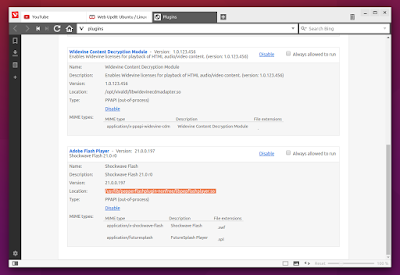
Vivaldi supports the Google Chrome built-in Pepper Flash plugin, but it doesnt come bundled with it. If you have Google Chrome installed on your system, Vivaldi should already be using its Pepper Flash plugin, so theres nothing you need to do.

Vivaldi Browser pepper flash plugin

If Google Chrome is not installed on your system, to get Vivaldi browser to use the Google Chrome Pepper Flash plugin, you can install a package called "pepperflashplugin-nonfree".

The package is available in Ubuntu 14.04, 15.04, 14.10 and 16.04 / Linux Mint 17.x and derivatives and you can install it by using the following command:
sudo apt-get install pepperflashplugin-nonfree

Then restart Vivaldi. Thats it!

Update: the bug that caused pepperflashplugin-nonfree not to work in Ubuntu 16.04 was fixed.


Extra tip:

If Google Chrome is installed, Vivaldi will automatically pick up its Widevine Content Decryption plugin (it comes with a symbolic link to the location of the libwidevinecdm.so plugin in the Google Chrome stable installation folder).

If you dont want to install Google Chrome and you need this plugin, you can extract libwidevinecdm.so from the Google Chrome deb and place it in /opt/vivaldi/, replacing the existing symbolic link.

thanks to B.Jay for the tip!


Available link for download

Read more »

Saturday, March 4, 2017

How to Configure any Generic Gamepad to Work in any PC game

How to Configure any Generic Gamepad to Work in any PC game


Hi Visitors ! are you sad because your cheap generic gamepad doesnt work in every PC game? I know how frustrating this is. Specially when the right analog stick doesnt work in FIFA :( .Even some of the games cannot detect a generic gamepad , that is very annoying.

Today I will show you how to configure your Generic gamepad in such a way that will work in every PC game as Branded Gamepad like Logitech Rumblepad or Xbox 360 controller. The most amazing thing is you do not need to use any emulator like x360ce for this,just a little bit modification in windows registry will do the trick  ;)


Lets begin!!  I think visual representation is better than anything.So, ive created a video tutorial for this.Watch the video given below,it shows detailed steps. 


Note- please enable subtitles before watching.Actually my microphone gone mad during video recording ,that is why i could add any audio with it :( But after enabling the subtitles you will see written instructions for better understanding.Hopefully i will make another video which will have audio instructions :).. and Oh! a friendly caution ! Dont mess with Windows Registry without proper knowledge.I can assure you  if you exactly follow the instructions shown in the video, there will be no problem at all,but dont try to play with other registry files without prior knowledge .If You like the video please hit the like button & do subscribe to my channel.Visit this blog regularly for more awesome tips & tricks ;)

--------------------
Regards
Shankha Jana


Available link for download

Read more »

Thursday, February 2, 2017

Get Mac OS X Lion to Work with NTFS UPDATED

Get Mac OS X Lion to Work with NTFS UPDATED


From a comment in a neighboring blog I successfully got my NTFS drives to mount again after upgrading to Lion. There are paid solutions to NTFS on Lion, but I use Windows-formatted drives so rarely that I cant justify $39.


[UPDATE Aug 31, 2011]
MacFUSE 2.2 has been released with Lion compatibility: There is a 2.2.1 out in the wild, but many have reported that it makes your CPU run like crazy. 2.2.x is expected to be the last MacFUSE release with the new Fuse4X project taking over, but not yet useful for NTFS, as far as I can tell.

Anyway, install NTFS-3G: http://sourceforge.net/projects/catacombae/files/NTFS-3G%20for%20Mac%20OS%20X/2010.10.2/ntfs-3g-2010.10.2-macosx.dmg/download

Then install MacFUSE 2.2: http://www.tuxera.com/mac/macfuse/MacFUSE-Tuxera-2.2.dmg

Its working great for me and not throwing that weird 15.00000 second timeout error that MacFUSE 2.0.3 was doing. and is simpler than the original method I posted.
[/UPDATE]

Old way...
How to do it:
1. Install the latest version of MacFUSE: http://macfuse.googlecode.com/files/MacFUSE-2.0.3%2C2.dmg

1b. If you dont already have it then install the latest version of NTFS-3G http://sourceforge.net/projects/catacombae/files/NTFS-3G%20for%20Mac%20OS%20X/2010.10.2/ntfs-3g-2010.10.2-macosx.dmg/download

2. Install the lastest MacFUSE core of Tuxera (aka NTFS-3G): Install http://www.tuxera.com/mac/macfuse-core-10.5-2.1.9.dmg

3. Install the 64-bit BETA version of the MacFUSE preference pane: http://content.wuala.com/contents/grahamperrin/public/2010/07/31/a/MacFUSE.prefPane-2.0-64-bit-2009-09-10.zip?dl=1

Restart as necessary to make it all happy and stuff.

Enjoy!

Credits: Commenter David @ http://www.blogger.com/comment.g?blogID=3156578562014006371&postID=2651866977865603342


Available link for download

Read more »

Thursday, January 5, 2017

How To Flash X BO V5 And Another X BO Android Phone Guaranted Work 100

How To Flash X BO V5 And Another X BO Android Phone Guaranted Work 100


Hello Every Body Now Localtechno will share with you all about "Cara Flash Ulang X-BOV5 dan X-BO android lainnya Dijamin Work 100%" Ok now we just headed to the scene and tools that you need is :

  1. 1. Download Firmware X-BO.Kivi.V5.Android.4.4.2.MT6572 in HERE OR
  2. 2. Download X-BO.M8.HTC.M8.CLONE.Android4.2.MT6572 in HERE
  3. 2. Download SpFlash Tools in HERE
  4. 3. Download Driver in HERE

And Then Follow This Step :

  1. 1. Extrack Firmware and SpFlash tools that you have downloaded
  2. 2. Install Driver
  3. 3. Run SpFlash tools with right clik and then choose Run us administrator
  4. 4. In the scatter - loading button, select MT6572_Android_scatter.txt
  5. 5. Uncheck the PRELOADER, danger Death Total on your android
  6. 6. If everything is ready, Now Clik Download Button in SP Flash Tools
  7. 7. Turn off your mobile, and plug on a computer with a USB cable
  8. 8. Wait until the process is complete, and Reboot

When turn on your android, need a long time to get in on the android main menu. You can also see the results of screenshots and video tutorial below :


I hope the above tutorial can help you in addressing bootloop, MAY USEFUL. Salam Localtechno ^_^


Available link for download

Read more »

Saturday, November 12, 2016

How To Flash Oppo NEO 3 R831K With Flash Tools Guaranteed Work 100

How To Flash Oppo NEO 3 R831K With Flash Tools Guaranteed Work 100


Hello Every Body, Now Localtechno will share with you all about "Cara Flash Oppo Neo 3 R831K Dijamin Work 100% by Localtechno" Bootloop is something that might make you dizzy. Therefore localtechno will try to help you in a way that is already localtechno try and work 100 %

Download the first material here :

  1. 1. Download Firmware Oppo Neo 3 R831K in HERE
  2. 2. Download Driver in HERE
  3. 3. Download Flash Costume For Oppo In HERE

If you have downloaded all the tools and firmware for flashing. Now follow these steps :

  1. 1. Ekstrack Flash Tools and Firmware that you have downloaded
  2. 2. Install Driver 
  3. 3. Run Flash Tools with the right click and choose run as administrator
  4. 4. In The Scatter-Loading Button, choose MT6572_Android_scatter.txt
  5. 5. Remember !!! uncheck PRELOADER danger of Death Total
  6. 6. Check List "DA DL With Check Sum" and Then Click Download Button
  7. 7. Turn Off Your Android Device and Plug on your computer with USB Cable
  8. 8. Wait Until Finish and Reboot Into Recovery and then wipe data & Chace
  9. 9. Reboot

You can also see a video tutorial and screenshots by localtechno below :


Okey I hope you understand this tutorial. And hopefully useful. Salam Localtechno ^ _ ^


Available link for download

Read more »

Wednesday, November 9, 2016

How to Install Clock Work MOD Recovery On Lava IRIS 504Q

How to Install Clock Work MOD Recovery On Lava IRIS 504Q


Requirements:

1. Sp Flash Tool
2. Recovery.img
3. MT6589_Android_scatter_emmc.txt (only use this one. it is modified.)

Very Easy & safe way to FLASH CWM RECOVERY Without having PC

steps:->

1. Downlaod CWM Recovery extract it and copy recovery.img only to root of your SD Cards
{ i.e. sdcard/recovery.img or sdcard2/recovery.img }

2: download Mobile Uncle Tools for MTK http://d-h.st/yco and install it as normal apps

3. Now open Mobile Uncle Tools apps you recently installed.

4. grant Superuser permissions

5. There click on recovery update menu

6. Then click on the recovery image name of ‘ recovery.img ’

7. Let the app install the recovery. after that apps ask you for reboot your device in to recovery?. press yes


Download: CWM 6.0.3.3 for Lava Iris 504Q
http://d-h.st/nIR

Download: Sp Flash Tools For Mediatek phones
http://mtk2000.ucoz.ru/down7/FT3.13.04.rar

Download: MT6589_Android_scatter_emmc.txt
http://d-h.st/Paz


Instructions for flashing using SP Flash Tools:
1. Install drivers for your phone MT65XX Drivers
2. Copy recovery.img and scatter file in new same folder
3. Extract and open the SP Flash Tools.
4. In SP Flash Tools, click on Scatter-Loading and the program will ask you the location of the scatter loading file for your device select mt6589 scatter file.txt
5.Check only recovery.img, uncheck all others. (will be checked auto)
6. Switch off your phone (Remove the battery to make sure it is switched off).
7. Click the Download option (present on the right of Firmware
> Upgrade option) and the flash tool will start looking for your phone.
8. Put Battery and Connect usb to your phone now. The Flash Tool will start the flashing process, the progress of which can be viewed from a yellow progress bar at the bottom of the flash tool.
Warning 1 - Dont interrupt this process as it can potentially brick your device.
Warning 2 - Make sure no power interruption takes place. (Use a laptop to ensure this).
9. After the process completes, a green ring will appear on your device signalling that the process was successful.
10.Disconnect your phone.

Thats all

Press volume Up and Power same time to get in to CWM


Available link for download

Read more »

Sunday, November 6, 2016

How To Build Your Calf Muscles Phen375 Fat Burners That Work

How To Build Your Calf Muscles Phen375 Fat Burners That Work


How To Build Your Calf Muscles : Phen375 Fat Burners That Work

How To Build Your Calf Muscles - Phen375 is a new product in the fat loss world and it works like a fat burning pillou probably read somewhere that it truly is a adequate choice to the earlier widely used phentermineou have got pounds as like ereallybody, you prefer snackshe matter is that you simply consumed more food than your body can process effectivelynstead of giving you Power you are requiring to go about your life, the excessive calories you used were stored as body fat masshen375 lowers your cravings for foodhis can be the type of true aid that you demand to have from fat loss productarrying surplus body mass makes you sluggishou might be way less likely to workouthe result is that in a brief time you abandon your extra body mass reduction aspirationshen375 preserves your energy level while you are losing that excess weighthe more excess pounds you shed, the more your vitality enhanceshen375 aids you stay with your weight loss objectives by increasing your energyach and efa ... [Read More : How To Build Your Calf Muscles]

In search of cheapest price tag and get on How To Build Your Calf Muscles ! and many more? Youre within a good option right here to locate & obtain The Best Way to Get rid of Fat ! inside inexpensive, you will are able to create a cost comparability with this particular looking site number to ensure you can see to choose the The Best Way to Get rid of Fat ! within Low priced. You should also observe recommendations about the product to look for the technique many people fulfilled following apply it. DONT spend some time over you should!


How To Build Your Calf Muscles : Phen375 Fat Burners That Work

How To Build Your Calf Muscles : Phen375 Fat Burners That Work

The Best Way to Get rid of Fat How To Build Your Calf Muscles / And I ought to know. I have spent my life studying nutrition and weight reduction, and I have taken a very uncommon path that in the long run led me to writing Eat Stop Consume. For starters, I have an honors degree in nutrition. So I realize the classic academic strategy to how we must consume. I spent 4 years of university studying all of the typical eat much less calories than you burn sort of stuff you need to have to know to turn into a dietitian. Now heres were it gets interesting, correct right after university, instead of turning out to be a dietitian, I started out working in the bodyweight loss sector. From managing the R&D department of a really successful sports activities supplement business to consulting start up businesses, makers and top fitness magazines, I have witnessed the inner functioning of the business that only a privileged few have ever witnessed. Confident, a good deal of men and women like to speak about dietary supplements, but how a lot of have really aided style some of the most common merchandise on the market place? You can speak all you want, but right up until you have truly worked on the inside, you genuinely have no thought how the bodyweight reduction and supplement market performs.

Hello, In search of information about this "How To Build Your Calf Muscles". If do you wish to find out about your The Best Way to Get rid of Fat. Dont Skip! Thus will not wait around find it at this point!


Haply You be like :
Eat Stop Eat The Fasting Diet Intermittent Fasting
The Six Pack Method
The Six Pack Method
Belinda Benns Get Lean Program :: Belinda Benn - Your
LeanBody System Free Video - The LeanBody Community from Abel

Look like a news Videos : How To Build Your Calf Muscles


Popular Search : how to build your calf muscles


Available link for download

Read more »