Tuesday, March 28, 2017
Game Super Nintendo Entertainment System Emulator
Game Super Nintendo Entertainment System Emulator
Game Super Nintendo Entertainment System Emulator
Jual Game Super Nintendo Entertainment System Emulator Untuk PC & Laptop
Game Super Nintendo Entertainment System Emulator: Harga Rp.25.000,-
- 500 Lebih File Game Super Nintendo Entertainment System
- Aplikasi exe Emulator Super Nintendo Untuk PC & Laptop [Portable]
Keterangan: DVD Merk MAXELL/SONY & Pengiriman Di Packing Menggunakan Box DVD
Untuk Pemesanan Bisa Call/SMS/WA: 0858-85411220 / 021-92719581 & BBM: 7C1940DB Harry
Mohon Maaf Tidak Melayani COD, Ketemuan, dan Kunjungan [Online Only]
Melayani Pengiriman Seluruh Indonesia via JNE & Pembayaran via Rek.BCA
Harga Belum Termasuk OngKir JNE
Pengiriman Resi JNE Software Computer [ A/n Pengirim Harry Awen ] Cek Disini


Available link for download

Wednesday, February 15, 2017
How to copy android system files
How to copy android system files
Have you experienced copying system files, reboot and nothing happen? Unable to replace system files?
One major problem is you did not mount system folder to Read and Write!

After running Root Explorer and inside the system folder. Remember to click on the MOUNT R/W.
If you do not mount it to Read/Write you will not be able to copy new files.


Make sure Root Explorer allow in SuperUser! If not, you will not be able to access system files will full right.

REBOOT! New system file will only executed after reboot.
NOTE:
Make sure you rename existing system file to BAK before copying new file! Else you might end up asking around for original file :)
Available link for download
Thursday, January 12, 2017
How To Remove System Apps in Android
How To Remove System Apps in Android

Are you on stock rom ? Do you want to get rid off the preinstalled apps ? Then this post is for you. In this post i am describing the steps to remove system apps from android mobiles.
Requirement
- A third party uninstaller
If you search on Play Store you will get many apps to remove system apps. I am selected HiUninstaller which is a free uninstaller with a simple interface and it allows to remove some pre installed apps without root.
STEPS
1. Download and Install HiUninstaller.
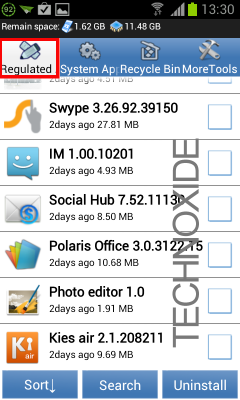
2. Open HiUninstaller , then you will see 4 Tabs Regulated Apps , System Apps, Recycle Bin and More Tools.
Regulated Apps tab - This tab shows all the apps installed by us and some pre installed apps.. you can uninstall any apps from this tab without root.
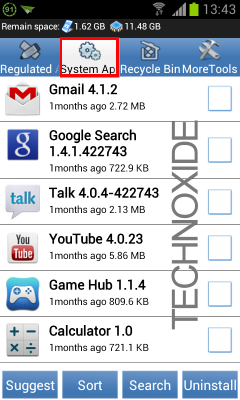
System Apps tab - This tab shows all the pre installed system apps.. your device must be rooted to uninstall any app from this tab.
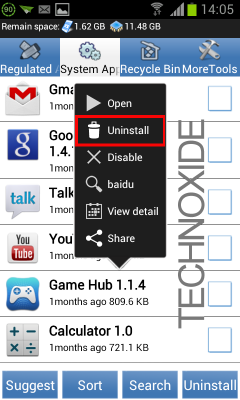
3. Select your preferred tab and click on the app you want to uninstall...It will popup a menu....select Uninstall.
4. It will popup a confirmation ... uncheck Recycle Bin if you dont want to keep backup and click OK button.
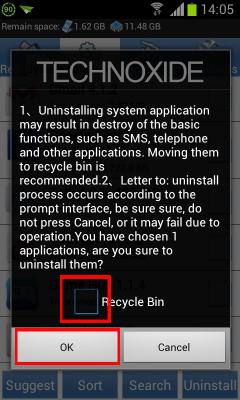
5. Again you will get a confirmation ...click OK button.
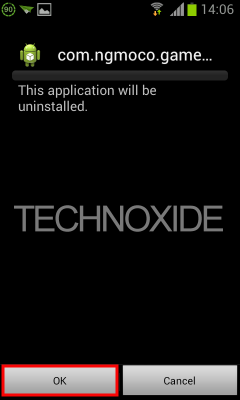
Thats it...
Note : Also you can uninstall apps by checking the corresponding checkbox and click Uninstall at the bottom right.
Available link for download
Wednesday, December 28, 2016
Game Nintendo Entertainment System Emulator
Game Nintendo Entertainment System Emulator
Game Nintendo Entertainment System Emulator
Jual Game Nintendo Entertainment System Emulator Untuk PC & Laptop
Game Nintendo Entertainment System Emulator: Harga Rp.30.000,-
- 10.000 Lebih File Game Nintendo Entertainment System
- Aplikasi exe Emulator Nintendo Untuk PC & Laptop [Portable]
Keterangan: DVD Merk MAXELL/SONY & Pengiriman Di Packing Menggunakan Box DVD
Untuk Pemesanan Bisa Call/SMS/WA: 0858-85411220 / 021-92719581 & BBM: 7C1940DB Harry
Mohon Maaf Tidak Melayani COD, Ketemuan, dan Kunjungan [Online Only]
Melayani Pengiriman Seluruh Indonesia via JNE & Pembayaran via Rek.BCA
Harga Belum Termasuk OngKir JNE
Pengiriman Resi JNE Software Computer [ A/n Pengirim Harry Awen ] Cek Disini


Available link for download
Tuesday, December 20, 2016
How to Fix Galaxy Note Unfortunately System UI has stopped
How to Fix Galaxy Note Unfortunately System UI has stopped
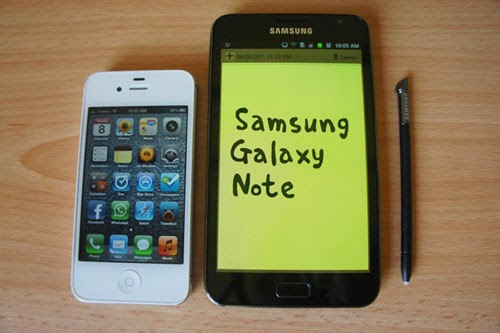
You can solve your problem with two methods.
Method #1
Set default theme
Method #2
Settings >> Applications >> View All Application >> Scroll down and click on Clear Cache and reboot your system.
I hope this article helpful for you. If you found any problem, then leave us a comment.
Available link for download
Friday, November 4, 2016
Heres Why Its Time to Upgrade Your Gaming System
Heres Why Its Time to Upgrade Your Gaming System
The average PC refresh cycle is getting longer and longer. While at one time a person was likely to refresh their PCs every two-to-three years, this cycle has stretched on to now be between five to seven years. While hardcore gamers might update their hardware on a 12 month cycle, the average person that doesnt have a budget to do yearly upgrades might still be using hardware form 2010.
And for the average person this might work -- but it wont work well. While hardware from 2010 might be able to play 2015s latest games, it will only do so with choppy frame rates at the lowest resolutions and graphics settings. This is far from an enjoyable gaming experience, and is not how the developers intended the games to be played.
Just to show you the performance advantage a modern system featuring an Intel® 6th. Gen™ CPU, DDR4 RAM, an Intel 750-series SSD, a GIGABYTE WindForce GeForce 980 Ti graphics card on a GIGABYTE Z170X-Gaming G1 motherboard has over a system with a 2010-era high-end hardware weve prepared a video demonstrating the vast difference in performance. As you will see, our benchmarking of the resource demanding Grand Theft Auto V and the benchmark suite Catzilla shows that the 2010-era system struggles while the GIGABYTE G1 Gaming motherboard based system has no problem.
Check out the video below from the GIGABYTE Motherboard and Brix YouTube channel:
Building a 2015 gaming machine
For the benchmarking tests we chose to put together a system that would represent what an average user would be after if they wanted to build a high-end system. Of course, there are those that have the budget for an extreme system with multiple graphics cards and extensive watercooling systems but many gamers simply dont have the budget for that and want high-end gaming at an affordable price.
Lets go through the parts used in building the PC and why we chose them.
GIGABYTE 100 Series Motherboard: For this video we used the GIGABYTE Z170X-Gaming G1 motherboard, the flagship Gaming motherboard of GIGABYTEs 100 Series lineup. The Gaming G1 motherboard has many high-end features that set it miles apart from the competition.

For audiophiles looking to game with crystal-clear sound the Gaming G1 motherboard has a Creative® Sound Core3D™ Quad-Core audio processor with a Burr-Brown high end 127 dB DAC which is Creative® certified ZxRi 120+dB SNR . For those with an interest in overclocking, the GIGABYTE Z170X-Gaming G1 board features enhanced BCLK frequency tuning, allowing overclockers to make adjustments outside of the traditional 5% straps. In addition, for gamers that play online, lag is a thing of the past: this board features the lag-killing Killer DoubleShot-X3™ Pro which intelligently routes traffic over the boards available connections ensuring that online games run silky smooth even as downloads continue in the background.
While this motherboard might be right for someone with a bigger budget for a system build, theres also the GIGABYTE Z170X-Gaming 7 or the Z170X-Gaming 3 for those that need to stay within a smaller budget. All of these GIGABYTEs 100 Series motherboards support the latest Intel 6th.® Gen™ CPU, DDR4 RAM, feature onboard USB Type-C™ and have other innovative and award-winning GIGABYTE features.
Intel 6th. Gen CPU: For those wanting the best in price-performance, theres no better choice than an Intel 6th. Gen CPU. As you can see in the video it offers double-digit performance gains over a CPU from the last generation. Under the lid Intel has made improvements to the micro architecture to make it more efficient.

One of the things Intel has improved is the processors ability to fetch and dispatch up to six instructions at once and store up to 224 instructions in its out-of-order buffer at once (up from 192 in Haswell).
In addition, it has enhanced support for DDR4, support for USB 3.1 over USB Type C, and better baseclock tuning for enhanced overclocking support.
If youre after some more in-depth benchmarking and analysis check out these reviews from around the web.
DDR4 RAM: First supported on Intel fifth-generation CPUs, DDR4 is the latest generation of RAM offering a range of improvements over over DDR2 and DDR3.

The primary advantages of DDR4 is that is offers higher speeds -- between 800 to 1600 MHz -- than DDR3 which had a maximum frequency of 1067 MHz, as well as it runs at a lower voltage.
The big speed increases that DDR4 offers makes it a must have for any gamer looking to get the most out of his system.
Intel 750 Series SSD: Over the past five years SSDs have gone down in price dramatically while increasing in speed and storage. Now, the cost per gigabyte of an SSD is getting to be very competitive to an HDD for the average user (with the cost/GB approaching $1). SSDs are faster than HDDs because they use something called non-volatile NAND memory instead of a magnetic platter and actuator arm. On average, a PCIe-based SSD will offer a 4X speed improvement over an HDD. For a more detailed explainer of the differences between an HDD and SSD, you can check out this post from PC Mag.

For our system we used the Intel 750 Series SSD. This SSD fits right into the motherboards PCI-e slot, and uses a controller protocol developed by Intel called Non-Volatile Memory Express (commonly shortened as NVMe). Benchmarks published online show that the SSD can push 2.4GB/sec of read and 1.2GB/sec of write bandwidth. For gamers this means that demanding games (such as Grand Theft Auto V which we tested) can run at a better FPS as the system has faster access to the games data and high-resolution textures.
Its time to upgrade
Available link for download