Showing posts with label post. Show all posts
Showing posts with label post. Show all posts
Tuesday, March 7, 2017
How To Create Custom Redirects for Blogger Post
How To Create Custom Redirects for Blogger Post
 Yesterday i wrote a post on editing blogger post URL, and i was mentioned to write down the posts old URL before changing to a new one .Because, if the post you are decide to change the URL is an old one there is chance that the old URL may be indexed in search engine or in social website like Facebook or Twitter or GooglePlus. Because of that there is a chance to lose the visitor coming from those sites as the URL will give a does not exist error ! Here comes the importance of Custom Redirects.
 Custom Redirects will help us to redirect the user from those old URL to the new URL. This post describe the steps to create a Custom Redirect in Blogger. Just follow the steps below.
Steps:
1. Login to your Blogger account.
2. In your blogs dashboard , GO to Settings > Search Preferences

3. Click on Custom Redirects > Edit

4. Now you will get something like below image

5. Now Add the your posts Old URL to From textfield and add the posts new URL to To textfield.
( Dont add the full URL just add the the red marked part of the URL in the example below )
eg. http://technoxide.blogspot.com/2012/07/redirect-blogger-post.html
6. Click Save and Save Changes.
Update: [ Custom Redirect Mobile Version of Blogger URL ]
You also need to add the mobile version of the old URL to the custom redirect. add ?m=1 after the old post URL to get the mobile version.
eg: http://technoxide.blogspot.com/2012/07/redirect-blogger-post.html?m=1
Thats it ! Now navigate to your posts old URL it will automatically redirects to your posts new URL.
Available link for download

Sunday, February 12, 2017
How to Index your Blog Post Quickly
How to Index your Blog Post Quickly
Website blog post indexed on Google search engines is very important for reaching maximum audience for your blog post content. Indexed mean that any search engine is showing your website result. If your website is not indexed on search engine, then the problem is that your website page result will not show on the search engine. Then this was a big problem for you. First, ensure that your website indexed on search engines, for check it type your website URL in any search engine and check that your website result was appeared or not. You can easily indexed your blog post quickly. Here I am providig some great ways to index your post content quickly.

Write Big and Quality Content
This is the most important part of your website. First write big and quality content to get indexed your post quickly. Use keywords and write post content more than 500+ words.
Use Ping tom Services
Ping-O-Matic is a very useful service for both blogger and WordPress users. It is an effective way to notify search engine for your website pages.
Sitemap Submission
You can submit a sitemap to Google, yahoo and many other popular search engines.
Create Back links
If you have so many back links of your website, then it was very helpful in indexed your blog post quickly. So you must create internal and external back links on your website.
Use Social Networking Website
Every blogger must use the social networking websites, because it is also an easy way to get indexed your blog post. Social networking website as Facebook, Twitter and Google+ helps to you create more back links of your website.
Available link for download
Tuesday, February 7, 2017
How To Change Blogger Post URL Using Custom Permalink
How To Change Blogger Post URL Using Custom Permalink
 Whenever we publish a new post, Blogger automatically generates the post URL according to the title of the blog post. For example, if the post title is How To Change Blogger Post URL Using Permalink? then Blogger will generate http:// technoxide.blogspot.com /2012/07/ how-to-change -blogger-post- url-using.html as the post URL. If you want to change this URL to a small SEO friendly one here comes the solution.
Recently Blogger introduced an option named Permalink in Post settings to edit the post URL to your desired one. In this post I included the simple steps to use custom permalink in Blogger blog. Here are the steps.
Steps:
Note : If you have Permalink Option in your Blogger Post Settings Start from Step 2.
1. Open a post you wish to edit the URL or Create a New Post.
(If you are editing a published post, then click on Revert to draft button to enable Permalink editing.)

2. Then click Permalink in Post Settings.
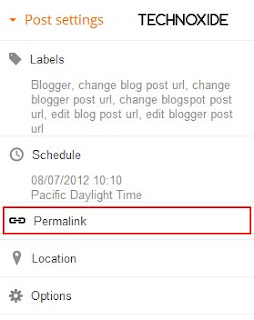
3. Now check the Custom URL radio button and type the new post URL in Custom URL text field. After changing the URL dont forget to click Done!
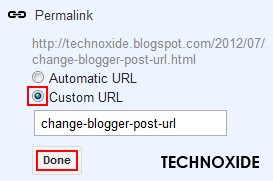
4.Finally, Click Publish .
Thats it...Now check the post URL it will be changed to the modified one !
Note : If you are changing URL of a old post, please note down the old URL before changing to a new one. Because your old post URL may be submitted to search engine or social websites.So If any one come to your blog using the old URL he will get a 404 not found error. Dont Worry ! you can Redirect your old URL to new URL using Custom Redirects feature of Blogger.
Available link for download
Subscribe to:
Posts (Atom)