Showing posts with label enter. Show all posts
Showing posts with label enter. Show all posts
Monday, April 10, 2017
How to remove bypass please enter the Privacy Protection
How to remove bypass please enter the Privacy Protection
With this Miracle Box method, you wont need to flash the phones firmware to fix this "please enter the privacy protection password to unlock" error. Some Supported :- Spice , karbonn , lava , micromax , intex , vivo , and More
Requirement
* Download Miracle Box (MIRACLE BOX SETUP DOWNLOAD HERE)
* PC windows
* USB cord
* Manually Install Mediatek VCOM drivers (see MTK USB DRIVER DOWNLOAD )
IF YOU NEED FIRMWARE ALL MOBILES TO CLICK HERE
Note:-
If this method fails to work for whatever reason then you can always use the SP Flash tool format method (SP FLASH TOOL DOWNLOAD HERE)
Procedure
1. Extract the content of the Miracle Box to your desktop. Open the folder and run "Miracle_Loader_2.27A"

2. Wait till the Miracle Box program is launched
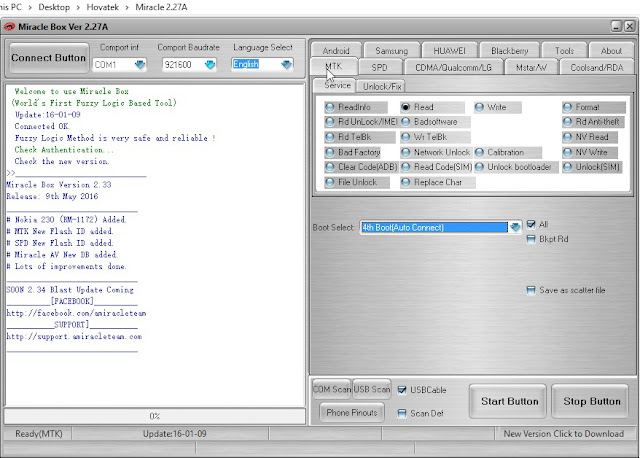
3. Click on the MTK tab
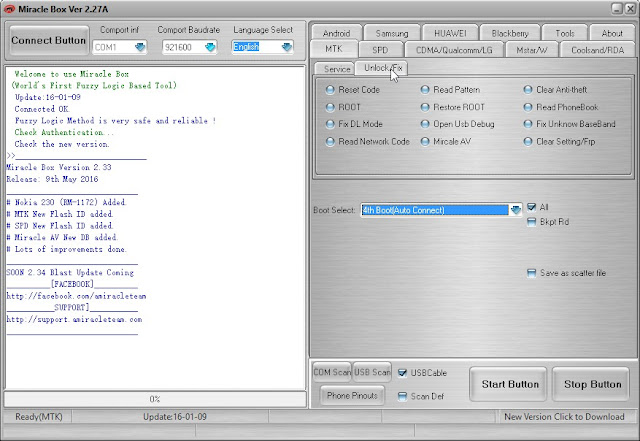
4. Click on the Unlock / Fix tab

5. Tick Clear Anti-theft

6. Click the dropdown box and select your chipset type MT****

7. Click the Start Button

8. Connect the phone to the PC (must be switched off still with battery inside)
9. Press the power button once (this is to ensure that your device is detected immediately). DO NOT hold down the power button else the phone will boot up normally
10. Wait for the message ">>Done. (Need to wait a few minutes the phone is switched)"
11. Disconnect and power on the phone !!!!! Download This App For future App !!!!!
Requirement
* Download Miracle Box (MIRACLE BOX SETUP DOWNLOAD HERE)
* PC windows
* USB cord
* Manually Install Mediatek VCOM drivers (see MTK USB DRIVER DOWNLOAD )
IF YOU NEED FIRMWARE ALL MOBILES TO CLICK HERE
Note:-
If this method fails to work for whatever reason then you can always use the SP Flash tool format method (SP FLASH TOOL DOWNLOAD HERE)
Procedure
1. Extract the content of the Miracle Box to your desktop. Open the folder and run "Miracle_Loader_2.27A"
2. Wait till the Miracle Box program is launched
3. Click on the MTK tab
4. Click on the Unlock / Fix tab
5. Tick Clear Anti-theft
6. Click the dropdown box and select your chipset type MT****
7. Click the Start Button
8. Connect the phone to the PC (must be switched off still with battery inside)
9. Press the power button once (this is to ensure that your device is detected immediately). DO NOT hold down the power button else the phone will boot up normally
10. Wait for the message ">>Done. (Need to wait a few minutes the phone is switched)"
11. Disconnect and power on the phone !!!!! Download This App For future App !!!!!
Available link for download

Friday, November 25, 2016
How to enter recovery mode in Samsung Galaxy S Plus
How to enter recovery mode in Samsung Galaxy S Plus
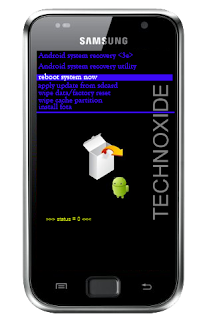
Methode:
1. Switch off your SGS Plus (wait until you get the vibration )
2. Now, press and hold the volume up key and the power button. Leave both buttons when you see the SAMSUNG logo.
3. After "Galaxy S Plus" splash screen you will get a white box and android logo image like below,then press menu soft key and wait some second.
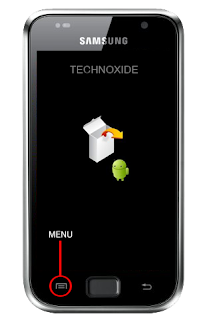
Thats it ! You will be in recovery mode !
Available link for download
Thursday, October 27, 2016
How to Fix ICS Keyboard Enter Key Smiley Key On SMS
How to Fix ICS Keyboard Enter Key Smiley Key On SMS
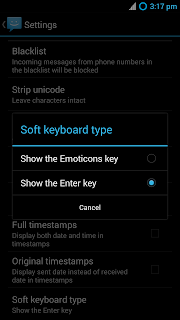
Most of the people may uses Emoticons (Smiley) than Enter key while chatting with friends. May be because of that, in the default SMS app of Android 4.0 (ICS), By default the Keyboard included an Emoticons (smiley) key in the place of Enter key. So if we like to have Enter key in place of Emoticons, then we can change it from the sms settings. here is the steps...
How To Enable Enter Key in Android 4.0 ( ICS ) Default SMS App?
1. Open SMS app.2. Go to Setting using softkey or Action bar 3 dots.
3. In the settings screen....scroll down to bottom and tap on Soft keyboard type.
4. Finally in the Dialog select Show the Enter key
Thats it done...
UPDATE :
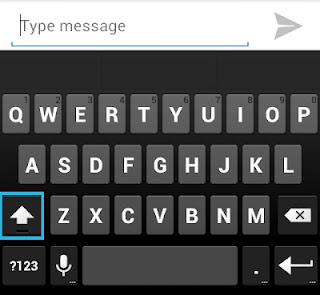
On Android 4.1+ (Jelly Bean)+ You can get the enter key by simply clicking the shift button. see the below image. ( Thanks to Kakouz )
Available link for download
Subscribe to:
Posts (Atom)