Showing posts with label karbonn. Show all posts
Showing posts with label karbonn. Show all posts
Wednesday, April 12, 2017
How to root karbonn A1
How to root karbonn A1
Requirements :
 ?Ginger break
?Root checker.apk
?Super user
?Ginger break?Root checker.apk
?Super user
Step-By-Step Instructions:-
1) Download the app Gingerbreak.apk. From Here.
2) Turn the USB Debugging mode on. From Settings>Applications>Development>USB Debugging.
3)Then install Gingerbreak.apk to your phone.
4) Open the Gingerbreak app.
5) Then click on Root Device.
6) You will have to wait for a minute
7) Then the phone will reboot.The reboot shows that the root is complete download super user from here
8) Using root checker check the rooting
9) download and install super user from here
8) Using root checker check the rooting
9) download and install super user from here
*********************************************************
Available link for download

Tuesday, April 11, 2017
how to root karbonn a6
how to root karbonn a6
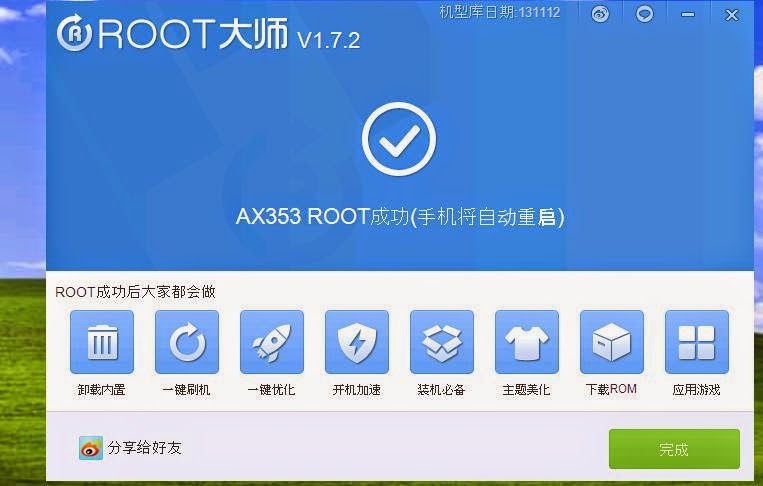
Requirements:
1.Vroot
2.USB driver(for your android click here)
3.Root checker
STEPS TO ROOT ANDROID :-
Step 1: Enable USB Debugging on your Android Smartphone. To enable USB debugging, Open Settings > Developers Option > USB Debugging > Tick (if u dont know how to enable usb debugging click here
Step 2: Download and install vRoot Application on your Windows Computer
.
Step 3: Once vRoot Application is installed on your Computer, and install usb driver and Open vroot.
Step 4: Once vRoot Application is launched, connect your Android device to the computer
Step 5: Once Your Smartphone is connected successfully to the computer, vRoot will automatically detect your Smartphone.
Step 6: Now, Click on the “Root” button to begin the rooting process.
Step 7: Now, vRoot will automatically “Reboot” your Smartphone and install the SuperSU Application
Step 8: Now your Android Device is Rooted. To check whether your phone is rooted correctly, open Applications Menu, there you will be able to see a new app installed, called SuperSU. If this app exist then it means you have successfully rooted your device.
Optional: You can also verify that your device is successfully rooted or not by Root Checker Application.
**************************************************************
Available link for download
Sunday, April 9, 2017
How to root karbonn A4 plus
How to root karbonn A4 plus
Requirements :
KARBONN USB DRIVER
BIN4RY
Step-By-Step Instructions:-
1.Go To Settings>Security & Enable The Install From Unknown Source. (Skip If Already Enabled)
2. Open Rooting Software File and Unzip Software
3. After that Connect Your Karbonn Android Mobile, and before to connecting make sure you have install Driver and Enable USB Debugging.
4. After that Wait few mins
5. Then open Rooting software folder and click on "RunMe.bat" file
6. Then you see Many option, so Type "1" for normal and press enter, then in few sec your mobile rooted and you have see message "Your mobile is rooted successfully".
7. And when you have need to unroot your mobile then open "RunMe.bat" file and type "x" and press enter then your mobile unrooted.
NOTE:
This article related to Rooting of Karboon Android Mobile Phone, and may be its work properly, if you have getting any problem use universal root
Available link for download
Tuesday, April 4, 2017
How to root karbonn A9
How to root karbonn A9
Requirements :
KARBONN USB DRIVER
BIN4RY
Step-By-Step Instructions:-
1.Go To Settings>Security & Enable The Install From Unknown Source. (Skip If Already Enabled)
2. Open Rooting Software File and Unzip Software
3. After that Connect Your Karbonn Android Mobile, and before to connecting make sure you have install Driver and Enable USB Debugging.
4. After that Wait few mins
5. Then open Rooting software folder and click on "RunMe.bat" file
6. Then you see Many option, so Type "1" for normal and press enter, then in few sec your mobile rooted and you have see message "Your mobile is rooted successfully".
7. And when you have need to unroot your mobile then open "RunMe.bat" file and type "x" and press enter then your mobile unrooted.
NOTE:
This article related to Rooting of Karboon Android Mobile Phone, and may be its work properly, if you have getting any problem use universal root
Available link for download
Wednesday, March 29, 2017
How to root karbonn A12 star
How to root karbonn A12 star
Requirements :
KARBONN USB DRIVER
BIN4RY
Step-By-Step Instructions:-
1.Go To Settings>Security & Enable The Install From Unknown Source. (Skip If Already Enabled)
2. Open Rooting Software File and Unzip Software
3. After that Connect Your Karbonn Android Mobile, and before to connecting make sure you have install Driver and Enable USB Debugging.
4. After that Wait few mins
5. Then open Rooting software folder and click on "RunMe.bat" file
6. Then you see Many option, so Type "1" for normal and press enter, then in few sec your mobile rooted and you have see message "Your mobile is rooted successfully".
7. And when you have need to unroot your mobile then open "RunMe.bat" file and type "x" and press enter then your mobile unrooted.
NOTE:
This article related to Rooting of Karboon Android Mobile Phone, and may be its work properly, if you have getting any problem use universal root
Available link for download
Monday, March 27, 2017
How to root karbonn A15 plus
How to root karbonn A15 plus
Requirements :
KARBONN USB DRIVER
BIN4RY
Step-By-Step Instructions:-
1.Go To Settings>Security & Enable The Install From Unknown Source. (Skip If Already Enabled)
2. Open Rooting Software File and Unzip Software
3. After that Connect Your Karbonn Android Mobile, and before to connecting make sure you have install Driver and Enable USB Debugging.
4. After that Wait few mins
5. Then open Rooting software folder and click on "RunMe.bat" file
6. Then you see Many option, so Type "1" for normal and press enter, then in few sec your mobile rooted and you have see message "Your mobile is rooted successfully".
7. And when you have need to unroot your mobile then open "RunMe.bat" file and type "x" and press enter then your mobile unrooted.
NOTE:
This article related to Rooting of Karboon Android Mobile Phone, and may be its work properly, if you have getting any problem use universal root
Available link for download
Thursday, March 16, 2017
How to root karbonn A3
How to root karbonn A3
Requirements :
? z4 root
? Root checker
? super user
Step-By-Step Instructions:-
1.Go To Settings>Security & Enable The Install From Unknown Source. (Skip If Already Enabled)
2.Open Settings>Application>Development>USB Debugging>Enable USB Debugging.(Skip If Already Enabled)
3.Download The Z4root App From Above Link.
4.Copy It To Your Phone Sdcard. Install The App.
5.Open The App&You Will Be Seeing A Button "Permanent Root".Press That.
Your Phone Will Autoboot Once, & You Are Done With Rooting Your Karbonn A3
6. And install super user from here
7. using root checker check if the mobile rooting or not
*********************************************************
? z4 root? Root checker
? super user
Step-By-Step Instructions:-
1.Go To Settings>Security & Enable The Install From Unknown Source. (Skip If Already Enabled)
2.Open Settings>Application>Development>USB Debugging>Enable USB Debugging.(Skip If Already Enabled)
3.Download The Z4root App From Above Link.
4.Copy It To Your Phone Sdcard. Install The App.
5.Open The App&You Will Be Seeing A Button "Permanent Root".Press That.
Your Phone Will Autoboot Once, & You Are Done With Rooting Your Karbonn A3
6. And install super user from here
7. using root checker check if the mobile rooting or not
*********************************************************
Available link for download
Wednesday, March 15, 2017
how to root karbonn A7 star
how to root karbonn A7 star
Requirements :
KARBONN USB DRIVER
BIN4RY
Step-By-Step Instructions:-
1.Go To Settings>Security & Enable The Install From Unknown Source. (Skip If Already Enabled)
2. Open Rooting Software File and Unzip Software
3. After that Connect Your Karbonn Android Mobile, and before to connecting make sure you have install Driver and Enable USB Debugging.
4. After that Wait few mins
5. Then open Rooting software folder and click on "RunMe.bat" file
6. Then you see Many option, so Type "1" for normal and press enter, then in few sec your mobile rooted and you have see message "Your mobile is rooted successfully".
7. And when you have need to unroot your mobile then open "RunMe.bat" file and type "x" and press enter then your mobile unrooted.
NOTE:
This article related to Rooting of Karboon Android Mobile Phone, and may be its work properly, if you have getting any problem use universal root
Available link for download
Wednesday, March 8, 2017
How to root Karbonn A5 plus
How to root Karbonn A5 plus
Requirements :
KARBONN USB DRIVER
BIN4RY
Step-By-Step Instructions:-
1.Go To Settings>Security & Enable The Install From Unknown Source. (Skip If Already Enabled)
2. Open Rooting Software File and Unzip Software
3. After that Connect Your Karbonn Android Mobile, and before to connecting make sure you have install Driver and Enable USB Debugging.
4. After that Wait few mins
5. Then open Rooting software folder and click on "RunMe.bat" file
6. Then you see Many option, so Type "1" for normal and press enter, then in few sec your mobile rooted and you have see message "Your mobile is rooted successfully".
7. And when you have need to unroot your mobile then open "RunMe.bat" file and type "x" and press enter then your mobile unrooted.
NOTE:
This article related to Rooting of Karboon Android Mobile Phone, and may be its work properly, if you have getting any problem use universal root
Available link for download
Sunday, March 5, 2017
How to root Karbonn A12
How to root Karbonn A12
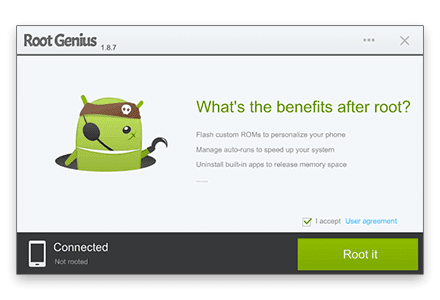
Root Genius is One click root tool designed to work on Windows Computer. It helps user to root their Android Smartphone in single click. Here, we are going to guide you how to use Root Genius to root any Android Device.
Note: If you are using any Antivirus Application on your computer then disable it first then after follow the below tutorial.Requirements:
1. Root genius
2.USB driver(for your android click here)
STEPS TO ROOT ANDROID :-
Step 1: Enable USB Debugging on your Android Smartphone. To enable USB debugging, Open Settings > Developers Option > USB Debugging > Tick to Enable. (if u dont know how to enable usb debugging click here )Step 2: Download and Open Root Genius Application on your Windows Computer and install usb driver
Step 3: Once Root Genius Application is launched, connect your Android device to the computer (with USB Debugging enabled).
Step 4: Once Your Smartphone is connected successfully to the computer, Root Genius will automatically detect your Android Device.
Step 5: Now, Click on the “Root Now” button to begin the rooting process.
Step 6: Now, Root Genius will automatically “Root” your Android Device and install the KingUser Application
Step 7: Now your Android Device is Rooted. To check whether your phone is rooted correctly, open Applications Menu, there you will be able to see a new app installed, called KingUser. If this app exist then it means you have successfully rooted your device.
Optional: You can also verify that your device is successfully rooted or not by Root Checker Application.
************************************************************
Available link for download
Sunday, February 19, 2017
How to root karbonn A8
How to root karbonn A8
Requirements :
KARBONN USB DRIVER
BIN4RY
Step-By-Step Instructions:-
1.Go To Settings>Security & Enable The Install From Unknown Source. (Skip If Already Enabled)
2. Open Rooting Software File and Unzip Software
3. After that Connect Your Karbonn Android Mobile, and before to connecting make sure you have install Driver and Enable USB Debugging.
4. After that Wait few mins
5. Then open Rooting software folder and click on "RunMe.bat" file
6. Then you see Many option, so Type "1" for normal and press enter, then in few sec your mobile rooted and you have see message "Your mobile is rooted successfully".
7. And when you have need to unroot your mobile then open "RunMe.bat" file and type "x" and press enter then your mobile unrooted.
NOTE:
This article related to Rooting of Karboon Android Mobile Phone, and may be its work properly, if you have getting any problem use universal root
Available link for download
Tuesday, February 14, 2017
How to root karbonn A11 plus
How to root karbonn A11 plus
Requirements :
KARBONN USB DRIVER
BIN4RY
Step-By-Step Instructions:-
1.Go To Settings>Security & Enable The Install From Unknown Source. (Skip If Already Enabled)
2. Open Rooting Software File and Unzip Software
3. After that Connect Your Karbonn Android Mobile, and before to connecting make sure you have install Driver and Enable USB Debugging.
4. After that Wait few mins
5. Then open Rooting software folder and click on "RunMe.bat" file
6. Then you see Many option, so Type "1" for normal and press enter, then in few sec your mobile rooted and you have see message "Your mobile is rooted successfully".
7. And when you have need to unroot your mobile then open "RunMe.bat" file and type "x" and press enter then your mobile unrooted.
NOTE:
This article related to Rooting of Karboon Android Mobile Phone, and may be its work properly, if you have getting any problem use universal root
Available link for download
Sunday, February 5, 2017
How to root karbonn a4
How to root karbonn a4
Requirements :
KARBONN USB DRIVER
BIN4RY
Step-By-Step Instructions:-
1.Go To Settings>Security & Enable The Install From Unknown Source. (Skip If Already Enabled)
2. Open Rooting Software File and Unzip Software
3. After that Connect Your Karbonn Android Mobile, and before to connecting make sure you have install Driver and Enable USB Debugging.
4. After that Wait few mins
5. Then open Rooting software folder and click on "RunMe.bat" file
6. Then you see Many option, so Type "1" for normal and press enter, then in few sec your mobile rooted and you have see message "Your mobile is rooted successfully".
7. And when you have need to unroot your mobile then open "RunMe.bat" file and type "x" and press enter then your mobile unrooted.
NOTE:
This article related to Rooting of Karboon Android Mobile Phone, and may be its work properly, if you have getting any problem use universal root
Available link for download
Wednesday, February 1, 2017
How to root karbonn A9 star
How to root karbonn A9 star
Root Genius is One click root tool designed to work on Windows Computer. It helps user to root their Android Smartphone in single click. Here, we are going to guide you how to use Root Genius to root any Android Device.
Note: If you are using any Antivirus Application on your computer then disable it first then after follow the below tutorial.Requirements:
1. Root genius
2.USB driver(for your android click here)
STEPS TO ROOT ANDROID :-
Step 1: Enable USB Debugging on your Android Smartphone. To enable USB debugging, Open Settings > Developers Option > USB Debugging > Tick to Enable. (if u dont know how to enable usb debugging click here )Step 2: Download and Open Root Genius Application on your Windows Computer and install usb driver
Step 3: Once Root Genius Application is launched, connect your Android device to the computer (with USB Debugging enabled).
Step 4: Once Your Smartphone is connected successfully to the computer, Root Genius will automatically detect your Android Device.
Step 5: Now, Click on the “Root Now” button to begin the rooting process.
Step 6: Now, Root Genius will automatically “Root” your Android Device and install the KingUser Application
Step 7: Now your Android Device is Rooted. To check whether your phone is rooted correctly, open Applications Menu, there you will be able to see a new app installed, called KingUser. If this app exist then it means you have successfully rooted your device.
Optional: You can also verify that your device is successfully rooted or not by Root Checker Application.
************************************************************
Available link for download
How to root karbonn A15
How to root karbonn A15
Requirements :
KARBONN USB DRIVER
BIN4RY
Step-By-Step Instructions:-
1.Go To Settings>Security & Enable The Install From Unknown Source. (Skip If Already Enabled)
2. Open Rooting Software File and Unzip Software
3. After that Connect Your Karbonn Android Mobile, and before to connecting make sure you have install Driver and Enable USB Debugging.
4. After that Wait few mins
5. Then open Rooting software folder and click on "RunMe.bat" file
6. Then you see Many option, so Type "1" for normal and press enter, then in few sec your mobile rooted and you have see message "Your mobile is rooted successfully".
7. And when you have need to unroot your mobile then open "RunMe.bat" file and type "x" and press enter then your mobile unrooted.
NOTE:
This article related to Rooting of Karboon Android Mobile Phone, and may be its work properly, if you have getting any problem use universal root
Available link for download
Wednesday, January 25, 2017
How to root karbonn A12 plus
How to root karbonn A12 plus
Requirements:
1.Vroot
2.USB driver(for your android click here)
3.Root checker
STEPS TO ROOT ANDROID :-
Step 1: Enable USB Debugging on your Android Smartphone. To enable USB debugging, Open Settings > Developers Option > USB Debugging > Tick (if u dont know how to enable usb debugging click here
Step 2: Download and install vRoot Application on your Windows Computer
.
Step 3: Once vRoot Application is installed on your Computer, and install usb driver and Open vroot.
Step 4: Once vRoot Application is launched, connect your Android device to the computer
Step 5: Once Your Smartphone is connected successfully to the computer, vRoot will automatically detect your Smartphone.
Step 6: Now, Click on the “Root” button to begin the rooting process.
Step 7: Now, vRoot will automatically “Reboot” your Smartphone and install the SuperSU Application
Step 8: Now your Android Device is Rooted. To check whether your phone is rooted correctly, open Applications Menu, there you will be able to see a new app installed, called SuperSU. If this app exist then it means you have successfully rooted your device.
Optional: You can also verify that your device is successfully rooted or not by Root Checker Application.
**************************************************************
Available link for download
how to root karbonn A7
how to root karbonn A7
Requirements :
? frama root
? Root checker
Step-By-Step Instructions:-
1.Go To Settings>Security & Enable The Install From Unknown Source. (Skip If Already Enabled)
2.Open Settings>Application>Development>USB Debugging>Enable USB Debugging.(Skip If Already Enabled)
3.Download The frama root App From Above Link.
4.Copy It To Your Phone Sdcard. Install The App.
5.Open The App and install it
6. click super user And install super user
7.And reboot the device
8.your mobile is now rooted
9. using root checker check if the mobile rooting or not
*********************************************************
? frama root? Root checker
Step-By-Step Instructions:-
1.Go To Settings>Security & Enable The Install From Unknown Source. (Skip If Already Enabled)
2.Open Settings>Application>Development>USB Debugging>Enable USB Debugging.(Skip If Already Enabled)
3.Download The frama root App From Above Link.
4.Copy It To Your Phone Sdcard. Install The App.
5.Open The App and install it
6. click super user And install super user
7.And reboot the device
8.your mobile is now rooted
9. using root checker check if the mobile rooting or not
*********************************************************
Available link for download
Friday, January 13, 2017
How To Flash karbonn a100 MTK Smartphone With SP Flash Tool
How To Flash karbonn a100 MTK Smartphone With SP Flash Tool
How To Flash karbonn a100 MTK Smartphone With SP Flash Tools
Unofficial support site for this Phone By Welcome Zone Haldwani
The Instructions Given Below To Flash Stock Rom Or Any Custom Rom Flash File Firmware using Smart Phone Flash Tool (SP Flash Tool) on Your Android MTK SmartPhone .
Requirements:
1=> Your Android Smartphone should have at-least 40-50 percent of battery to perform the Flashing Process.
2=> SP Flash Tool And Usb Drivers .
You Can Download It From Last In The Post
3=> USB Cable.
Step 1: Download and install Android USB Drivers on your computer From The Link Given Up. In case You Already Installed Android USB Drivers on your Computer then skip this step.

Step 2: Then Next Step Is Power Off your Android Smartphone and remove the Battery (if it is removable).
Step 3: Download And Extract the Stock Rom or Custom Rom that you want to Flash on your Smartphone .
Step 4: Download and Extract Smart Phone Flash Tool on Your Computer. After Extracting you will be able to see the following files.
Step 5: Now Open Flash_tool.exe .

Step 6: When Smart Phone Flash Tool is launched , Click on the Scatter-Loading Button That Is On Right Side .

Step 7: Now , Locate the Scatter File (Give The Path Of That File You Extracted In Your Computer).
Step 8: Then Next Is Click on the Download Button to begin the Flashing Process.

After Clicking On The Download Button You Can See This Type Of Screen .

Step 9: Now, Connect your Android Smartphone to the Computer Via USB Cable (without battery- if it is removable).

Now One Red Line Is Run ThenThen One Voilet Line Then One Yellow Line Is Run And Then It finished .


Step 10: When Flashing is completed, a Green Download Ok Logo will appear.

Step 11: Now You Can Close the Smart Phone Flash Tool In your computer and disconnect your Android Smartphone from the computer .
Note => If You want To Flash Only User Data Or Recovery File So Tick Mark Only User Data Or Recovery File .
Deselect all parts except those one you want to flash and then press F9 Or Hit Download Button .


When You Click On The Download Button , The tool will immediately show a warning Message because not all parts are selected, but you should continue anyway, Safely press Yes.

Now Process To Flash Only One File Is Started And Compleated In Just A Minute .


Congratulations, Now your Smartphone is successfully Flashed With the Stock Rom you have Downloaded Or Only User Data Or Recovery File .
| karbonn a100 | Flash File | Download |
| karbonn a100 | Flash Tool | Download |
| karbonn a100 | Usb Driver | Download |
| Page | Like This |
Available link for download
Monday, January 9, 2017
How to root karbonn a2 plus
How to root karbonn a2 plus
Requirements :
? frama root
? Root checker
Step-By-Step Instructions:-
1.Go To Settings>Security & Enable The Install From Unknown Source. (Skip If Already Enabled)
2.Open Settings>Application>Development>USB Debugging>Enable USB Debugging.(Skip If Already Enabled)
3.Download The frama root App From Above Link.
4.Copy It To Your Phone Sdcard. Install The App.
5.Open The App and install it
6. click super user And install super user
7.And reboot the device
8.your mobile is now rooted
9. using root checker check if the mobile rooting or not
? frama root? Root checker
Step-By-Step Instructions:-
1.Go To Settings>Security & Enable The Install From Unknown Source. (Skip If Already Enabled)
2.Open Settings>Application>Development>USB Debugging>Enable USB Debugging.(Skip If Already Enabled)
3.Download The frama root App From Above Link.
4.Copy It To Your Phone Sdcard. Install The App.
5.Open The App and install it
6. click super user And install super user
7.And reboot the device
8.your mobile is now rooted
9. using root checker check if the mobile rooting or not
*****************************************
Available link for download
Subscribe to:
Posts (Atom)