Showing posts with label xiaomi. Show all posts
Showing posts with label xiaomi. Show all posts
Saturday, April 1, 2017
How To Root Unroot Xiaomi Redmi 2 Without PC
How To Root Unroot Xiaomi Redmi 2 Without PC
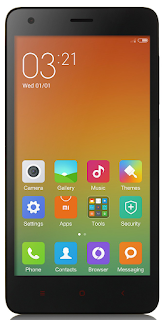 Redmi 2 is my first Xiaomi device and I am really satisfied with the spec and performance of the Redmi 2 for the price tag 6,999/- INR. Here I am posting the safest root method available in Xiaomi official forum for Redmi 2. This root method doesnt need any PC or Custom Recovery, just do it in your phone it self.
I have tested this root on the Redmi 2 Global version with MIUI version 6.4.4.0 (KHJMICB) and it worked without issue. In the Xiaomi forums Redmi 2 rooting thread you can find other variants of Redmi 2 root too.
Update
- Post updated with unrooting method.
Update (23/05/2015)
- Redmi 2 OTA update installation will fail on rooted device. So Unroot your Redmi 2 before OTA update.
Update (29-5-2015)
- Root available for V6.5.2.0.KHJMICD
Update (21-7-2015)
- Root available for V6.6.6.0.KHJMICF
Notes:
- In this post I am using the root for Redmi 2 Indian (Global) version with MIUI 6.4.4.0 (KHJMICB). If you have different phone or different MIUI version use appropriate root file.
- This root process will not delete any data. (Still recommend to backup important data)
- Battery percentage should be 40 or above.
- Rooting Will Void Warranty I am not responsible for any damage.
Redmi 2 Root Without PC
1. Download Specific Root File for Your Redmi 2 Version - Download2. Copy The Root File to Internal Memory.
3. Open Updater app (Probably in Tools Folder)
4. In Updated app tap on the 3 dots on the right top and select Choose update package.
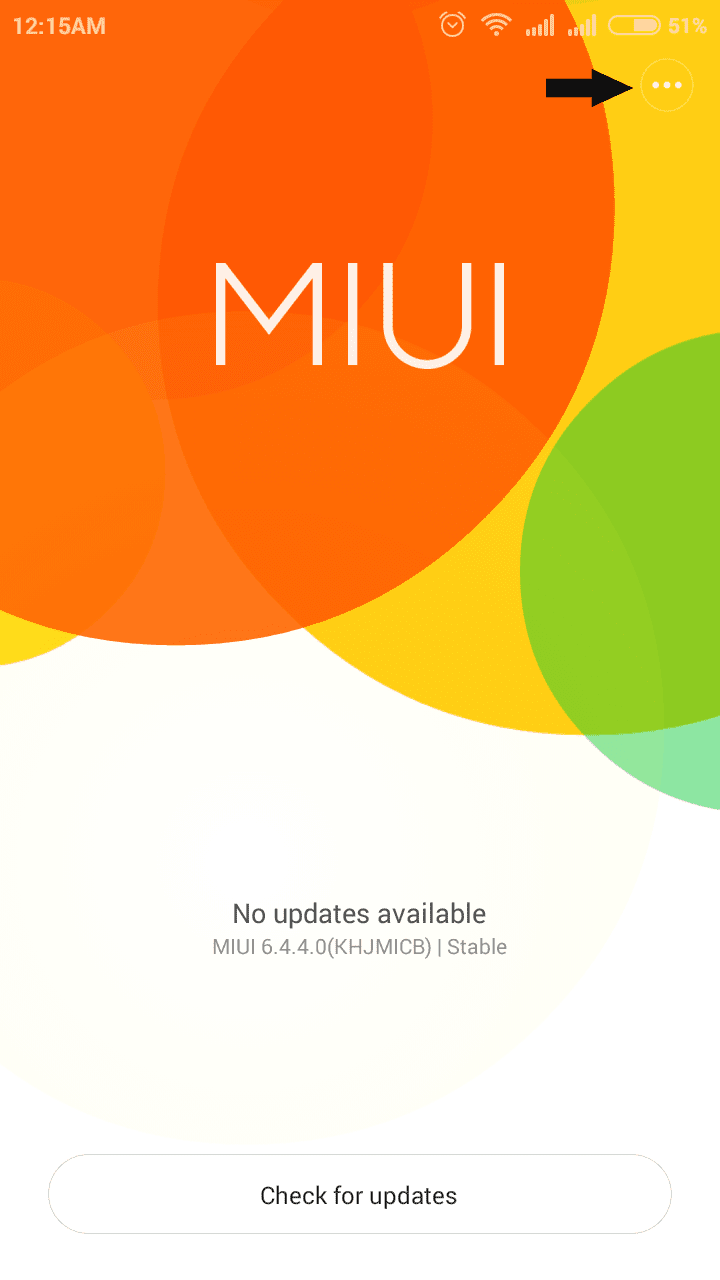
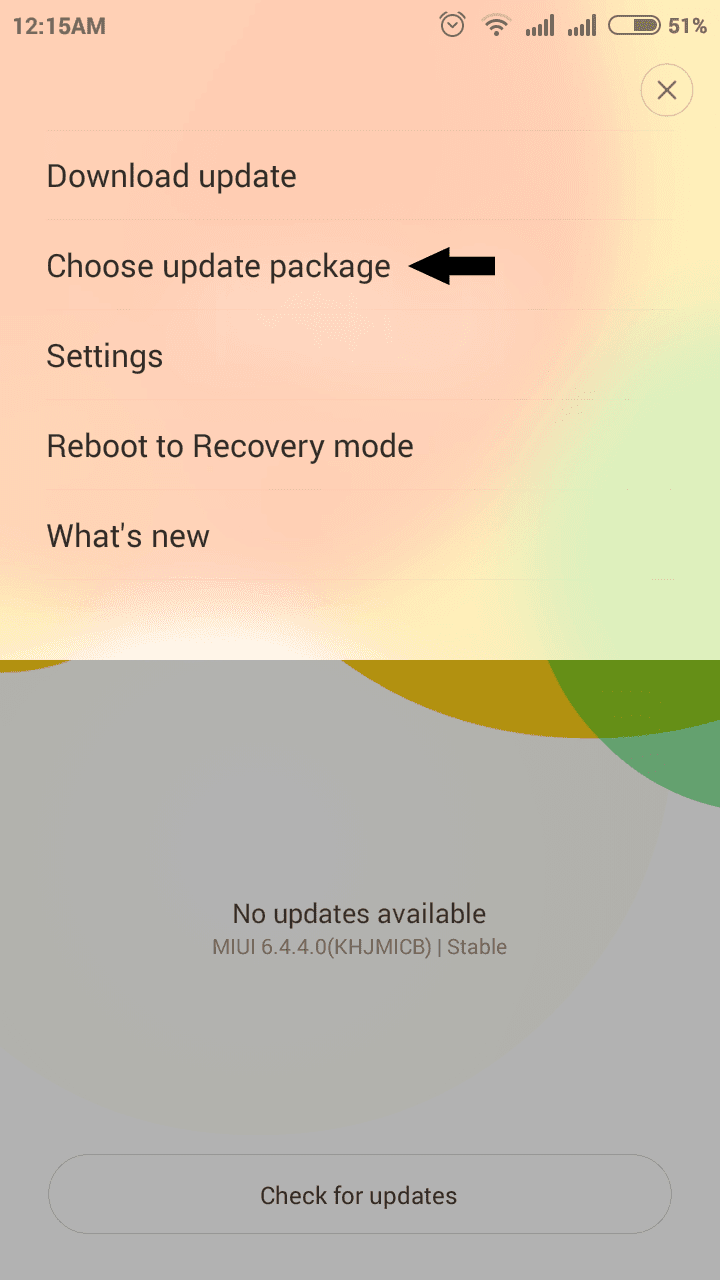
5. Now browse for the copied root file and select it.
(When You select the root package phone will reboot. Wait till it finish the process.)
6. After Reboot, Open Security app and tap on Permissions. You will see Root access menu there.
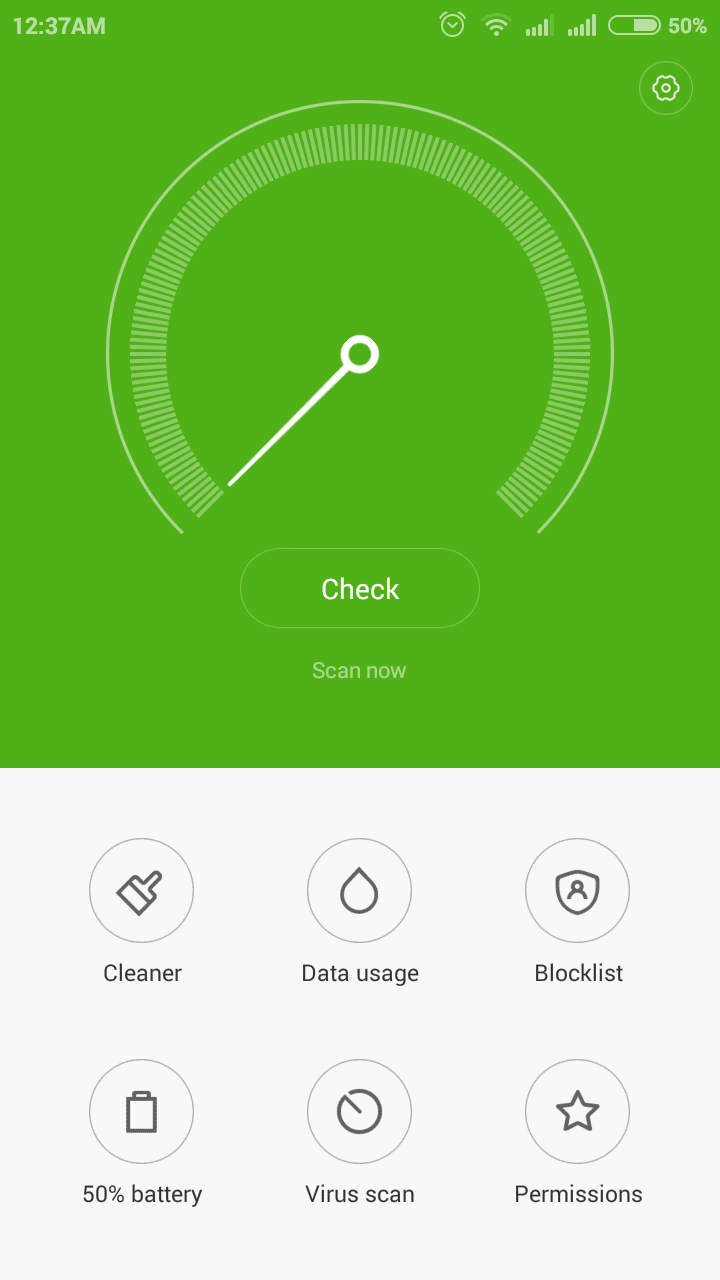
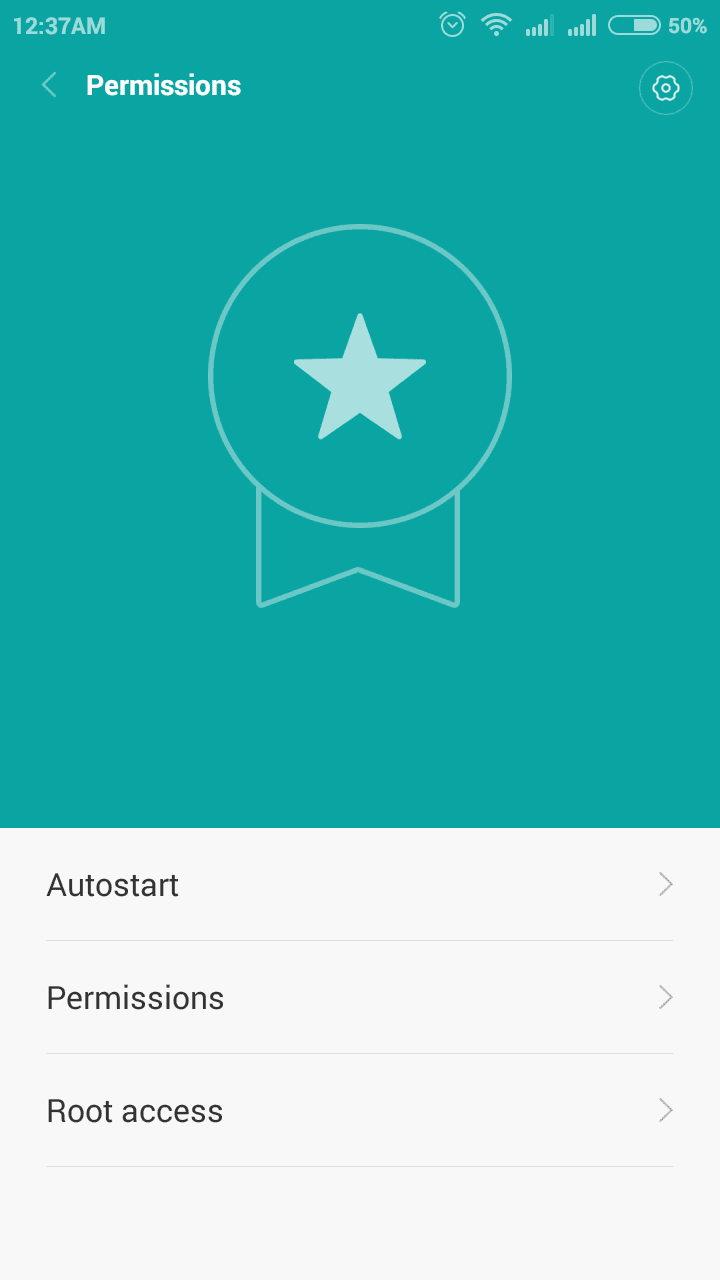
7. For Better root Management download Supersu and open it, then enable root access for Supersu in Security app finally Reboot device ...
Thats it you are successfully rooted your Xiaomi Redmi 2.
Redmi 2 Unroot Without PC
If any case you wish to unroot your Redmi 2 follow the below steps.1. Download Specific UnrootRoot (Disable) File for Your Redmi 2 Version - Download
2. Copy the Unroot file to Internal Memory.
3. follow the rooting procedure from step 3.
Thats it.
Available link for download

Thursday, December 15, 2016
How to Flash Mi Xiaomi Android Device Fastboot Method
How to Flash Mi Xiaomi Android Device Fastboot Method
When you have any major software issues with your Mi, Xiaomi android device, flashing the device is the most likely solution. To flash Mi, Xiaomi android device, you need Mi Flash Tool installed on your Windows PC along with the necessary drivers.
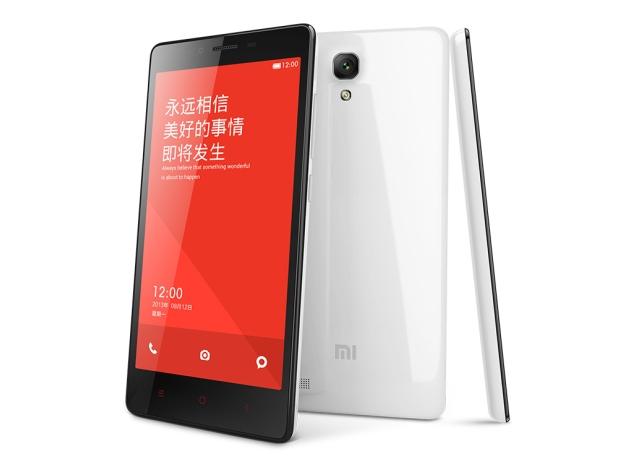
On this page, we contain detailed tutorial on how to flash your Mi, Xiaomi and RedMi android devices including the download links for the necessary files needed to complete the flashing operation.
i. Mi Flash TooL | ii. Mi ADB Drivers | iii. Unlock your Mi, Xiaomi device bootloader here(if its locked)
Now, flashing your Mi Android Device;
1. Install the Mi Flash Tool you downloaded on your PC and then, download Mi, Xiaomi Stock Firmware for your device from here.
2. Turn off the device and boot it to fastboot mode. To boot Mi android device to fastboot, while the device is powered off, press the Volume- key and the Power Keytogether.
3. Connect the device to your PC using its compatible USB Cable.
4. Extract the downloaded ROM onto a folder on your PC using 7zip. You may download 7zip from here.
5. Open the folder where the ROM is extracted then, copy the path of the ROM folder.
6. Lunch MiFlash.exe and copy the ROM path you copied earlier into the address field and click Refresh.
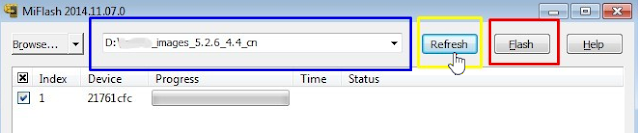
7. When MiFlash.exe is refreshed and located the device, click Flash.
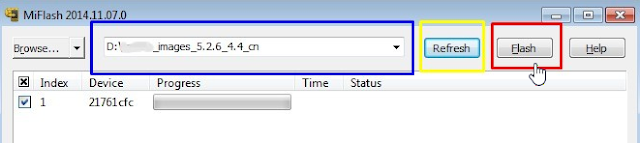
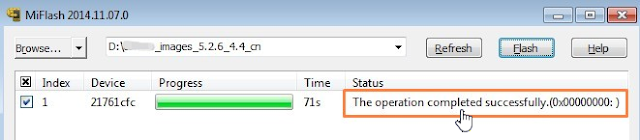
8. Wait until the progress bar inside MiFlash turns fully green, which means the ROM has been successfully installed. Then your device should automatically boot to the new version.
Do you find this tutorial useful? Or, have any issues? Lets hear you in the comment!
Sharimg is lovely,Feel free to share this post.
On this page, we contain detailed tutorial on how to flash your Mi, Xiaomi and RedMi android devices including the download links for the necessary files needed to complete the flashing operation.
This fastboot method implies that you are flashing using Mi .tgz stock firmware files. With this method, you cannot recover your files on the phone and it can be used to unbrick your Mi, Xiaomi android devices.
Flashing Mi, Xiaomi and RedMi Android Devices Using Mi Flash Tool
To begin with, download the files listed below and install them on your Windows PC.i. Mi Flash TooL | ii. Mi ADB Drivers | iii. Unlock your Mi, Xiaomi device bootloader here(if its locked)
Now, flashing your Mi Android Device;
1. Install the Mi Flash Tool you downloaded on your PC and then, download Mi, Xiaomi Stock Firmware for your device from here.
2. Turn off the device and boot it to fastboot mode. To boot Mi android device to fastboot, while the device is powered off, press the Volume- key and the Power Keytogether.
3. Connect the device to your PC using its compatible USB Cable.
4. Extract the downloaded ROM onto a folder on your PC using 7zip. You may download 7zip from here.
5. Open the folder where the ROM is extracted then, copy the path of the ROM folder.
6. Lunch MiFlash.exe and copy the ROM path you copied earlier into the address field and click Refresh.
7. When MiFlash.exe is refreshed and located the device, click Flash.
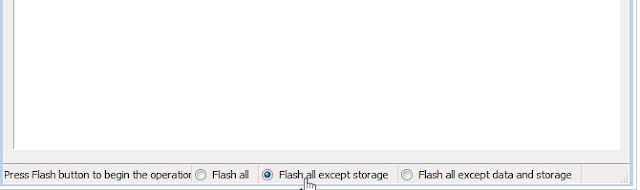
By default, MiFlash.exe excludes storage in the flashing. If you wish to flash all, see the image below.
8. Wait until the progress bar inside MiFlash turns fully green, which means the ROM has been successfully installed. Then your device should automatically boot to the new version.
Do you find this tutorial useful? Or, have any issues? Lets hear you in the comment!
Sharimg is lovely,Feel free to share this post.
Available link for download
Monday, October 24, 2016
How to Root Xiaomi MI 5 and install custome recovery
How to Root Xiaomi MI 5 and install custome recovery

How to Root Xiaomi MI 5 and install custome recovery
This guide helps you to Root and Install TWRP Recovery on Xiaomi Mi 5. Chinese smartphone maker Xiaomi recently launched it’s flagship device Xiaomi Mi 5. The Mi 5 has 5.15-inch Full HD (1080p) IPS display with almost zero bezels and has a pixel density of 428PPI and weighs only 129g.
Under the hood, the phone powered by the Quad-core Qualcomm Snapdragon 820 chipset and an Adreno 530 GPU. The Mi5 comes with 3GB RAM and 32GB Internal storage with 3D glass back. Xiaomi also integrates a fingerprint sensor in the physical home button. The phone recently launched, but developers already find a way to root Xiaomi Mi 5 and install TWRP recovery on the phone.
Thanks to developer Cofface for providing the unofficial version of TWRP for Xiaomi Mi 5. So here is the step by step guide to Root and Install TWRP Recovery on Xiaomi Mi 5. Read the below note carefully before you Root and Install TWRP Recovery on Xiaomi Mi 5.
Warning
Rooting may void your phone warranty, and you won’t claim it back. Follow the steps correctly otherwise you may brick your device. I am not responsible for any damage to your phone. This will/may brick your device, if you apply official OTA updates, using this custom recovery. It will erase all your phone data, so I advise you first to take a complete backup of your phone and then proceed. Ensure that your phone has at least 50-60% charged to prevent the accidental shutdown in-between the process.
Files required to Root and Install TWRP Recovery on Xiaomi Mi 5
Download ADB and Fastboot drivers for Windows or Mac and install them on your PC. This will also install your device driver.
You need to Unlock your Phone’s Bootloader.
Download TWRP Recovery for Xiaomi Mi 5
Download SuperSU to root Xiaomi Mi 5 and copy it to your phone sd card.
Known Issue (TWRP)
TWRP touch sometimes does not respond for 3-4 minutes.
Steps to Root Xiaomi Mi 5 and Install TWRP
Step 1. First, enable USB debugging option from Settings> Developer options. To enableDeveloper Options, go to About phone and tap the Build Number 7 times.
Step 2. Download TWRP 3.0.0 for Xiaomi Mi5 from above and place it in the folder where ADB installed and rename it to ‘recovery.img’.
Step 3. Now go to installation directory open ADB folder and open the command window thereby pressing and hold the ‘shift’ key and right-clicked anywhere in that folder.

Step 4. Now connect your phone to PC and reboot the device into fastboot mode by typing below command or pressing “Power + Volume Down” button at the same time.
You are in Fastboot mode now to check your connection by entering below command in command prompt. It will return your device serial number means your device properly connected. Check your driver if the above command is not responding.
fastboot devicesimage

Step 5. Type the below command correctly in command prompt and then press enter. It starts flashing recovery on your phone.

Step 6. Now type below command in command prompt or by pressing “volume up + power button” to reboot your phone into recovery mode. Now you successfully installed the custom recovery on Xiaomi Mi 5.

Step 7. With above command your phone boot into the recovery mode.
Step 8. Now select your preferred Language and set it to what you want, tap “Never show this screen on boot again”, and Swipe allow modification.image

Step 9. Now Go to “Wipe” section and tap “Format Data”, and type “yes”.
Step 10. Now go to the option Reboot to recovery and allow disable recovery flash.
Step 11. Now repeat step Number 5 and no need to format data again.
Step 12. In TWRP recovery navigate to Install Zip and select ‘SuperSu.zip’ to root Xiaomi Mi5.
Step 13. Swipe to install SuperSu and reboot your device. That’s it, you have rooted Xiaomi Mi5 and installed a custom recovery on successfully. The first reboot takes some time to start the system.
That’s all; this is the complete guide of how to Root and Install TWRP Recovery on Xiaomi Mi 5. If you have any questions, then comment below.
Available link for download
Subscribe to:
Posts (Atom)