Showing posts with label mi. Show all posts

Tuesday, March 21, 2017

how to get mi credits for free

how to get mi credits for free


how to get mi credits for free?

Bypass the Mi Credits on MiUi 

As the post title goes, we are going to remove the MiCredits section from your screen till the end of this post. Lots of awesome themes are available at the theme manager on MiUi but the problem is that not all of the them are free out there. Many of the good themes what we like the most asks for the MiCredits that we dont have and in the end we are left with just with the trial period of that theme which doesnt even last for 1 hour. so lets know about what are these Mi Credits before making it disappear.

What Is This Mi Credits?


MIcredits is just a virtual currency to buy the paid themes created by lots of the users. Credits can also be used to buy songs subscriptions in the music player under the online music category. You can buy MiCredits by using your paypal account directly on the go. Just go to the Micredits webpage and follow up the way mentioned there to link your paypal account to buy the credits. After that at theme store you can access your mi credits to buy themes which will suit best for your devices user interface.

Now end of story telling lets talk about the purpose for what and why you are here!!
 

STEPS TO GET THROUGH THE MICREDITS!


Remember:- All available themes at the Miui theme store created by the users is the result of a big hard work and time. So please appreciate them in any of the ways you can.

>>THE THING THAT IS REQUIRED THE MOST TO GET MI CREDITS IS ROOT<<

STEP 1   :- Download *WSM TOOLS(Xposed framework for MiUi) *PAID THEME 
*THEME AUTHORIZATION &
*MI THEMES PRO(these 3 are the modules for the credits). These following apks are what we need to get the job done.
 
STEP 1.1 :- Dont worry Ive uploaded the apps for you down below the post.

STEP 2   :- Install the WSM tools after granting it root permissions and reboot the device.
 
STEP 3   :- After when the WSM framework is installed on your device then install all the rest of the modules one by one which are mentioned above.

STEP 4   :- Now in the WSM tools check all the modules as shown in the image.
 
STEP 5   :- Now reboot the device again and you are done!!!

After the last step you will not see the credits section in the theme manager of MiUi! Now nothing will stand between your choices, download all your favorite themes and keep it!

NOTE:- If you will update the paid theme that you downloaded then it will not update, so delete the theme and re-download it to get the added features of themes if you want!
Thanks to pro_burgerz for their hardwork for the wsm tools for miui!!

>>>LINK TO CREDITS APPS PACKAGE FOR THE JOB<<<

ENJOY ALL YOUR FAVORITE THEMES FOR FREE!!!
GOOD LUCK!!

IF YOU HAVE ANY QUERIES RELATED TO THE TOPIC COMMENT YOUR QUESTION HASSLE FREE, I WILL HELP YOU OUT TO RESOLVE IT ASAP!

Available link for download

Read more »

Thursday, December 15, 2016

How to Flash Mi Xiaomi Android Device Fastboot Method

How to Flash Mi Xiaomi Android Device Fastboot Method


When you have any major software issues with your Mi, Xiaomi android device, flashing the device is the most likely solution. To flash Mi, Xiaomi android device, you need Mi Flash Tool installed on your Windows PC along with the necessary drivers.

On this page, we contain detailed tutorial on how to flash your Mi, Xiaomi and RedMi android devices including the download links for the necessary files needed to complete the flashing operation.
 This fastboot method implies that you are flashing using Mi .tgz stock firmware files. With this method, you cannot recover your files on the phone and it can be used to unbrick your Mi, Xiaomi android devices.

Flashing Mi, Xiaomi and RedMi Android Devices Using Mi Flash Tool

To begin with, download the files listed below and install them on your Windows PC.

i. Mi Flash TooL | ii. Mi ADB Drivers | iii. Unlock your Mi, Xiaomi device bootloader here(if its locked)

Now, flashing your Mi Android Device;

1. Install the Mi Flash Tool you downloaded on your PC and then, download Mi, Xiaomi Stock Firmware for your device from here.

2. Turn off the device and boot it to fastboot mode. To boot Mi android device to fastboot, while the device is powered off, press the Volume- key and the Power Keytogether.

3. Connect the device to your PC using its compatible USB Cable.

4. Extract the downloaded ROM onto a folder on your PC using 7zip. You may download 7zip from here.

5. Open the folder where the ROM is extracted then, copy the path of the ROM folder.

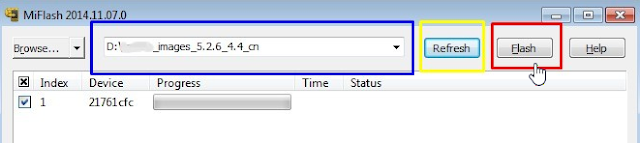
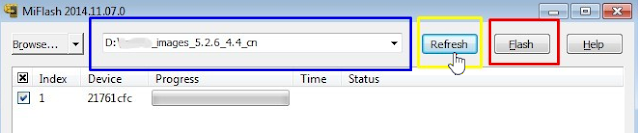
6. Lunch MiFlash.exe and copy the ROM path you copied earlier into the address field and click Refresh.

7. When MiFlash.exe is refreshed and located the device, click Flash.

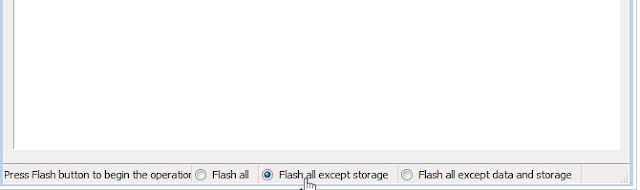
 By default, MiFlash.exe excludes storage in the flashing. If you wish to flash all, see the image below.

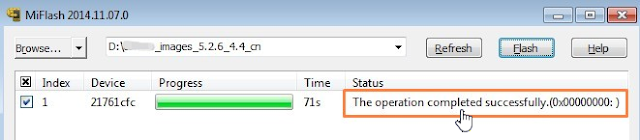
8. Wait until the progress bar inside MiFlash turns fully green, which means the ROM has been successfully installed. Then your device should automatically boot to the new version.

Do you find this tutorial useful? Or, have any issues? Lets hear you in the comment!
Sharimg is lovely,Feel free to share this post.


Available link for download

Read more »

Monday, October 24, 2016

How to Root Xiaomi MI 5 and install custome recovery

How to Root Xiaomi MI 5 and install custome recovery


How to Root Xiaomi MI 5 and install custome recovery


This guide helps you to Root and Install TWRP Recovery on Xiaomi Mi 5. Chinese smartphone maker Xiaomi recently launched it’s flagship device Xiaomi Mi 5. The Mi 5 has 5.15-inch Full HD (1080p) IPS display with almost zero bezels and has a pixel density of 428PPI and weighs only 129g.

Under the hood, the phone powered by the Quad-core Qualcomm Snapdragon 820 chipset and an Adreno 530 GPU. The Mi5 comes with 3GB RAM and 32GB Internal storage with 3D glass back. Xiaomi also integrates a fingerprint sensor in the physical home button. The phone recently launched, but developers already find a way to root Xiaomi Mi 5 and install TWRP recovery on the phone.

Thanks to developer Cofface for providing the unofficial version of TWRP for Xiaomi Mi 5. So here is the step by step guide to Root and Install TWRP Recovery on Xiaomi Mi 5. Read the below note carefully before you Root and Install TWRP Recovery on Xiaomi Mi 5.

Warning
Rooting may void your phone warranty, and you won’t claim it back. Follow the steps correctly otherwise you may brick your device. I am not responsible for any damage to your phone. This will/may brick your device, if you apply official OTA updates, using this custom recovery. It will erase all your phone data, so I  advise you first to take a complete backup of your phone and then proceed. Ensure that your phone has at least 50-60% charged to prevent the accidental shutdown in-between the process.

Files required to Root and Install TWRP Recovery on Xiaomi Mi 5
Download ADB and Fastboot drivers for Windows or Mac and install them on your PC. This will also install your device driver.
You need to Unlock your Phone’s Bootloader.
Download TWRP Recovery for Xiaomi Mi 5
Download SuperSU to root Xiaomi Mi 5 and copy it to your phone sd card.
Known Issue (TWRP)

TWRP touch sometimes does not respond for 3-4 minutes.

Steps to Root Xiaomi Mi 5 and Install TWRP
Step 1. First, enable USB debugging option from Settings> Developer options. To enableDeveloper Options, go to About phone and tap the Build Number 7 times.

Step 2. Download TWRP 3.0.0 for Xiaomi Mi5 from above and place it in the folder where ADB installed and rename it to ‘recovery.img’.

Step 3. Now go to installation directory open ADB folder and open the command window thereby pressing and hold the ‘shift’ key and right-clicked anywhere in that folder.

 image-24.jpeg (1366×768)

Step 4. Now connect your phone to PC and reboot the device into fastboot mode by typing below command or pressing “Power + Volume Down” button at the same time.

You are in Fastboot mode now to check your connection by entering below command in command prompt. It will return your device serial number means your device properly connected. Check your driver if the above command is not responding.
fastboot devicesimage

image-23.jpeg (894×380)

Step 5. Type the below command correctly in command prompt and then press enter. It starts flashing recovery on your phone.


image-22.jpeg (1274×468)

Step 6.  Now type below command in command prompt or by pressing “volume up + power button” to reboot your phone into recovery mode. Now you successfully installed the custom recovery on Xiaomi Mi 5.


image-21.jpeg (1276×472)


Step 7. With above command your phone boot into the recovery mode.

Step 8. Now select your preferred Language and set it to what you want, tap “Never show this screen on boot again”, and Swipe allow modification.image


image-20.jpeg (673×597)


Step 9. Now Go to “Wipe” section and tap “Format Data”, and type “yes”.

Step 10. Now go to the option Reboot to recovery and allow disable recovery flash.

Step 11. Now repeat step Number 5 and no need to format data again.

Step 12. In TWRP recovery navigate to Install Zip and select ‘SuperSu.zip’ to root Xiaomi Mi5.

Step 13. Swipe to install SuperSu and reboot your device. That’s it, you have rooted Xiaomi Mi5 and installed a custom recovery on successfully. The first reboot takes some time to start the system.

That’s all; this is the complete guide of how to Root and Install TWRP Recovery on Xiaomi Mi 5. If you have any questions, then comment below.


Available link for download

Read more »