Showing posts with label unlock. Show all posts
Showing posts with label unlock. Show all posts
Saturday, February 11, 2017
How to factory unlock iphone for indians and other operators
How to factory unlock iphone for indians and other operators

How to factory unlock iphone for indians and other operators
Here is our experience on legally unlocking iPhone 4, which was bought from AT&T USA. We recently unlocked the iPhone legally and started using with Airtel in India.
When we moved from USA to India, one of the gadgets my wife wanted to bring was an iPhone. Just before returning to India, we bought an iPhone from AT&T in USA and paid the cancellation charges to cancel the contract with AT&T. We were of the impression that once we pay the contract cancellation charges, the phone will become ours to keep and use it how and where we want to use it.
Once we reached India, we realized that is not the case. We failed to unlock the iPhone 4 anywhere in India. After making several attempts in various ways, we gave up on unlocking iPhone. Finally, we were able to make the iPhone 4 work in India using a Gevey Ultra we imported from USA.
Even though Gevey Ultra worked reasonably well, it often required reconfiguration on the iPhone, which was a pain to do all the time.
Once we reached India, we realized that is not the case. We failed to unlock the iPhone 4 anywhere in India. After making several attempts in various ways, we gave up on unlocking iPhone. Finally, we were able to make the iPhone 4 work in India using a Gevey Ultra we imported from USA.
Even though Gevey Ultra worked reasonably well, it often required reconfiguration on the iPhone, which was a pain to do all the time.
The good days came to an end when we accidentally upgraded our iPhone 4 to the latest iOS 5.1 operating system. When iOS 5.1 was installed on iPhone, it locked out the Gevey Ultra and the Airtel SIM was no longer working. The iPhone would no longer recognize the SIM and it became another toy on our table.
Unlock iPhone 4 through AT&T
After keeping the iPhone in the shelf for several months, we heard the official announcement from AT&T about the unlocking process. We immediately called AT&T to find the reality. We were not very confident since I had called AT&T several times in the past asking for help to unlock but they refused to unlock the phone even though we said we had paid out all contract cancellation fees.
When we called this time, one of the menu options in their automated phone system was Press 1 if you are calling to unlock your iPhone. That was music to our ears!
The process was very easy and simple this time. See the steps we followed which results in unlocking our AT&T iPhone:
1. Called AT&T customer service
2. Gave our original AT&T cell phone number which we used with the iPhone more than a year ago and theIMEI number of the phone.
3. AT&T representative verified the record to make sure we had paid out all contract cancellation fees. In case you did not cancel your contract but completed your 2 year contract period, that would qualify.
4. AT&T representative updated their system and recorded our request for unlocking. They suggested us to wait for an email from Apple explaining the unlocking process.
5. Within a day, we got an email from Apple asking us to do a simple process - backup the iPhone using iTunes and then restore from the backup.
6. We went to Airtel office in India, applied for a new Micro SIM to match the iPhone. Within 2 minutes, we got the new Micro Sim and it got activated within 10 minutes.
7. We came home from Airtel, connected iPhone to the computer, opened iTunes and selected "Backup iPhone".
8. Once the backup was completed, we chose "Restore from Backup".
When the phone was restored from backup, Apple pushed the unlock code to our phone which unlocked the phone permanently!
Here is the welcome message we got:

My wife was literally dancing because it has been more than a year she was struggling to use her iPhone 4 in India with Airtel service provider.
However, the joy did not last long. Even though the iTunes showed the phone is successfully activated, the phone was still showing "No Service" error. My wife was about to explode but I suggested her to complete the wizard in iTunes and click "Continue" until she get out of the wizard to complete the restore process.
Once we completed the restore wizard in iTunes, the phone started flashing and then it gave the moment of celebration to us with the label "Airtel" appearing in top left corner of the phone.
The one year long wait seem to have come to an end. We made couple of calls from the iPhone 4 and the unlocked iPhone 4 appears to be working great with Airtel.
We are using an iPhone 4, but I am pretty sure the same process will work for iPhone 4S. Also, even though we are using Airtel, you should be able to follow same unlock process and should be able to use your iPhone with any other service provider in India.
SIM not found error in iPhone when using Airtel micro SIM
When we received the micro Sim from Airtel, we had no patience to wait until we connect to iTunes and perform the backup and restore process suggested by Apple to complete the unlock process. We thought since we had done several backup and restore in the past, that would be enough to complete the unlock process. So, we inserted the Airtel micro sim card to the iPhone and wife started pressing everywhere on the phone in the effort to get it working. No matter what she try, the phone kept on giving various erros including SIM not found, invalid SIM, No Service etc. At some point, she even called Airtel complaining that the Sim was not activated and is giving error with the iPhone.
Finally, it all turned out that following correct process solved the problem. Once we backed up the iPhone and restored from backup as suggested by Apple, the iPhone started working perfectly with Airtel in India.
If the above steps did not work, you may try the following phone unlocking services. GSM Unlock Labs offers affordable unlocking services for iPhone.
Available link for download

Tuesday, January 10, 2017
Hard Reset QMobile A5 Classic pattern unlock
Hard Reset QMobile A5 Classic pattern unlock
Hard Reset QMobile A5 Classic
Qmobile a5 classic pattern unlock

Qmobile is largest best smartphones selling company after Samsung in Asia Region. Working with different names in different counties of Asia (i.e micromax mobiles, Qmobiles).The company is also well known in manufacture of smartphone with best battery life and cheap phones.If you are owner of Qmobile A5 Classic cellular phones and you are stuck into recovery , hang on logo , or forgot pattern lock , here is easy solution to sort this out. All you have to do is
- Turn off your Qmobile Smartphone .
- Press and hold Volume up , Volume Down and Power button together. (as mention into image below).
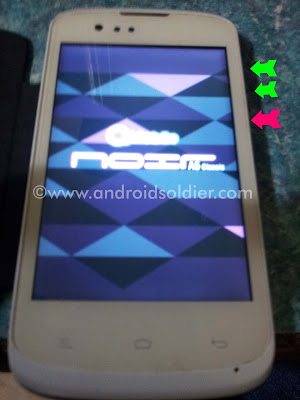
- Leave power button when phone turn on but keep holding volume buttons until you see the factory menu (as shown below image).
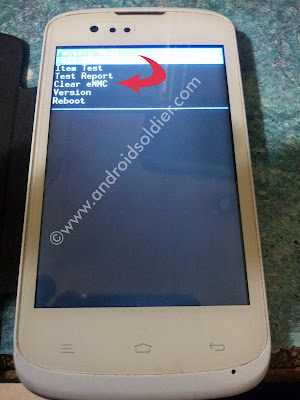
- Now select 4th option Clear eMMC . This will erase all your data store on internal storage including smartphone apps.
- Your smartphone will turn on and you are good to go.
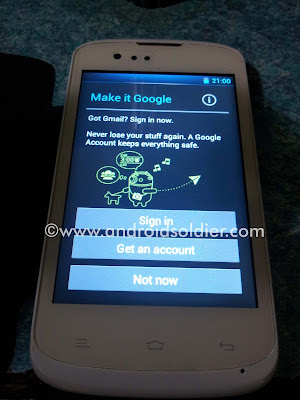
Follow the instructions on screen and enjoy your amazing android smartphone. If you question or queries please write in comments section.
Available link for download
Saturday, January 7, 2017
GUIDE Unlock Bootloader Moto G 2nd Gen
GUIDE Unlock Bootloader Moto G 2nd Gen
UNLOCK YOUR BOOTLOADER
WARNING: UNLOCKING YOUR BOOTLOADER VOIDS YOUR WARRANTY.PROCEED AT YOUR OWN RISK.
NOTE: Unlocking the bootloader will Wipe/ factory reset your device, and will delete all personal data from your device such as apps, photos, messages, and settings.
INSTRUCTIONS:
- Make sure to take a backup of your entire device data.
- Download the Android SDK OR Download the Minimal ADB and Fastboot
- Install the latest Motorola USB Drivers on your desktop. Download here.
- Put your device in fastboot mode (power off, then press the power and volume down buttons simultaneously).
- Open Command Prompt on androidsdk/platform-tools/ (Hold Shift and right click and press open command window here)
- Connect your Phone to PC
- Type this in the CMD prompt window - fastboot oem get_unlock_data
- You will get a return string. Copy it. [Right Click-Mark- Mark the text by pressing the shift key-Now press Ctrl+C]
- Paste all the lines together in a notepad. Remove the empty spaces.
- Now go to the Motorola Site.Sign in using your Google account or Motorola ID. Scroll down the page and paste the copied string in the field at step #6. Then click on ‘Can my device be unlocked?’, after which a "REQUEST UNLOCK KEY" button will appear at the bottom of page.
- To get your unlock key, select the ‘I Agree’ option. Note: You will receive an email with your Unlock Key at the email address you used to log in there.
- Important – Copy the 20-character key that Motorola sent you via email. Make sure your device is connected.
- Then in CMD type: fastboot devices (To check your device is connected)
- Then type: fastboot oem unlock UNIQUE_KEY
NOTE: In above command, replace the word ‘UNIQUE_KEY’ with the unlock code that you got via email. Then hit enter and the unlocking process should begin. Wait for a while and soon you’ll see ‘Bootloader Unlocked’ warning on your Moto G(2nd Gen).
To relock the bootloader:
Go to Fastboot and give the command fastboot oem lock
You can always appreciate my work by pressing the Thanks Button.

Good Day
Available link for download
Saturday, December 31, 2016
GcPro Key LG Sprint LS770 Unlock Much more Setup Download
GcPro Key LG Sprint LS770 Unlock Much more Setup Download
GcPro Key Total update count 39 release date 26-05-16

Unofficial Support Site by Welcome Zone Haldwani
GCPRO GSM TOOL V1.0.0.0032 released.Whats New?
Added Qcom New GCMod_Method for imei repair
Diag
adb & root need
Added LG Sprint Support for LS770
and other models with same security.
Improvements:
Motorola Unlock
MTK imei with single sim phone.
MTK imei had issue with less then 2 imei repair from last release.
Build read was result empty some time.
Recovery mode pattern remove show false result even if it was successful.
Samsung sprint & domestic unlock & searching only on old samsung note3 etc.
must read new helpfile & new steps
Strongly recommend to use this version for all your task...
Do you feel it ?
Do you feel it ?
Feel The Difference With GCPro.
Download Links:
link1= https://mega.co.nz/#F!1pxHgTBA!P7owR-MlJxD-r0 _N6o0xWQ
link2= https://drive.google.com/folderview?... FE&usp=sharing
link3= GCPROTEAM by gc P. - 4shared
link4= https://www.dropbox.com/sh/w9gdsem09... Upj32aEVa?dl=0
link5= https://www.mediafire.com/folder/kzd5v0z4fecn7/ GCPROKEY
__________________
Best Regards
Faisal_Computer
General Manager
GPGIndustries
Available link for download
Subscribe to:
Posts (Atom)