Showing posts with label repair. Show all posts
Showing posts with label repair. Show all posts
Tuesday, April 11, 2017
How to repair replace invalid imei on Android Tablets and Smartphones
How to repair replace invalid imei on Android Tablets and Smartphones
How to Replace or Repair Invalid IMEI on Android Tablets and Smartphones.
Imei Invalid Android Fix
Dany Genius Tab G4 Invalid IMEI Repair
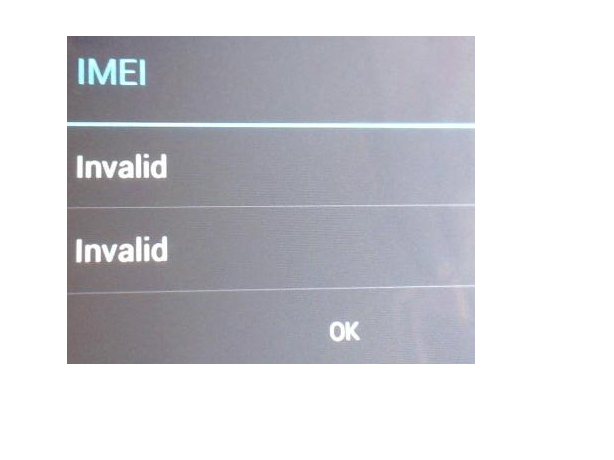
What is IMEI ?
Imei is 14 digit base unique identity for Tablets and mobiles. You can find it under the battery starting with 35xxxx or 1xxxxxx .
This tutorial is about fixing Invalid Imei for your smartphone and tablets . If your imei is corrupt or invalid or showing Null ,then you wont able to use your Sim card or GSM Services. Here is very simple way to repair invalid imei in Android tablets and smartphones.
Note:- This tutorial is about MTK CPU Based Android Tablets. The tool and tutorial will only work for MTK Cpu based tablets . Do not try it with Allwinner or Rockchip based tablets.
To check your imei you need to enter a code *#06# on your dialer . If imei is corrupted then it wont show the proper imei.
To repair invalid IMEI on MTK CPU based android smartphones and tablets , you need MTK Droid Tools. Download MTK DROID TOOLS .
Turn on USB Debugging Mode on your tablet or smartphone.
Connect your tablet with computer and run MTKdroidTools.exe .
To repair invalid IMEI on MTK CPU based android smartphones and tablets , you need MTK Droid Tools. Download MTK DROID TOOLS .
Turn on USB Debugging Mode on your tablet or smartphone.
Connect your tablet with computer and run MTKdroidTools.exe .

All information regarding your tablet will be show . On lower corner of software screen, you will see yellow box with name of your MTK devices. You must root your smartphone or android tablet to repair the invalid imei .
For Root click on Root button .
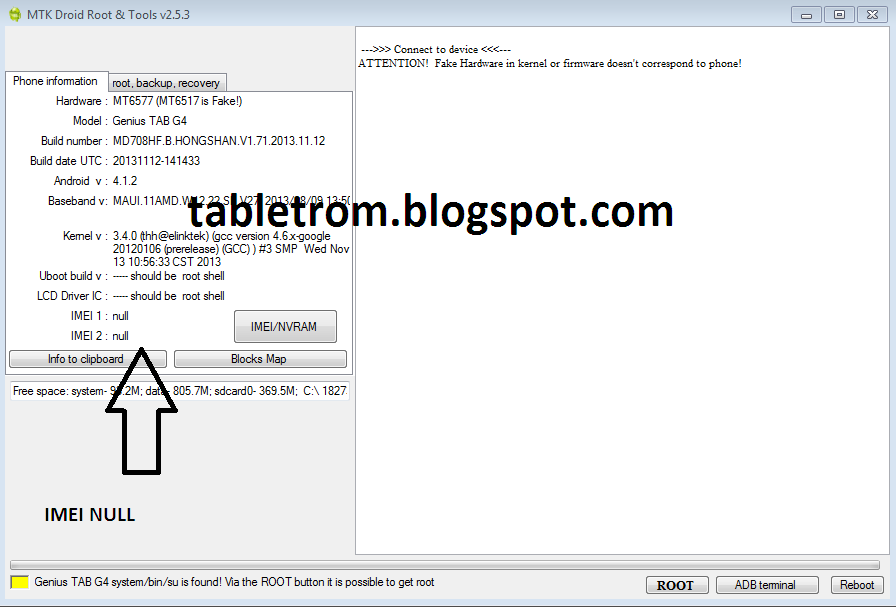
Some files will be run into software and the box in the lower left corner turn into green. You will see (Root Shell) written after your device name.(as shown below picture).A SU(Super User) icon will appear on your tablet or smartphone .

Now Click on IMEI/NVRM button . Write Original IMEI or whatever IMEI you want . Do not forget to add country code in start before IMEI number. For example, the user in united state of america must add 01xxxxxxxxxxxx and then 12digit IMEI . IMEI must be 14 digit long. First two digit of your country code and then 12 digit of IMEI number. Click on Replace IMEI. A pop up window will appear click OK .

Changes will take effect shortly . If you still not see IMEI then Reboot tablet with reboot button. IMEI number will be available as show below. You are done. Now you can use SIM, 3G/4G,GPRS features on your tablet or smartphones.

I have personally Repair Invalid IMEI with above written method. I used to repair IMEI of DANY GENIUS TAB G4 and the method worked like charm. I do not take responsibility of any damages.
You may Also Like :
How To Root Android Smartphones
What is Recovery in Android
What is Rooting means in Android
How to Root Allwinner Tablets
Fix Screen Shift on Allwinner Tablet
Touch Replacement Video Tutorial .
How To Root Android Smartphones
What is Recovery in Android
What is Rooting means in Android
How to Root Allwinner Tablets
Fix Screen Shift on Allwinner Tablet
Touch Replacement Video Tutorial .
Available link for download

Saturday, December 31, 2016
How to boot repair or Flash Redmi Note 2 Prime Dual Sim 4G Model 2014912 with Flash tool Tested
How to boot repair or Flash Redmi Note 2 Prime Dual Sim 4G Model 2014912 with Flash tool Tested
This tutorial tested by me without any error some time we are flashing this device so many time take in flashing so we are search other tool for flashing and easy to flash this device from the many time i search but after many time i found other flash tool and i try this device in this tool so easy procedure easy or not was give many time for flashing so this tool with i have experience so here post new with different tool but here some different procedure from the before flashing tool this tool you can use if before post not success then you can use this tool if you want to first try use so dont worry because this is tested by me its very easy to flash and just remember of required for flashing if any issue in required from yours so first prepare to required after try in flash and we are mention which need to flashing in below and also must remember before use this tutorial which one first read all carefully this tutorial after try in flash because if you read tutorial then you can easy flashing this device this my own experience and must be working well micro USB cable if any issue in this then you cant connect device with computer or laptop also must be working device charging socket if any issue so also you cant connect with computer or laptop must be installed driver in your computer or laptop if not install in your computer or laptop then device not connect so you cant flash see below description about firmware.
If you want to repair your device, you can try to repair it by you.
You have to charge your battery with any charger and charged it by 70%, Your data is very important for you so it is good to do a backup of your data it may consist like your contact details, your important messages, your emails or any other important thing which you feel to be the backup in your device, this backup can be done on another device. we have to do the backup because after a format of your device, all your data will be gone and it will not be recovered. For backup in other devices you can use other external device like your hard drive, sd card or any other suitable devices. If you are doing by your own.do it at your own risk as we dont take any responsibility if your device is damaged.Required for flash:
- Redmi Note 2 Prime (Dual Sim 4G) Model : 2014912 device with well battery charged, and do not try with low battery
- Redmi Note 2 Prime (Dual Sim 4G) Model : 2014912 Stock ROM Firmware (tested) | Download Mirror-1, Mirror-2
- Redmi Note 2 Prime (Dual Sim 4G) Model : 2014912 USB (Flashing) OR Dead Boot Repair driver | Download here
- Redmi Note 2 Prime (Dual Sim 4G) Model : 2014912 Flash Tool | Download here
- Good Quality Micro usb cable
- Computer or Laptop
Procedure:
- First download tested Firmware, Flash tool or driver from above link (if link not working just leave your comment on below comment box i will soon fix it)
- Extract to all are zip files to desktop or as you like path (must be installed winrar software to Extract)
- Open Driver folder and choose Qualcomm_USB_Driver_Setup.exe file and wait until finish installation
- Open QPST.WIN.2.7_Installer-00430.1 folder and chose setup.exe file and open and install it
- Now open QFIL from the "C:Program FilesQualcommQPST in" path
- Tick on Flat Build option
- Go to Programmer Path and click on Browse.. button and choose prog_emmc_firehose_8916.mbn file
- Click on Load XML.. button and choose rawprogram_unsparse.xml file and second choose patch0.xml file from the Firmware folder
- Insert USB cable and wait until driver install
- After drier installed just Click on Download button and wait until finish procedure
- Congratulation you are done
Redmi Note 2 Prime Dead Boot Repair done Screenshot:

Available link for download
Subscribe to:
Posts (Atom)