Showing posts with label start. Show all posts
Showing posts with label start. Show all posts
Thursday, March 2, 2017
How to Kill Auto Start Applications Windows7
How to Kill Auto Start Applications Windows7
Many of the auto start applications start automatically when the system turns on.
This will slows down the system and boot time will be more. Follow these simple steps and you can kill unnecessary AUTO START APPLICATIONS.
1. First click on the START button, and type " Run", click on "Run" Program (or) Just click on +R
+R
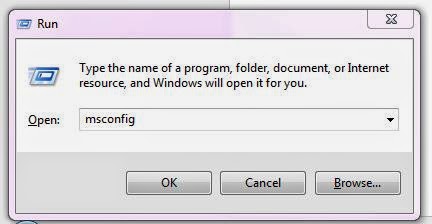
2.Type "msconfig" and press OK.
This will slows down the system and boot time will be more. Follow these simple steps and you can kill unnecessary AUTO START APPLICATIONS.
1. First click on the START button, and type " Run", click on "Run" Program (or) Just click on
+R2.Type "msconfig" and press OK.
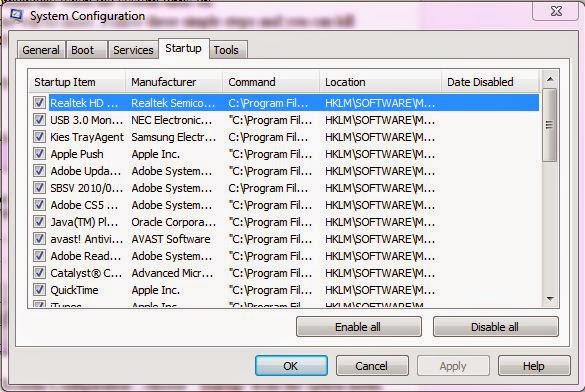
3. Now a new window opens with name "System Configuration", choose " Startup" from the option menu.
4. There you will find all the StartUp Applications.
5. Deselect any unnecessary application from that window and click on "OK".
6. You need to restart the system to become your settings effective.
7. Thats it and you FIXED it.
Available link for download

Friday, December 23, 2016
How to fix “The program can’t start because MSVCR110 dll is missing from your computer ” error on Windows
How to fix “The program can’t start because MSVCR110 dll is missing from your computer ” error on Windows
If you run a application and got the error message "The program can’t start because MSVCR110.dll is missing from your computer." then the Microsoft Visual C++ Redistributable is missing on the current computer.

This error appears when you wish to run a software which require the Microsoft Visual C++ Redistributable 2012. The redistributable can easily be downloaded on the Microsoft website as x86 or x64 edition.
Depending on the software you wish to install you need to install either the 32 bit or the 64 bit version. If you do not know which version you need to install, start to install the 32 bit version and if you still got the error install then the 64 bit version. On a 32 bit OS you can install only the 32 bit redistributable.
Available link for download
Subscribe to:
Posts (Atom)