Saturday, February 4, 2017
How to Backup Whatsapp Messages
How to Backup Whatsapp Messages
How to Backup Whatsapp Chat Messages:


Available link for download

Friday, January 27, 2017
How to Read WhatsApp Messages without Alerting the Sender
How to Read WhatsApp Messages without Alerting the Sender

1. Disable Read Receipts
- Open WhatsApp and go to app settings.
- Tap on “Accounts” and then on “Privacy”.
- Scroll to the bottom and untick “Read receipts”.
2. Get A Glance From The Notification Bar
3. Enable Airplane Mode Before Reading Messages
4. Add WhatsApp Widget To Your Home Screen
5. Use WhatsApp Pop-up
- Only when screen “on”
- Only when screen “off”
- Always show pop-up
Available link for download
Friday, December 23, 2016
How to Get Back Deleted Text Messages on HTC Desire Android Phone
How to Get Back Deleted Text Messages on HTC Desire Android Phone
What do you do if you removed text messages of importance from your HTC Desire Android phone by accident? Giving them up and avoiding the same error can be your choice, but not the best one. Why don’t you try to seek out a method to get them back? If you are at your wits end, you can ask the help from Android phone data recovery apps of various kinds. And in this text, you can find how to use an Android phone contacts and text messages restore app named iSunshare Android Data Genius to get back the deleted text messages on HTC Desire-series Android phone.
In the first place, connect the HTC Desire Android phone to a computer through USB data line, and turn on the USB debugging mode in the phone.
Tips: If you are inquisitive about the method to open the USB debugging in HTC Android phone, you can try one of the ways in the following.
1. SettingsApplicationsDevelopmentUSB debugging
2. SettingsDeveloper optionsUSB debugging
Suppose you cannot find Developer options, after entering Settings, you can choose About phone, locate and tap Build number continuously until the developer mode is enabled, go back to Settings and you will see that Developer options turn up.
In the second place, install HTC phone driver and root the phone on the computer.
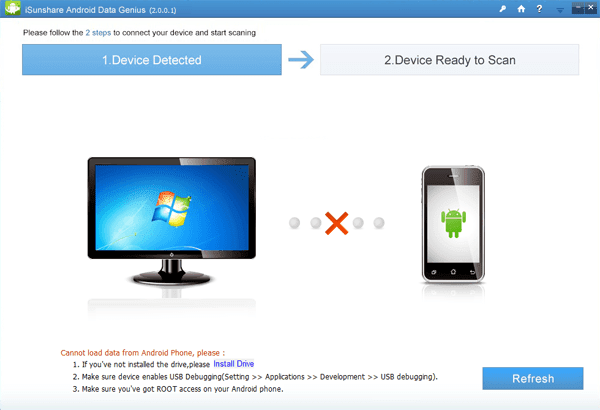
If the computer cannot detect your phone or you are unable to open phone data in it, you have to install a phone driver first. FYI, you can download “HTC_Android_USB_Driver.exe” which is a commonly-used HTC Android phone driver and have it installed. Additionally, root your phone by root software. If not, you cannot apply any phone data recovery app to get back your deleted short messages.
In the third place, download the cost-free version of the app mentioned before and accomplish its setup in the computer.
In the fourth place, wait for the app to scan and find the text messages in your phone.
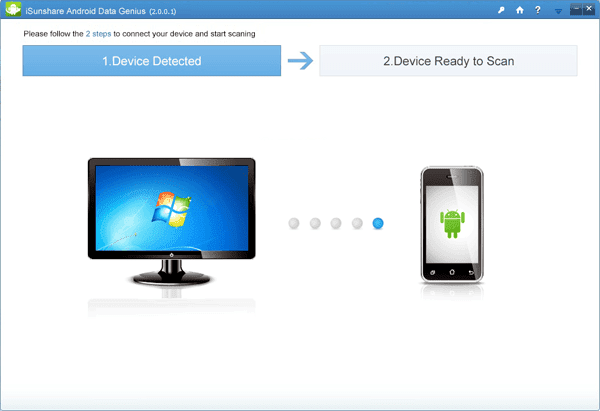
After its installation, this app will open by itself, so what you need to do is waiting for it to detect your phone and scan the short messages in the phone, as exhibited in the picture below.
Note: If the preceding procedures are not well-prepared, the app will fail to detect the HTC phone and scan its short messages (see following photo).
In the fifth place, get the deleted text messages back by recovering them from the software.
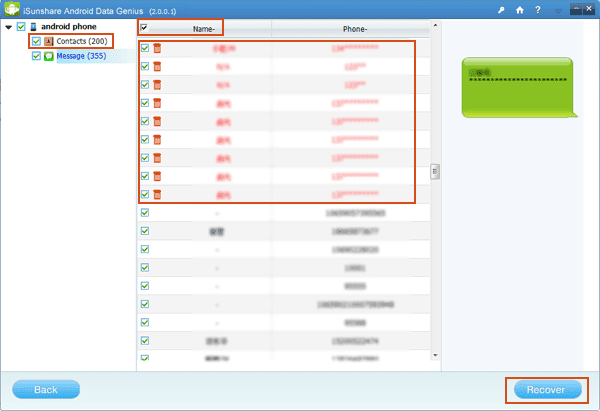
Unselect Contacts to cancel this default selection, uncheck the box before Name so as not to choose all of the text messages (the deleted and the existing included), select those items from the deleted in red character and then tap Recover button to save them in the computer.
With this method in your mind, you can be worry-free when you remove significant text messages from your HTC Desire Android phone or Android phone of another brand. Hopefully, no same mistake will be made.
Related article:
Android USB Drivers for HTC
Available link for download
Monday, November 28, 2016
How to Recover Deleted Text Messages on Your Android Phone
How to Recover Deleted Text Messages on Your Android Phone

Tools You Can Use To Recover Deleted Text Messages
- Coolmuster Android SMS+Contacts Recovery
- Wondershare Dr.Fone for Android
Steps To Follow


Available link for download