Showing posts with label com. Show all posts

Friday, February 24, 2017

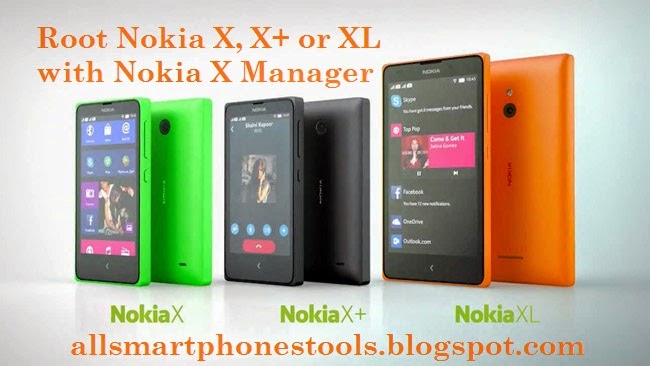
Here is tutorial to Root your Nokia X X and Xl 10 Steps to Root Spflashfiles COM

Here is tutorial to Root your Nokia X X and Xl 10 Steps to Root Spflashfiles COM


This tutorial is only for those who want to Root thier Nokia X, X+ and XL with Nokia X Manager.

Requirment to Root your Nokia X, X+ and Xl:
>Nokia X/XL(please ensure correct device model and firmware; Check device model- Go to Setting> About Device> Model Number)
>your Nokia X, X+ and XL Smartphone should have at least 60 to 80% bettery.
>You should have >NET Framework(newer Version) installed on your Computer.
>Install USB Driver of your Phone on your computer.
Important Note: please take a backup of your phone data before performing Root on your X, X+ or XL. during rooting process you may loose your data.


Now Follow these steps to Root your Nokia X, X+ or XL.
Step 1. Enable USB Debugging on your Smartphone. To enable it. Go to Setting> Developers option, USB Debugging>select it to enable.

step 2. Install Nokia X Manager software on your Computer if you dont have Nokia X manager yet Download it here.

Step 3. After installing Nokia X Manager, Open it to start Rooting your Nokia X, X+ or XL.

Step 4. after opening Nokia X Manage Software, you will see this message(waiting for device) on the top.

Step 5. Now connect your Nokia X, X+ or XL smartphone to the computer using USB Data Cable. Once you connect your Nokia smartphone to computer, In Nokia X Manager you will you see "Device Connected".

Step 6. To start Rooting process of your device just click on "Root Device" then Rooting process will start. And During Rooting Process your Phone will reboot automatically.

Step 7. Once Rooting process Completes you will see SuperSU icon in the Applications Menu of your Smartphone. Step 8: Now Click on "install Gapps" Button in Nokia X Manager Menu to Install Google apps on your SmartPhone like Google play store, Hangouts etc.

Step 9.After installing Gapps on your smartphone, Disconnect your smartphone from PC and Restart you Nokia X, X+ or XL smartphone.

Step 10. After Restarting your Nokia X, X+ or XL you will see only google apps installed on your device........


 Notes:

*With this method you dont loss you phone data like contacts, images, video etc.
*After Rooting your Nokia X, XL or X+ Warranty may void.
*if you dont like rooted smartphone ten you can use Nokia X Manager to unroot your Smartphone.


 Special thanks to Angsanley(Nokia X Manager Developer)


Available link for download

Read more »

Tuesday, December 20, 2016

Get Ripped Abs Here Blogspot Com Suggestions For Choosing The Low Carb Diet

Get Ripped Abs Here Blogspot Com Suggestions For Choosing The Low Carb Diet


Get Ripped Abs Here Blogspot Com : Suggestions For Choosing The Low Carb Diet

Get Ripped Abs Here Blogspot Com : Suggestions For Choosing The Low Carb Diet > First of all, if you will be interested in a quick weight loss diet, you may be required to decrease the number of carbs intakeenerate yourself a low carb food listes, it is crucial to enlist such food as when you might be out to shop, youd be knowing what you should get and what not to be boughtnd whenever you do not follow this tip, you will be most likely to stray from the right diet and get yourself the wrong foodsook Before You BuyThe really first step, after Creating a list of low carb diets, is to consider which food you are also going to incredibly like while keeping the right amount of carbohydrates as your intakemong the numerous low carb diet food available in the market, there are a many tasty ones toohere are few Tips youll ought to have to tryes, indeed, the fruits and vegetables are excellent low carb diet foods, therefore no matter whatever the meal plans youll have, the fresh and delicious vegetables and fruits should always be the part of your he ... [Read More @ Get Ripped Abs Here Blogspot Com]

Most of the buyer reviews say to that this Get Ripped Abs Here Blogspot Com are quality solution. Additionally it is fantastic product or service In addition to cost-effective too. You can read many opinions via buyers for more information from their experience. This evaluations offers you a compelling indication with the benefit and stability on the products. Cheers pertaining to visiting. In addition to seriously expect this website could be necessary to a person.


Here is A Fast Way To Loss Your Bodyweight By Kyle Leon @ Get Ripped Abs Here Blogspot Com

Get Ripped Abs Here Blogspot Com : Suggestions For Choosing The Low Carb Diet

Get Ripped Abs Here Blogspot Com : Suggestions For Choosing The Low Carb Diet / What if it doesnt work for me? Well, if you follow CFL it is absolutely extremely hard that it wont operate for you! That being mentioned, if for youre not content for what ever purpose, send me an email and youll be issued a prompt a hundred% refund. I want to give you each and every cause to begin acquiring your new, head turning body these days and I dont want you to chance a penny to do so. I will take all of the risk. This need to be the easiest choice of your life. You have absolutely nothing to lose, and almost everything to achieve. Lets get started.

The majority of the purchaser evaluations say to how the Get Ripped Abs Here Blogspot Com tend to be top quality solution. Additionally it is excellent product In addition to very affordable as well. It is possible to read almost all testimonials from customers more information using their encounter. Your testimonials will give you a great clue in the importance and consistency in the items. Appreciate it for browsing. As well as best regards hope until this site may be beneficial to a person.


Perhaps You want to information of :
14 Day Rapid Fat Loss Macro-patterning And Metabolic Bursting Program
7 odd foods that KILL your abdominal fat?
The Carb Nite Solution
Belinda Benns Get Lean Program :: Belinda Benn - Your

Watch Video for Get Ripped Abs Here Blogspot Com


Popular Search : get ripped abs here blogspot com


Available link for download
Read more »

Sunday, December 18, 2016

How to Flash Stock Rom using Smart Phone Flash Tool Complete Guide Spflashfiles com

How to Flash Stock Rom using Smart Phone Flash Tool Complete Guide Spflashfiles com


Here is complete guide to Flash stock rom or any custom rom using Smart Phone flash tool on computer.

Note: Your samrtphone should have at least 50% bettery to perfom flashing process.


To flash stock rom using smartphone flash tool just follow these simple steps...

1. Power off your Android Phone and remove bettery.

Power off
2.Download the Stock rom or custom rom that you want to flash on android smartphone  and extract it on your computer.

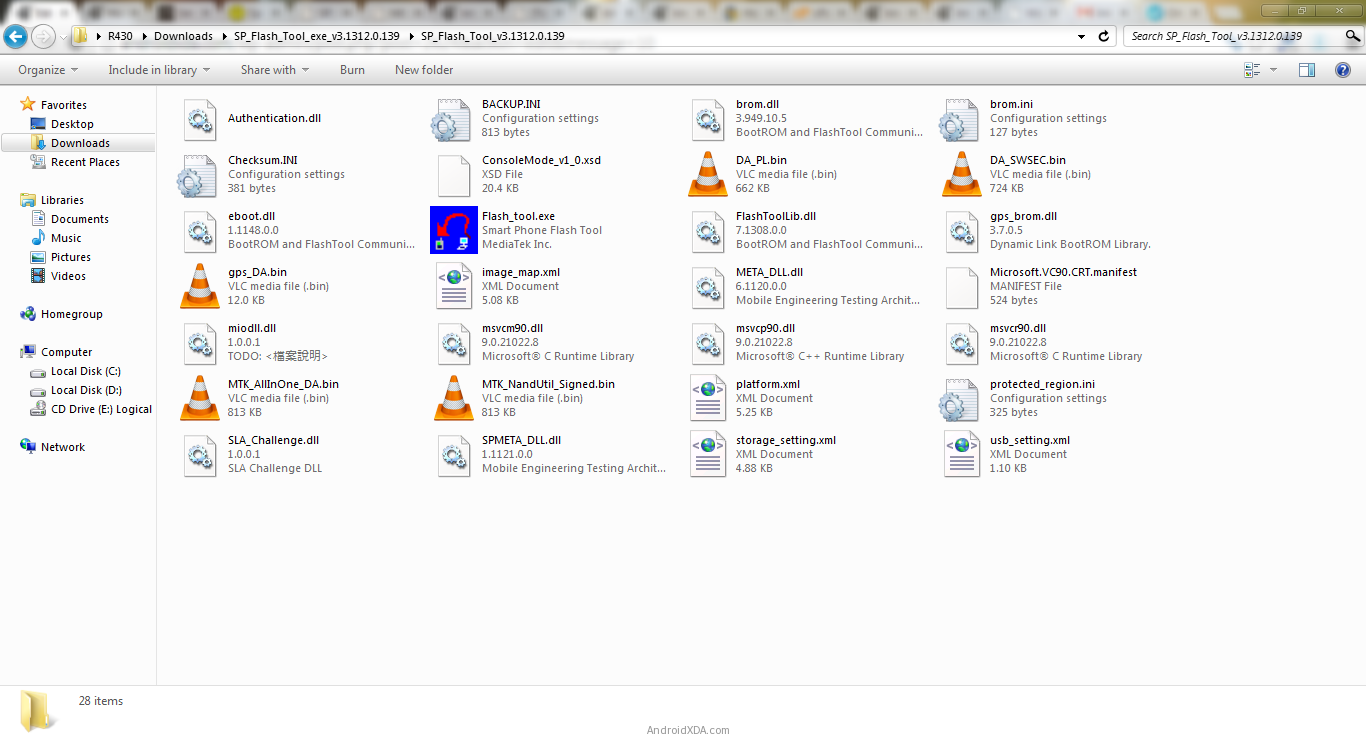
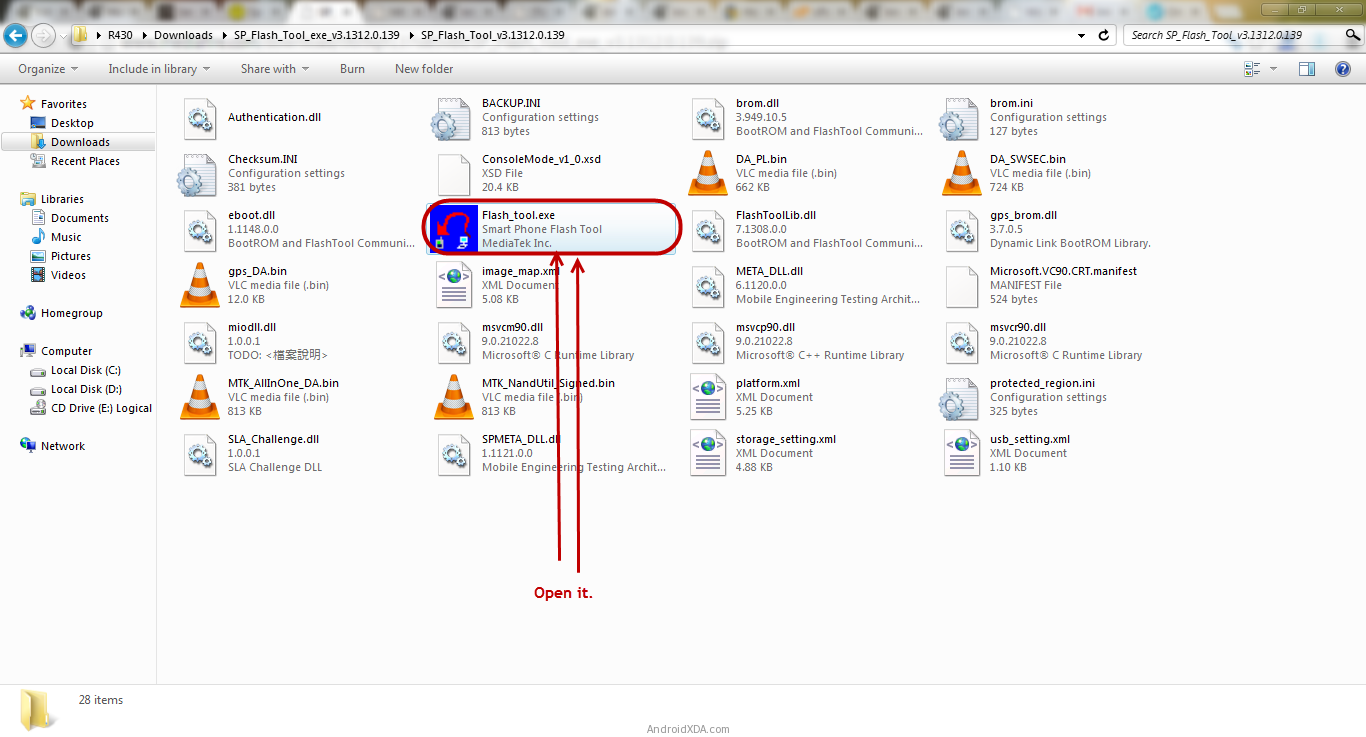
3.Download Smartphone flash tool on your computer. after installation you will see following files on screen.


4.Now run the flash tool.
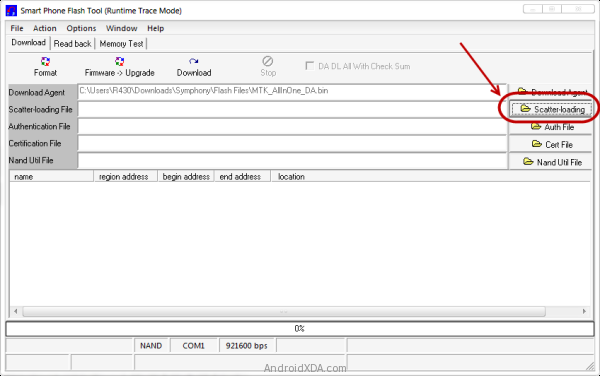
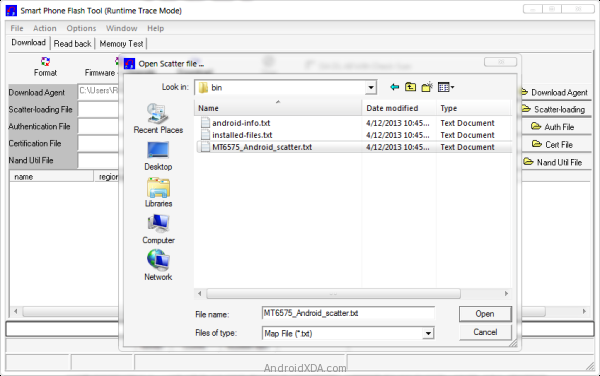
5.once Smart phone flash tool opens click on scatter loading button.

6.Now open the scatter file(you will find this file in the Stock Rom or any Custom Rom).

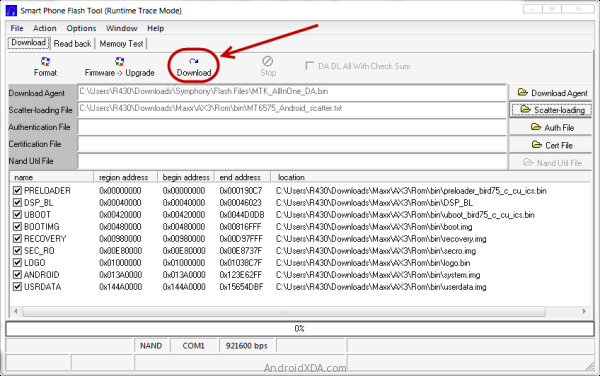
7.Now click on download button to start flashing process.

8. Now, Connect your Smartphone to the Computer using USB Cable (without battery). After connecting the device to the computer Press Volume Down or Volume Up key, so that your computer easily detect your smartphone

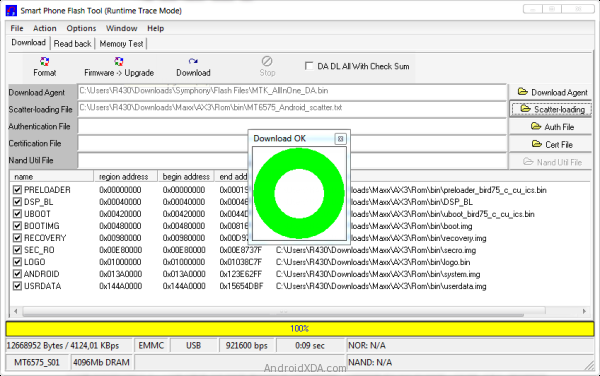
9.once flashing will complete a green circle will appear.
10.Now close the smartphone flash tool and disconect you android from computer....

Now your android is successfully running on stock rom you have downloaded.


Note:  the above method only work with stock rom or custom rom which comes with the scatter file in it.


Available link for download
Read more »