Showing posts with label customize. Show all posts
Showing posts with label customize. Show all posts
Wednesday, March 8, 2017
How To Customize Android Notification Bar
How To Customize Android Notification Bar
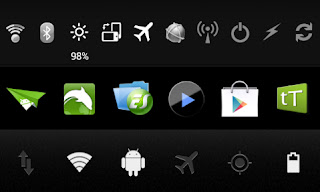
For custom notification toggles i am not going to recommend you to flash a custom ROM. Without having a custom or rooted ROM you can add and customize notification toggles by installing free or paid apps.
I prefer Notification Toggles and 1Tap quick Bar. These apps are free for download. To enable the premium features you can buy the full version from PlayStore. I am happy with the free version.
Notification Toggle
Pros:- Possible to add many toggles in one line
- Possible to add 2 Notification bar
- Possible to add Installed apps to notification bar
- Possible to add custom icon images
- Possible to add custom icon colors
Cons:
- Installed apps icons are a little big
- default toggle icons are not much attractive when compared with 1Tab Quick Bar
- UI is not much attractive
1Tap quick Bar
Pros:- UI is attractive and user friendly
- Possible to add Installed apps to notification bar
- Possible to add background to the notification bar
- Installed apps icons are better size when compared with Notification Toggle
- Default toggle icons are better than Notification Toggle
Cons:
- Possible to add only 6 icons per notification bar
- Free version limited with 1 notification bar
Note : Above is my review for the Free versions of the apps. The premium version may be more attractive.
Download Apps from Play Store Notification Toggles | 1Tap quick Bar
Available link for download

Subscribe to:
Posts (Atom)